
Routing and Switching Complete Guide with an Easy Example
Introduction
Every time you browse a website, send a WhatsApp message, watch a YouTube video, or join a Zoom meeting, two essential networking technologies work behind the scenes. These technologies are called Routing and Switching.
Although these terms are often mentioned together. They perform different tasks, Switching connects devices within the same local area network (LAN). While Routing connects different networks together, allowing data to travel across the internet.
Understanding routing and switching is one of the most important fundamentals of computer networking. It is essential for anyone preparing for certifications like CCNA, CompTIA Network+, or CCNP.
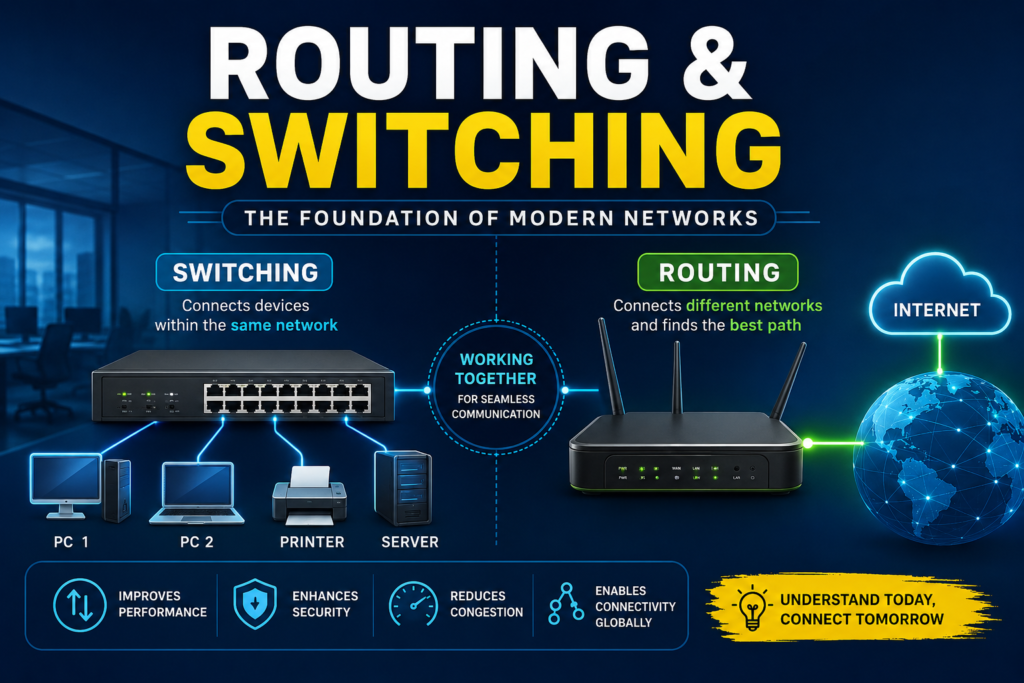
Table of Contents
What is Switching?
Switching is the process of forwarding data between devices that are connected with the same local network (LAN).
A network switch receives data from one device and sends it only to the specific destination device.
Unlike older hubs that broadcast data to every device, switches intelligently forward data using MAC (Media Access Control) addresses.
Example
Suppose an office has:
- Computer A
- Computer B
- Printer
- Server
All devices connect to a switch.
When Computer A sends a document to the printer:
- The switch receives the data.
- It checks the destination MAC address.
- It forwards the data only to the printer.
Other devices never receive the unnecessary traffic.
What is a Network Switch?
A network switch is a Layer 2 networking device that connects with multiple devices inside the same LAN.
It creates dedicated communication paths, resulting in:
- Faster communication
- Better performance
- Reduced network congestion
- Improved security
Features of a Switch
- Connects multiple devices
- Learns MAC addresses automatically
- Sends data only to the destination device
- Reduces collisions
- Improves network speed
- Supports VLANs (managed switches)
What is Routing?
Routing is the process of sending data between different networks.
A router determines the best path for data packets to travel from one network to another.
Without routers, the Internet would not exist.
What is a Router?
A router is a Layer 3 networking device that connects different networks together.
Examples include:
- Home Wi-Fi routers
- ISP routers
- Enterprise routers
- Cloud routers
How Routing Works
When your computer wants to visit:
The process is:
Computer
↓
Local Switch
↓
Router
↓
Internet
↓
Google Server
↓
Response Returns
↓
Router
↓
Switch
↓
Computer
The router examines the destination IP address and chooses the best route using its routing table.
Types of Routing
1. Static Routing
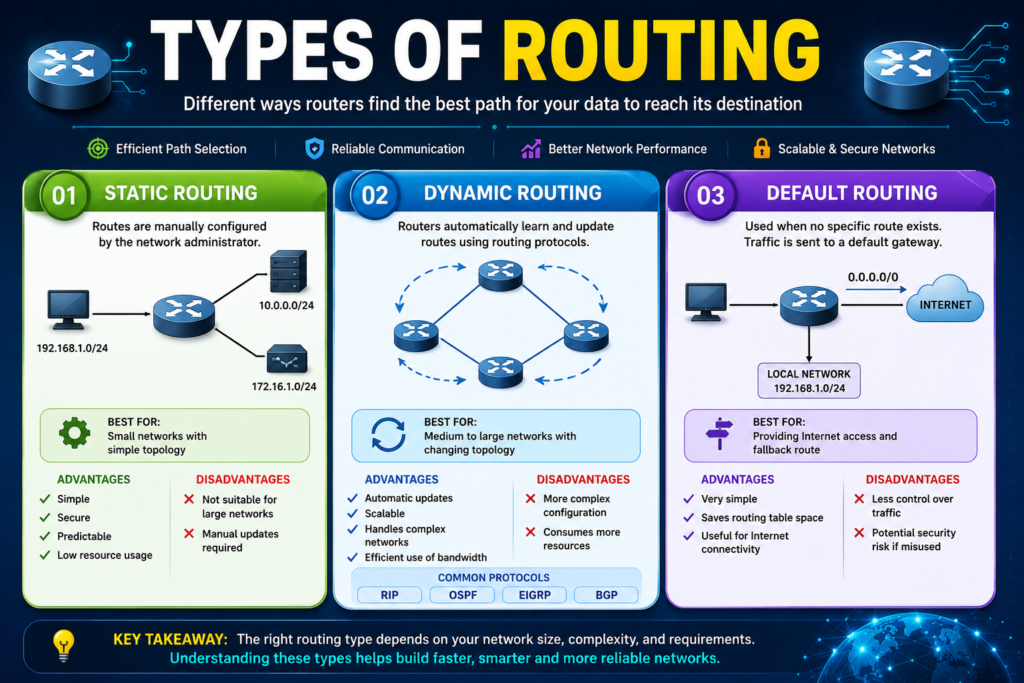
Routes are manually configured by the network administrator.
Advantages
- Simple
- Secure
- Predictable
Disadvantages
- Difficult to manage in large networks
2. Dynamic Routing
Routers automatically learn routes using routing protocols.
Popular routing protocols:
- RIP
- OSPF
- EIGRP
- BGP
Advantages:
- Automatic updates
- Scalable
- Efficient
3. Default Routing
Used when no specific route exists.
Home routers commonly use a default route pointing to the Internet Service Provider (ISP).
Difference Between Routing and Switching
| Feature | Switching | Routing |
| OSI Layer | Layer 2 | Layer 3 |
| Device | Switch | Router |
| Uses Address | MAC Address | IP Address |
| Connects | Devices in same LAN | Different Networks |
| Speed | Faster | Slightly slower |
| Decision Based On | MAC Table | Routing Table |
Example: A School Network
Imagine a large school with three buildings.
Building A
- Administration Office
Building B
- Computer Lab
Building C
- Library
Each building has many computers connected to a switch.
Example:
Computer 1
↓
Switch
↓
Printer
The switch handles communication inside that building.
Now suppose a student in the Computer Lab wants to access the library server.
The communication path becomes:
Computer
↓
Lab Switch
↓
Router
↓
Library Switch
↓
Library Server
Here:
- Switches manage communication inside each building.
- The router connects the buildings together.
Example:
Postal Delivery
Imagine sending a letter.
Switching = Inside the Post Office
Workers sort letters into the correct local mailbox.
They don’t send every letter everywhere.
Instead, they deliver only to the correct destination.
This is exactly how a switch works.
Routing = Between Cities
Suppose you send a letter from Lahore to Karachi.
The postal system decides:
- Which highway to use
- Which transport company
- Which sorting center
This decision-making process is exactly what a router does.
Routers choose the best route for data packets.
OSI Layer Relationship
Switches operate mainly at:
Layer 2 (Data Link Layer)
They work using MAC addresses.
Routers operate at:
Layer 3 (Network Layer)
They work using IP addresses.
MAC Address vs IP Address
MAC Address
- Physical address
- Permanently assigned to the network card
- Used by switches
Example:
00:1A:2B:3C:4D:5E
IP Address
- Logical address
- Can change
- Used by routers
Example:
192.168.1.10
Why Routing and Switching Are Important
Without switching:
- Computers inside an office could not communicate efficiently.
Without routing:
- Different networks and the Internet would remain disconnected.
Together they enable:
- Internet browsing
- Online gaming
- Video conferencing
- Cloud computing
- File sharing
- Email communication
- Streaming services
Advantages of Switching
- High-speed communication
- Reduces network congestion
- Better bandwidth utilization
- Dedicated communication paths
- Improved security
Advantages of Routing
- Connects different networks
- Finds the best path for data
- Supports large-scale networks
- Enables Internet access
- Prevents routing loops with protocols
Common Routing Protocols
| Protocol | Purpose |
| RIP | Small networks |
| OSPF | Medium to large enterprise networks |
| EIGRP | Cisco environments |
| BGP | Internet backbone routing |
Applications of Routing & Switching
- Homes
- Schools
- Universities
- Hospitals
- Banks
- Offices
- Data Centers
- Cloud Networks
- Internet Service Providers (ISPs)
Key Takeaways
- Switching connects devices within the same local network (LAN).
- Routing connects different networks and directs traffic between them.
- Switches use MAC addresses and operate at OSI Layer 2.
- Routers use IP addresses and operate at OSI Layer 3.
- Together, routing and switching form the backbone of modern computer networks, enabling seamless communication from local offices to the global Internet.
Conclusion
Routing and switching are the foundation of modern networking. A switch ensures efficient communication among devices on the same local network. While a router connects separate networks and determines the best path for data to travel. Whether you’re using a home Wi-Fi network, a corporate office, or the global Internet, these technologies work together to deliver fast, reliable, and secure communication. Understanding routing and switching is a crucial step for anyone pursuing a career in networking, cybersecurity, cloud computing, or IT infrastructure.
FAQ
What is switching?
Switching is the process of forwarding data between devices within the same local area network using MAC addresses.
What is routing?
Routing is the process of forwarding data between different networks using IP addresses.
Which device performs switching?
A network switch.
Which device performs routing?
A router.
Which OSI layer does a switch use?
Layer 2 (Data Link Layer).
Which OSI layer does a router use?
Layer 3 (Network Layer).
What address does a switch use?
MAC Address.
What address does a router use?
IP Address.


