
OSI Model
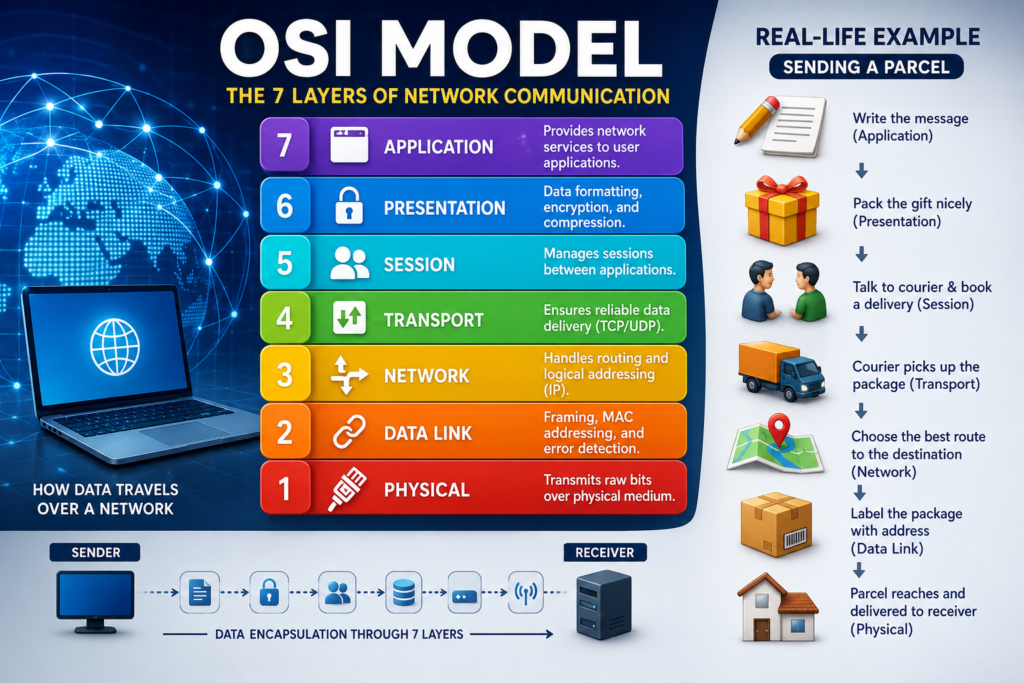
The OSI (Open Systems Interconnection) Model is a conceptual framework. That explains how data travels from one device to another device by using a network. It divides the communication process into seven distinct layers. That’s making it easier to understand, troubleshoot, and design computer networks.
The OSI model was developed by the International Organization for Standardization (ISO) in 1984. Which is widely used as a reference model in networking education and cyber security.
What is the OSI Model?
The OSI Model is a 7 layer networking model. That standardizes how computers communicate across a network.
Instead of treating communication as one large process. The OSI model separates it into seven smaller layers. Each layer performs a specific task and communicates with the layers directly above and below it.
This layered approach makes network systems easier to build, maintain, and troubleshoot.
Example:
Sending a Parcel
Imagine you want to send a gift to your friend who lives in another city.
The process is also done in 7 steps looks like this:
- Write the message
- Pack the gift
- Label the package
- Choose transportation
- Deliver through different routes
- The courier reaches your friend’s house
- Your friend opens the package and reads the message
The OSI Model also works in the same way.
When you send a message on WhatsApp, browse a website, or send an email, your data passes through multiple layers before reaching the destination.
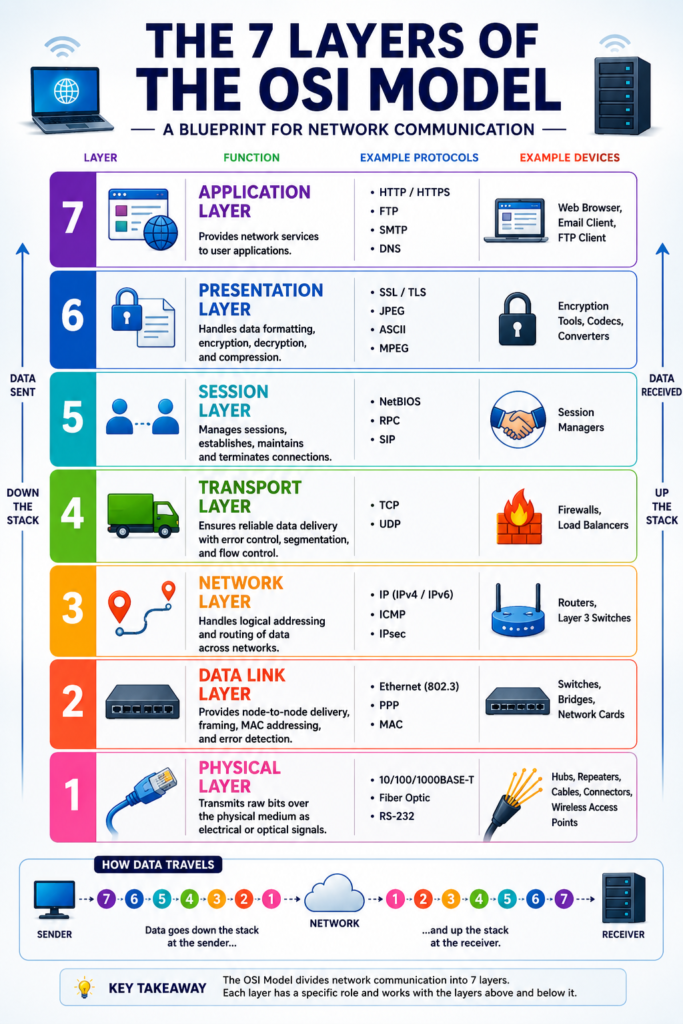
The 7 Layers of the OSI Model
| Layer | Name | Main Function |
| 7 | Application | User interaction |
| 6 | Presentation | Data formatting & encryption |
| 5 | Session | Session management |
| 4 | Transport | Reliable data delivery |
| 3 | Network | Routing and IP addressing |
| 2 | Data Link | MAC addressing and error detection |
| 1 | Physical | Transmits electrical or wireless signals |
Layer 7 – Application Layer
The Application Layer is the closest layer to the user.
It provides network services to applications such as:
- Web browsers
- Email clients
- FTP software
- Messaging apps
Common Protocols
- HTTP
- HTTPS
- FTP
- SMTP
- DNS
Example
When you open www.google.com in Chrome, the request starts at the Application Layer.
Layer 6 – Presentation Layer
This layer prepares the data before transmission.
Its responsibilities are:
- Data formatting
- Encryption
- Decryption
- Compression
Example
When you visit an HTTPS website, SSL/TLS encryption occurs at this layer.
Layer 5 – Session Layer
The Session Layer creates, manages, and ends communication sessions between devices.
Responsibilities
- Start sessions
- Maintain sessions
- End sessions
- Synchronization
Example
During a Zoom meeting, the session layer keeps the connection active until you leave the meeting.
Layer 4 – Transport Layer
The Transport Layer ensures reliable communication.
It breaks data into segments and reassembles them at the destination.
Protocols
- TCP
- UDP
TCP
- Reliable
- Error checking
- Ordered delivery
Used by:
- Websites
- Emails
- File downloads
UDP
- Faster
- No delivery guarantee
Used by:
- Online games
- Video streaming
- Voice calls
Layer 3 – Network Layer
The Network Layer determines the best path for data to travel.
Its main responsibility is routing.
Uses
- IP addresses
- Routers
- Path selection
Protocols
- IPv4
- IPv6
- ICMP
Example
A router chooses the fastest route to deliver your data across the Internet.
Layer 2 – Data Link Layer
This layer transfers data between devices on the same network.
It uses MAC addresses instead of IP addresses.
Responsibilities
- Frame creation
- Error detection
- MAC addressing
Devices
- Switches
- Network Interface Cards (NIC)
Layer 1 – Physical Layer
The Physical Layer transmits raw bits using electrical, optical, or wireless signals.
Examples
- Ethernet cables
- Fiber optic cables
- Wi-Fi signals
- Radio waves
Devices
- Hub
- Repeater
- Cables
- Connectors
Complete Example of Opening a Website
Suppose you type:
Step 1 – Application Layer
Your browser creates an HTTP request.
↓
Step 2 – Presentation Layer
The request is encrypted using HTTPS.
↓
Step 3 – Session Layer
A secure communication session is established.
↓
Step 4 – Transport Layer
TCP divides the request into smaller segments.
↓
Step 5 – Network Layer
The router finds the best path using IP addresses.
↓
Step 6 – Data Link Layer
The data is converted into frames with MAC addresses.
↓
Step 7 – Physical Layer
Bits travel through cables or Wi-Fi signals.
The destination server receives the data, processes it, and sends the response back through the same layers in reverse order.
Data Encapsulation
As data moves down the OSI layers, each layer adds its own information.
Application Data
↓
Presentation
↓
Session
↓
Segment (Transport)
↓
Packet (Network)
↓
Frame (Data Link)
↓
Bits (Physical)
This process is called Encapsulation.
Devices Used at Different OSI Layers
| Device | OSI Layer |
| Hub | Layer 1 |
| Repeater | Layer 1 |
| Switch | Layer 2 |
| Bridge | Layer 2 |
| Router | Layer 3 |
| Firewall | Layer 3–4 (often higher in modern implementations) |
| Gateway | Layer 7 |
Common Protocols by Layer
| Layer | Protocols |
| Application | HTTP, HTTPS, FTP, SMTP, DNS |
| Presentation | SSL, TLS |
| Session | NetBIOS, RPC |
| Transport | TCP, UDP |
| Network | IP, ICMP, IPSec |
| Data Link | Ethernet (IEEE 802.3), PPP |
| Physical | Ethernet physical standards, Fiber, Wi-Fi radio signaling |
Advantages of the OSI Model
- Easy to understand networking concepts
- Simplifies troubleshooting
- Standardizes communication
- Supports interoperability between vendors
- Makes network design easier
- Helps students prepare for networking certifications
Limitations of the OSI Model
- Mostly a reference model
- Some protocols don’t fit perfectly into one layer
- The Internet primarily uses the TCP/IP model
- Can be more theoretical than practical
OSI Model vs TCP/IP Model
| OSI Model | TCP/IP Model |
| 7 Layers | 4 Layers |
| Reference model | Practical Internet model |
| Created by ISO | Developed by DARPA |
| Mainly educational | Used on the Internet |
Memory Trick
A common mnemonic for remembering the layers from Layer 7 to Layer 1 is:
All People Seem To Need Data Processing
- A – Application
- P – Presentation
- S – Session
- T – Transport
- N – Network
- D – Data Link
- P – Physical
Conclusion
The OSI Model is one of the most important concepts in networking. That model provides a 7 layer concept. Which divides communication into seven logical layers. It provides a clear way to understand how data moves across networks. Whether you’re browsing a website, streaming a video, or sending an email, each layer performs a specific role to ensure reliable communication.
Mastering the OSI Model is an excellent foundation for learning networking, cyber security, and cloud computing.
FAQ
What does OSI stand for?
OSI stands for Open Systems Interconnection.
How many layers are in the OSI Model?
The OSI Model consists of seven layers.
Why is the OSI Model important?
It provides a standardized framework for understanding, designing, and troubleshooting network communication.
Is the OSI Model still used?
Yes. While the Internet primarily uses the TCP/IP model, the OSI Model remains essential for learning networking and diagnosing network issues.
Which layer uses IP addresses?
The Network Layer (Layer 3) uses IP addresses for routing data between networks.
Which layer uses MAC addresses?
The Data Link Layer (Layer 2) uses MAC addresses for communication within the same local network.


