
Common Ports & Protocols A Complete Beginner’s Guide with Easy Examples (2026)
Introduction
Every time you browse a website, send an email, stream a video, or connect to a remote computer. Then your device communicates using network protocols through specific port numbers.
Think of the Internet as a huge city. Every building has an address (IP address), and every office inside that building has a room number (port number). A protocol defines the rules for communication, while a port tells the operating system which application should receive the data.
Understanding ports and protocols is one of the most important skills in networking, cybersecurity, and system administration.

Table of Contents
What Is a Protocol?
A protocol is a set of rules that devices follow to communicate over a network.
Protocols defined are:
- How data is sent
- How data is received
- How errors are handled
- How devices identify each other
- How secure communication is established
Example
When you visit:
Your browser and Google’s server communicate using the HTTPS protocol.
Without protocols, computers would not understand each other.
What Is a Port?
A port is a logical communication endpoint used by applications.
An IP address identifies the computer.
A port identifies the application running on that computer.
For example:
192.168.1.10:80
- IP Address = 192.168.1.10
- Port = 80
The server knows that requests coming to Port 80 should go to the web server.
Example
Imagine a large hospital.
- Hospital Address = IP Address
- Department = Port
- Communication Rules = Protocol
For example:
| Department | Port |
| Reception | 80 |
| Emergency | 443 |
| Pharmacy | 25 |
| Laboratory | 21 |
The address gets you to the hospital.
The department number gets you to the correct service.
Protocols define how doctors, nurses, and patients communicate.
Types of Ports
Ports range from 0 to 65535.
They are divided into three categories.
1. Well-Known Ports (0–1023)
Used by standard Internet services.
Examples:
- HTTP
- HTTPS
- FTP
- DNS
- SSH
2. Registered Ports (1024–49151)
Used by registered software and applications.
Examples:
- Microsoft SQL Server
- MySQL
- Remote Desktop
3. Dynamic or Private Ports (49152–65535)
Temporary ports assigned by the operating system.
Used for:
- Browsers
- Games
- Video calls
- Streaming
- Temporary client connections
Common Network Protocols
HTTP
Port: 80
Purpose:
Transfers web pages.
Example:
http://example.com
Not encrypted.
HTTPS
Port: 443
Purpose:
Secure web communication using SSL/TLS encryption.
Example:
Used by:
- Online banking
- Shopping websites
- Social media
- Government portals
FTP
Port: 21
Purpose:
Transfers files between computers.
Example:
Uploading website files to a hosting server.
SFTP
Port: 22
Purpose:
Secure file transfer over SSH.
Much safer than FTP.
SSH
Port: 22
Purpose:
Secure remote login.
Example:
An administrator managing a Linux server remotely.
ssh user@192.168.1.20
Telnet
Port: 23
Purpose:
Remote login.
Not encrypted.
Rarely used today because SSH is more secure.
SMTP
Port: 25
Purpose:
Sending emails.
Example:
Your mail server sending messages to another mail server.
POP3
Port: 110
Purpose:
Downloading emails from the server.
Usually removes emails from the server after download (depending on configuration).
IMAP
Port: 143
Purpose:
Synchronizing emails across multiple devices.
Example:
Checking the same Gmail inbox on:
- Laptop
- Mobile phone
- Tablet
DNS
Port: 53
Purpose:
Converts domain names into IP addresses.
Example:
google.com
↓
142.250.xxx.xxx
Without DNS, users would have to remember IP addresses.
DHCP
Ports:
- UDP 67 (Server)
- UDP 68 (Client)
Purpose:
Automatically assigns IP addresses.
Example:
When you connect your laptop to Wi-Fi, DHCP provides an IP address automatically.
SNMP
Port: 161
Purpose:
Network monitoring and management.
Used by:
- Routers
- Switches
- Printers
- Servers
LDAP
Port: 389
Purpose:
Directory services.
Used in:
- Microsoft Active Directory
- Enterprise user authentication
RDP
Port: 3389
Purpose:
Remote Desktop.
Allows remote control of Windows computers.
MySQL
Port: 3306
Purpose:
Database communication.
Example:
A website retrieving user information from a MySQL database.
Microsoft SQL Server
Port: 1433
Purpose:
Database server communication.
NTP
Port: 123
Purpose:
Synchronizes system time.
Example:
Keeping computers and servers on the correct date and time.
TCP vs UDP
Many protocols use either TCP or UDP.
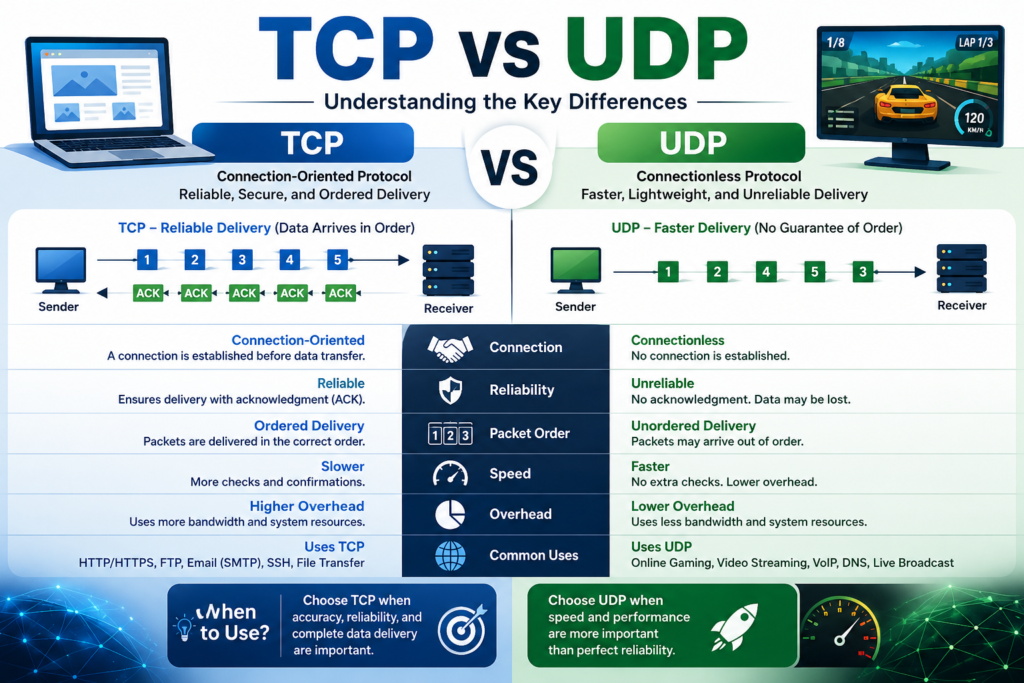
TCP
Characteristics:
- Reliable
- Error checking
- Ordered delivery
- Connection-oriented
Used by:
- HTTP
- HTTPS
- FTP
- SSH
- SMTP
Example:
Downloading a software installer where every byte must arrive correctly.
UDP
Characteristics:
- Faster
- No guaranteed delivery
- Connectionless
- Lower overhead
Used by:
- DNS
- VoIP
- Online gaming
- Video streaming
Example:
A live football match where speed is more important than perfect delivery.
Common Ports Table
| Protocol | Port | TCP/UDP | Purpose |
| HTTP | 80 | TCP | Web browsing |
| HTTPS | 443 | TCP | Secure websites |
| FTP | 21 | TCP | File transfer |
| SFTP | 22 | TCP | Secure file transfer |
| SSH | 22 | TCP | Secure remote login |
| Telnet | 23 | TCP | Remote login |
| SMTP | 25 | TCP | Send email |
| DNS | 53 | TCP/UDP | Domain name resolution |
| DHCP | 67/68 | UDP | Automatic IP assignment |
| POP3 | 110 | TCP | Receive email |
| NTP | 123 | UDP | Time synchronization |
| IMAP | 143 | TCP | Email synchronization |
| SNMP | 161 | UDP | Network monitoring |
| LDAP | 389 | TCP/UDP | Directory services |
| HTTPS (Alternative) | 8443 | TCP | Secure web applications |
| MySQL | 3306 | TCP | Database access |
| RDP | 3389 | TCP | Remote Desktop |
| PostgreSQL | 5432 | TCP | Database access |
Scenario: Accessing an Online Shopping Website
Suppose you visit:
The communication happens like this:
- Your browser asks DNS (Port 53) for Amazon’s IP address.
- DNS returns the server’s IP address.
- Your browser opens a TCP connection to Port 443.
- HTTPS encrypts the communication using TLS.
- The web server sends the requested web pages.
- When you log in or make a payment, all data remains encrypted.
Protocols involved:
- DNS
- TCP
- HTTPS
- TLS
Ports involved:
- 53
- 443
Why Are Ports Important?
Ports help:
- Identify services
- Route traffic correctly
- Improve network organization
- Enable multiple applications on one device
- Configure firewalls
- Detect suspicious network activity
- Troubleshoot connectivity issues
Without ports, computers wouldn’t know which application should receive incoming data.
Security Best Practices
To secure your network:
- Close unused ports.
- Use HTTPS instead of HTTP.
- Replace Telnet with SSH.
- Keep servers updated.
- Enable firewalls.
- Monitor open ports regularly.
- Use strong authentication and encryption.
- Limit database access to trusted hosts.
- Regularly scan for exposed services using authorized security tools.
Conclusion
- A protocol defines the rules for communication between devices.
- A port identifies the specific application or service receiving network traffic.
- Common services use standardized port numbers, such as 80 (HTTP), 443 (HTTPS), 53 (DNS), and 22 (SSH).
- TCP prioritizes reliable delivery, while UDP prioritizes speed.
- Understanding ports and protocols is essential for networking, cybersecurity, server administration, and troubleshooting.
FAQ
What is the difference between a port and a protocol?
A protocol defines how data is exchanged, while a port identifies which application or service should receive that data on a device.
Why does HTTPS use Port 443?
Port 443 is the standardized port assigned to HTTPS, which uses TLS/SSL encryption to protect web traffic.
Is FTP secure?
Traditional FTP is not secure because it transmits data in plain text. SFTP and FTPS provide secure alternatives.
Can two applications use the same port?
Generally, no. Only one application can actively listen on a specific IP address and port combination at a time, unless special configurations such as port sharing or reverse proxies are used.
Why is DNS so important?
DNS translates easy-to-remember domain names into IP addresses, allowing users to access websites without memorizing numerical addresses.


