
What Is a File System?
A file system is the method an operating system uses to store, organize, retrieve, and manage files and folders on a storage device. Such as a hard drive (HDD), solid state drive (SSD), USB flash drive, or memory card.
Without a file system, a computer would not know where files are stored or how to find them. It acts like a digital filing cabinet that keeps everything organized.
Simple Definition:
A file system is a set of rules that tells the computer how to store, organize, access, and manage data on storage devices.
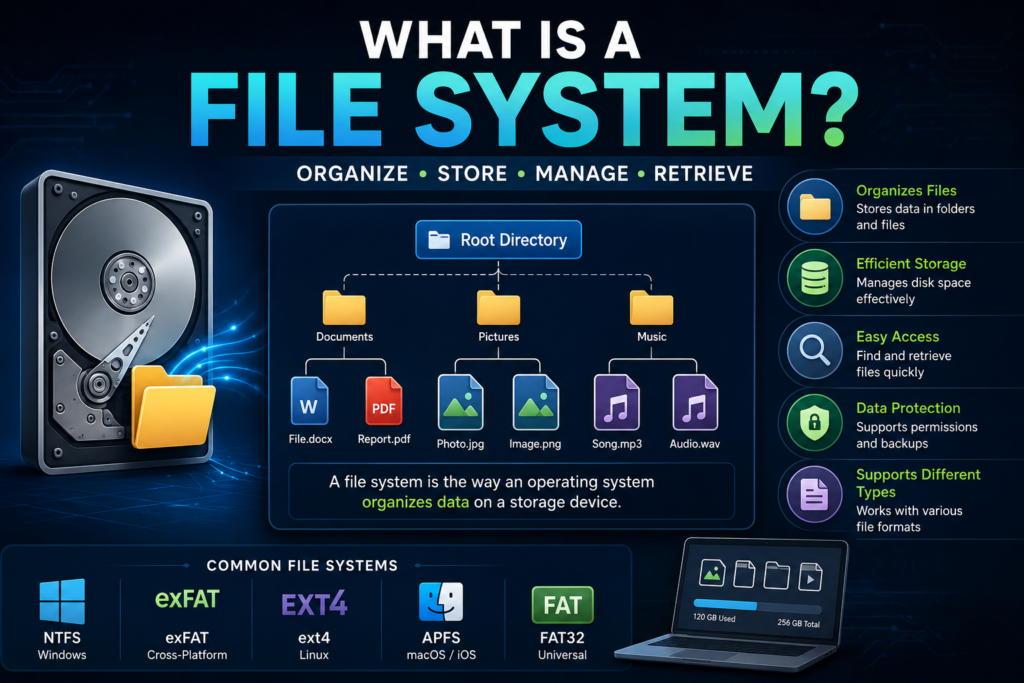
Example
Imagine a public library.
- The library is the storage device.
- Books are your files.
- Bookshelves are folders.
- The library catalog is the file system.
Without the catalog, finding a specific book would be so difficult. Because books would be scattered randomly.
A file system performs the same job by organizing your files so the operating system can quickly locate them.
Why Do We Need a File System?
A file system helps computers:
- Store files safely
- Organize data into folders
- Quickly locate files
- Delete unwanted files
- Rename files
- Control file permissions
- Reduce data corruption
- Manage available storage space
Without a file system, every piece of data would be mixed together, making the computer nearly impossible to use.
How Does a File System Work?
When you save a file:
- The operating system receives the request.
- The file system finds empty storage space.
- It records where the file is stored.
- It creates an entry with the file name.
- The file becomes available for future access.
When you open the file later, the file system checks its records and retrieves the correct data.
Main Components of a File System
1. Files
Files store data such as:
- Documents
- Images
- Videos
- Music
- Programs
Examples:
- report.docx
- photo.jpg
- movie.mp4
- project.py
2. Directories (Folders)
Folders help organize files into categories.
Example:
Documents
Projects
Assignments
Notes
Pictures
Family
Travel
3. Metadata
Metadata is information about a file, are following:
- File name
- File size
- Date created
- Date modified
- File owner
- Permissions
4. Storage Blocks
Storage devices are divided into small units called blocks or clusters.
The file system stores pieces of files inside these blocks.
Common Types of File Systems
1. FAT32 (File Allocation Table)
One of the oldest and most compatible file systems.
Advantages
- Works on almost every operating system
- Excellent for USB drives
- Easy to use
Limitations
- Maximum file size: 4 GB
- Less secure
- No journaling
2. exFAT
Designed for flash storage.
Advantages
- Supports very large files
- Cross-platform compatibility
- Ideal for external drives
Commonly used for:
- SD cards
- USB drives
- External SSDs
3. NTFS (New Technology File System)
The default file system for Windows.
Features
- File permissions
- Encryption
- Compression
- Journaling
- Large file support
Best for:
- Windows computers
- Internal hard drives
4. ext4 (Fourth Extended File System)
The default Linux file system.
Features
- Fast performance
- High reliability
- Large storage support
- Journaling
Commonly used on:
- Ubuntu
- Kali Linux
- Debian
- Fedora
5. APFS (Apple File System)
Designed by Apple.
Used in:
- macOS
- iPhone
- iPad
Features:
- Encryption
- Fast SSD performance
- Space sharing
- Snapshots
Comparison of Popular File Systems
| File System | Operating System | Max File Size | Security | Journaling |
| FAT32 | Windows, Linux, macOS | 4 GB | Low | No |
| exFAT | Windows, Linux, macOS | Very Large | Medium | No |
| NTFS | Windows | Very Large | High | Yes |
| ext4 | Linux | Very Large | High | Yes |
| APFS | macOS | Very Large | High | Yes |
Advantages of File Systems
A good file system provides:
- Fast file searching
- Better storage management
- Improved security
- Data protection
- Reduced file corruption
- Efficient disk usage
- Backup support
Disadvantages
Some file systems have limitations.
Examples:
- FAT32 cannot store files larger than 4 GB.
- NTFS has limited write support on some operating systems.
- APFS works mainly within Apple’s ecosystem.
- Older file systems are less secure.
File Systems in Daily Life
Every device you use relies on a file system.
Examples include:
- Windows laptop → NTFS
- Android phone → ext4 or F2FS
- MacBook → APFS
- USB flash drive → FAT32 or exFAT
- Linux server → ext4 or XFS
File System vs Database
| File System | Database |
| Stores files | Stores structured data |
| Used by operating systems | Used by applications |
| Organizes folders and files | Organizes records and tables |
| Good for documents and media | Good for business data |
Example Scenario
Suppose you save your university assignment.
Documents
Semester 5
Computer Fundamentals
Assignment.docx
The file system records:
- File name
- Folder location
- File size
- Storage blocks
- Creation date
- Last modified date
- Owner
- Permissions
Later, when you double-click Assignment.docx, the operating system asks the file system where the file is stored, and it retrieves the data almost instantly.
Best Practices
To keep your file system healthy:
- Organize files into folders.
- Back up important data regularly.
- Safely eject USB drives before removing them.
- Keep enough free storage space.
- Scan storage devices for malware.
- Use the recommended file system for your operating system.
Conclusion
A file system is the foundation of data storage on every computer and mobile device. It ensures that files are stored efficiently, organized logically, and retrieved quickly. Whether you’re using Windows, Linux, or macOS, the file system works behind the scenes to manage your data securely and efficiently.
Understanding file systems is an essential part of computer fundamentals, as it helps you better understand how operating systems interact with storage devices and how your files remain organized and accessible.
FAQ
What is a file system in simple words?
A file system is a method used by an operating system to organize, store, and retrieve files on a storage device.
Which file system is best for Windows?
NTFS is the best choice for Windows because it offers security, reliability, and support for large files.
Which file system is best for Linux?
ext4 is the most commonly used file system for Linux distributions due to its stability and performance.
Why is FAT32 still used?
FAT32 is widely supported by many devices, making it a good choice for USB drives and memory cards, even though it has a 4 GB file size limit.
Can a storage device have different file systems?
Yes. Different partitions on the same storage device can use different file systems, depending on your needs.

