
Dynamic Analysis in Cybersecurity Complete Lecture for Beginners
Introduction to Dynamic Analysis
Dynamic analysis is one of the most important techniques used in cybersecurity to understand how software behaves when it is running. It helps security professionals identify suspicious activities, investigate malware, test applications, and discover security weaknesses.
In simple words, dynamic analysis means running a program in a controlled environment and observing what it does. Instead of only looking at the program code, security professionals examine its actual behavior.
For example, imagine that you receive an email containing an attachment named Payment Invoice. The file looks like a normal invoice, but you are not sure whether it is safe. A cybersecurity analyst can run the file inside an isolated testing environment and monitor its activities. If the file creates suspicious processes, changes important system settings, or connects to an unknown server, the analyst can investigate whether it is malicious.
This is how dynamic analysis helps cybersecurity professionals understand the behavior of unknown software.
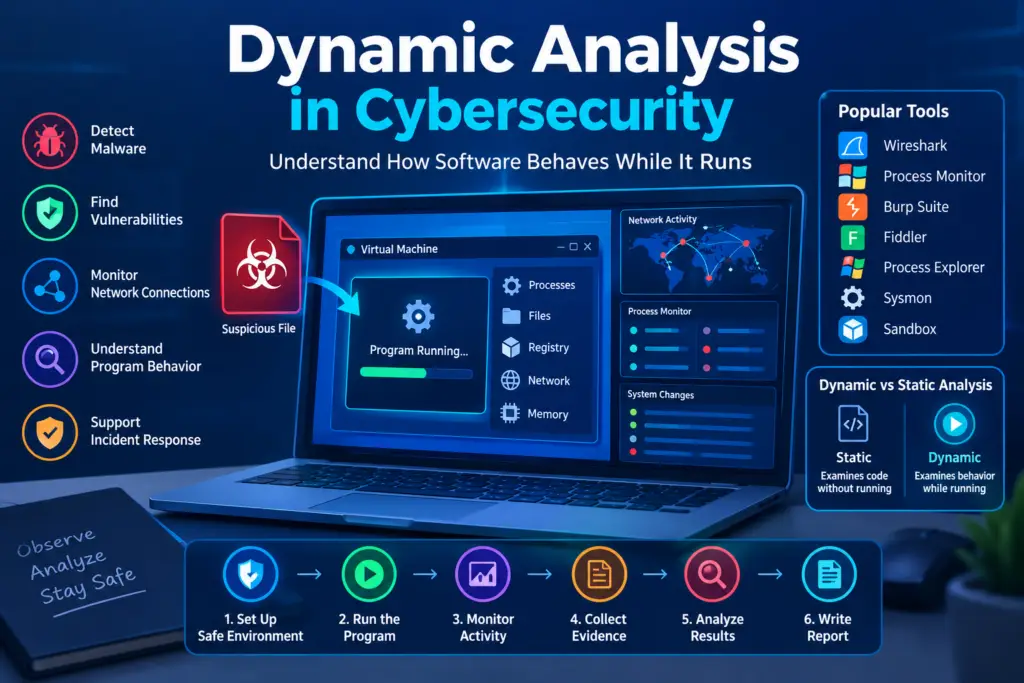
Table of Contents
Learning Objectives
By the end of this lecture, students will be able to
- Explain the meaning of dynamic analysis in cybersecurity
- Understand why dynamic analysis is important
- Describe how dynamic analysis works step by step
- Identify the different types of dynamic analysis
- Understand common tools used for dynamic analysis
- Explain the difference between static analysis and dynamic analysis
- Understand applications of dynamic analysis
- Identify the advantages and limitations of dynamic analysis
- Follow basic safety practices when analyzing suspicious software
- Understand how dynamic analysis supports malware analysis and penetration testing
What Is Dynamic Analysis
Dynamic analysis is the process of examining a program, application, or file while it is executing. During this process, cybersecurity professionals monitor the program to understand how it interacts with the operating system, files, memory, and network.
The main purpose of dynamic analysis is to discover what the software actually does during execution.
A program may appear safe when viewed from the outside but perform unexpected activities when it runs. Dynamic analysis helps reveal these activities.
For example, a free application may claim to provide photo editing features. However, while running, it might attempt to access sensitive files or send information to an unfamiliar external server. By monitoring the application’s behavior, a security analyst can investigate whether these actions are necessary or suspicious.
Simple Definition
Dynamic analysis is a cybersecurity technique in which software is executed in a controlled environment to observe its behavior and identify possible security risks.
Understanding Dynamic Analysis Through an Example
Imagine that you purchase a second hand laptop from an unknown seller. The laptop appears normal, but you suspect that an unfamiliar program installed on it may be unsafe.
You could investigate the program in a separate testing environment.
First, you prepare a virtual machine. Next, you execute the program and observe its activities. You check whether it creates new files, launches other processes, changes system settings, or connects to the internet.
After examining the collected evidence, you decide whether the behavior appears legitimate or requires further investigation.
This process demonstrates the basic idea of dynamic analysis.
Why Dynamic Analysis Is Important in Cybersecurity
Modern cyberattacks often involve programs that hide their behavior, download additional components, or perform harmful activities only under certain conditions.
Dynamic analysis helps cybersecurity professionals investigate these activities by observing software during execution.
Detecting Malware
Malware is software designed to perform harmful or unauthorized activities. Examples include ransomware, spyware, trojans, and computer worms.
Dynamic analysis helps researchers observe how suspected malware behaves when it runs.
For example, ransomware may create unusual processes and begin modifying or encrypting files. Monitoring these actions can help researchers identify ransomware behavior.
Discovering Security Vulnerabilities
A vulnerability is a weakness in software or a system that could be exploited to compromise security.
Dynamic analysis can help identify vulnerabilities that appear during application execution.
For example, a web application may allow a user to access another user’s private information by changing a record identifier in a request. Dynamic security testing can reveal this access control weakness.
Monitoring Network Connections
Applications frequently communicate with servers to download updates, synchronize information, or provide online features.
However, unexpected network communication may indicate suspicious behavior.
For example, an application that should operate offline repeatedly attempts to contact an unfamiliar server. An analyst can examine the network traffic to determine the purpose of these connections.
Understanding Program Behavior
Sometimes the source code of an application is unavailable. In other cases, the code is difficult to understand.
Dynamic analysis allows analysts to observe the program’s behavior without needing access to its original source code.
For example, a security researcher can monitor a suspicious executable to determine which processes it launches and which files it attempts to access.
Supporting Incident Response
Incident response is the process of identifying, investigating, containing, and recovering from cybersecurity incidents.
Dynamic analysis can help investigators understand how suspicious software operates and what actions it performs.
For example, after a computer becomes infected, an analyst may examine a suspected malicious file in an isolated environment to identify its behavior and develop suitable detection measures.
How Dynamic Analysis Works
Dynamic analysis follows a structured process. Each step helps the analyst collect useful evidence while reducing the risk of damaging the testing system.
Step One. Prepare a Safe Environment
Create an isolated testing environment such as a properly configured virtual machine.
Step Two. Execute the Program
Run the application under controlled conditions.
Step Three. Monitor Its Behavior
Observe processes, files, memory activity, system changes, and network communication.
Step Four. Collect Evidence
Save relevant logs, screenshots, network captures, and system activity records.
Step Five. Analyze the Results
Determine whether the observed activities are normal, suspicious, or potentially malicious.
Step Six. Prepare a Report
Document the findings, risks, evidence, and recommended actions.
Step One. Prepare a Safe Testing Environment
Before executing unknown software, an analyst should prepare an environment that reduces the risk of infection or data loss.
A virtual machine is a computer system created using software. It runs an operating system inside another computer, allowing researchers to conduct many types of tests separately from their normal working environment.
For example, a student can create a Windows virtual machine using VirtualBox and use it to examine a suspicious application.
The testing environment should not contain personal documents, saved passwords, or confidential business information. Network access should be restricted when necessary, and shared folders and clipboard features should be disabled when they create additional risk.
A virtual machine is not a perfect security boundary, so sensitive malware analysis may require a dedicated, more strongly isolated laboratory.
Step Two. Execute the Program
After preparing the environment, the analyst runs the target program.
The goal is to observe how the application behaves during execution.
Some applications perform their activities immediately, while others wait for a user action, a particular input, or a specific system condition.
For example, a suspicious application might look harmless when opened. However, clicking a particular button could cause it to launch another process or attempt a network connection.
The analyst records the conditions under which the behavior occurs.
Step Three. Monitor Program Behavior
Monitoring is one of the most important parts of dynamic analysis.
The analyst observes the program’s interaction with the operating system and other resources.
Important activities include the following.
Process Activity
A process is a program that is currently running on a computer.
Analysts monitor which processes are created, which programs launch other programs, and whether any processes behave unexpectedly.
For example, a document viewer that launches an unfamiliar command interpreter without a clear reason may require further investigation.
File System Activity
Applications may create, read, modify, rename, or delete files.
Monitoring these actions helps analysts identify unexpected changes.
For example, a program that rapidly modifies many personal documents may be showing behavior associated with ransomware.
System Configuration Changes
Applications may change operating system settings or configuration locations.
On Windows, some applications use the registry to store configuration information and startup settings.
For example, an unfamiliar program that attempts to create an unexpected startup entry may be trying to run automatically when the computer starts. The behavior should be investigated rather than automatically treated as proof of malware.
Network Activity
Analysts observe the connections an application makes to other computers or servers.
They may examine destination addresses, ports, DNS requests, protocols, and the timing of connections.
For example, a program that repeatedly contacts an unknown server after launch may be communicating with a remote service that needs further investigation.
Memory Activity
Running programs use memory to store instructions and data.
Memory analysis may help reveal suspicious code, decrypted malware components, or sensitive information held in memory.
For example, certain malware decrypts part of its code only after execution. A memory investigation may help researchers examine that code.
Step Four. Collect Evidence
Observations should be supported by evidence whenever possible.
Evidence may include process logs, file activity records, network packet captures, memory dumps, screenshots, and operating system event logs.
For example, instead of simply writing that an application made a suspicious connection, an analyst can record the destination address, connection time, process name, and relevant network capture.
This makes the finding easier to verify and helps other security professionals repeat the investigation.
Step Five. Analyze the Results
After collecting the evidence, the analyst determines whether the observed behavior is expected or suspicious.
It is important to consider the purpose of the program.
For example, a legitimate software updater may download files and create background processes. These actions are not necessarily malicious.
However, an unknown application that downloads additional executable files, creates an unexpected startup entry, and attempts to disable security software presents a stronger reason for investigation.
Good analysis considers several observations together instead of relying on one unusual event.
Step Six. Prepare a Security Report
A dynamic analysis report explains the testing process and its results.
A professional report generally includes the name and type of the sample, the testing environment, the tools used, the observed behavior, relevant evidence, possible risks, and recommended actions.
For example, the report may state that the tested program created an unexpected child process, modified a startup configuration, and attempted to connect to an unfamiliar external address.
The report should distinguish confirmed findings from assumptions. It should also explain any limitations, such as behavior that could not be reproduced during testing.
Types of Dynamic Analysis in Cybersecurity
Dynamic analysis can be divided into several practical areas according to the type of software and the security problem being investigated.
Malware Dynamic Analysis
Malware dynamic analysis focuses on suspicious or malicious programs while they are executing.
Researchers observe how these programs interact with the operating system, access files, communicate over networks, and attempt to maintain access.
Common areas of investigation include ransomware behavior, spyware activity, suspicious downloads, unauthorized process creation, and communication with command and control infrastructure.
Example
A security team receives a suspicious executable from an employee. The team runs it in a strongly isolated laboratory and discovers that it attempts to contact an external server and create an unexpected startup entry.
The analysts document the behavior and use the evidence to help develop detection rules.
Web Application Dynamic Analysis
Web application dynamic analysis examines a running website or web application by sending requests and observing its responses.
It is used to identify security weaknesses involving authentication, authorization, input validation, session management, and data handling.
For example, an online shopping website may allow customers to view their own orders. A tester discovers that changing an order identifier in a request reveals another customer’s order.
This indicates a possible broken access control vulnerability.
Authorized testers can use this finding to help the developers enforce ownership checks on the server.
Network Dynamic Analysis
Network dynamic analysis focuses on communications produced by running applications or devices.
Analysts examine traffic to understand which systems are communicating, which protocols are being used, and whether the traffic appears unusual.
For example, a workstation begins sending repeated requests to an unfamiliar external address. Network analysis may help determine whether the activity is associated with legitimate software, a misconfiguration, or a possible infection.
Memory Dynamic Analysis
Memory analysis examines the contents of a running process or system memory.
It is particularly useful when suspicious activity is not fully represented by files stored on disk.
For example, a malicious program may load additional code into memory after it starts. A memory investigation may help researchers identify the loaded code and understand the program’s behavior.
Memory analysis can involve specialized techniques and tools, and results must be interpreted carefully.
API Monitoring
An application programming interface is a mechanism that allows software components to communicate with other software or operating system services.
API monitoring observes the functions an application uses while it runs.
For example, an analyst may discover that an application repeatedly requests access to files, starts additional processes, or attempts to use sensitive operating system features.
The analyst can then investigate whether those operations are necessary for the application’s intended purpose.
System Call Monitoring
A system call is a request made by a program to the operating system to perform a particular operation.
Examples include opening files, creating processes, allocating memory, and accessing network resources.
Monitoring system calls can provide detailed information about program behavior.
For example, an application that repeatedly attempts to access protected system files may require further examination to determine whether it is operating normally.
Common Tools Used for Dynamic Analysis
Cybersecurity professionals use different tools depending on the operating system, application, and type of investigation.
Process Monitor
Process Monitor is a Windows utility that records file system, registry, and process activity.
It helps analysts understand how an application interacts with Windows.
Example
A security analyst opens an unfamiliar program inside a test environment and uses Process Monitor to observe which files and registry locations it accesses.
The results show that the program repeatedly attempts to modify a startup configuration. The analyst investigates whether this action is expected.
Wireshark
Wireshark is a network protocol analyzer used to capture and examine network traffic.
It supports the investigation of protocols such as DNS, TCP, TLS, and HTTP.
Example
An analyst observes that a computer generates repeated DNS requests to an unfamiliar domain. Using Wireshark, the analyst examines the requests and compares them with other evidence to determine whether the activity is suspicious.
Burp Suite
Burp Suite is a platform for testing web application security.
It allows authorized testers to intercept and inspect HTTP requests and responses, examine application behavior, and investigate common web security weaknesses.
Example
A tester examines an application’s account management feature and discovers that a user can access information belonging to another account by changing a request parameter.
The developer uses this finding to correct the server’s access control checks.
Fiddler
Fiddler is a web debugging proxy used to inspect HTTP and HTTPS communications in supported configurations.
It is useful for understanding how desktop applications, websites, and APIs exchange data.
Example
A developer tests a mobile application and discovers that a request contains more personal information than the server requires. The developer reviews the request and reduces the amount of unnecessary data being transmitted.
Process Explorer
Process Explorer is a Windows utility that provides detailed information about running processes.
It helps analysts inspect process relationships, loaded components, and other process properties.
Example
A computer shows unusually high CPU usage. An analyst uses Process Explorer to identify the responsible process and examine its relationship with other running programs.
Sysmon
System Monitor, commonly called Sysmon, is a Windows system monitoring utility from Microsoft Sysinternals.
It can record selected security relevant events, including process creation, network connections, and certain file activity, depending on the configuration.
Example
A security team investigates a suspicious workstation and reviews Sysmon logs to understand which process started an unfamiliar program and whether it made network connections.
Sandbox Environments
A sandbox provides an isolated environment for running and observing potentially unsafe software.
Some sandboxes automatically collect information about file activity, process behavior, and network connections.
Example
A security analyst submits a suspicious file to an approved analysis sandbox and reviews the resulting behavioral report.
Analysts should consider privacy requirements and organizational policies before uploading potentially confidential files to an external service.
Case Study of Dynamic Analysis
Scenario of a Suspicious Email Attachment
Consider an organization that receives an email claiming to contain an urgent invoice.
An employee notices that the attachment has an unfamiliar file type and reports it to the security team.
The security team decides to investigate the file using dynamic analysis.
Initial Investigation
The analyst records the file name, file type, file size, and cryptographic hash.
A cryptographic hash helps identify the exact file being investigated. It does not, by itself, prove whether the file is malicious.
The analyst then prepares an isolated environment that does not contain sensitive information.
Execution and Monitoring
The file is executed under controlled conditions while the analyst monitors process activity, file changes, and network communication.
The analyst observes that the program launches an unexpected child process and attempts to contact an unfamiliar external address.
These observations are recorded for further investigation.
Evidence Analysis
The analyst reviews the collected logs and network information.
The unexpected child process and external connection are considered together with the file’s origin and other evidence.
The analyst does not assume that one unusual connection automatically proves malicious behavior.
Final Findings
If further evidence supports a malicious classification, the security team can block the identified indicators, search for related activity across organizational systems, and investigate whether any computers were affected.
The organization can also use the findings to improve email filtering, endpoint monitoring, and employee awareness training.
Lessons Learned
This example demonstrates how dynamic analysis helps security teams move from suspicion to evidence based conclusions.
It also shows why safe isolation, systematic monitoring, and careful interpretation are essential.
Understanding Dynamic Analysis Through a Simple Laboratory Example
Students can learn the basic principles of dynamic analysis by observing a harmless program that they create themselves.
Laboratory Objective
The objective is to understand how a program creates a file and how a monitoring tool records that activity.
Laboratory Requirements
Students need a computer, a basic programming environment, and a file monitoring tool.
The exercise should use a harmless program and should not involve unknown executables or real malware.
Laboratory Procedure
First, create a simple program that writes a short message to a text file in a temporary testing folder.
Next, start a file monitoring tool and configure it to observe that folder.
Run the program and examine the monitoring results.
The tool should record the creation of the text file and may record other related file operations.
Finally, compare the observed events with the actions written in the program.
Expected Results
Students should be able to identify which file was created, when the operation occurred, and which process performed the action.
What Students Learn
This simple experiment demonstrates an important principle of dynamic analysis.
A program performs actions during execution, and monitoring tools can collect evidence about those actions.
The same general principle is used in more advanced investigations involving suspicious software, although malware analysis requires stronger isolation and more specialized knowledge.
Indicators of Suspicious Behavior
Dynamic analysis often involves looking for activities that differ from the expected behavior of a program.
Unexpected Process Creation
A program launches another process that does not appear necessary for its intended purpose.
For example, a basic image viewer unexpectedly launches a command interpreter.
Unusual File Modifications
A program changes many files without an obvious reason.
For example, an unfamiliar application rapidly modifies documents in several folders.
Suspicious Network Communication
An application repeatedly contacts an unfamiliar server or sends unexpected amounts of data.
For example, an offline utility repeatedly attempts to communicate with an external address.
Unexpected Startup Changes
A program attempts to configure itself to run automatically when the system starts.
For example, an unfamiliar executable creates a new startup entry without explaining why.
Attempts to Disable Security Controls
A program tries to interfere with antivirus protection, security logging, or other defensive mechanisms.
For example, an application attempts to stop a security service without a legitimate administrative purpose.
Unusual Access to Sensitive Information
A program attempts to access credentials, private documents, or other sensitive data without a clear operational need.
These indicators require investigation. Legitimate programs may sometimes perform similar activities, so analysts should evaluate the context and supporting evidence before drawing conclusions.
Advantages of Dynamic Analysis
Observes Real Program Behavior
Dynamic analysis allows analysts to see the actions a program performs during execution.
Helps Detect Hidden Activities
It can reveal unexpected processes, file changes, network connections, and runtime operations.
Supports Malware Investigation
It helps researchers understand how suspected malware operates and what systems or resources it may affect.
Helps Test Running Applications
Security testers can examine how applications respond to requests, inputs, authentication attempts, and other conditions.
Produces Useful Evidence
Monitoring records can help support incident reports, security investigations, and remediation decisions.
Limitations of Dynamic Analysis
It Cannot Test Every Possible Condition
A program may behave differently depending on its inputs, permissions, execution time, or environment.
A short test may not reveal every possible vulnerability or malicious activity.
Malware May Hide Its Behavior
Some malware detects analysis environments and delays or changes its activities.
It Requires Careful Isolation
Running unknown software without proper safeguards may damage files, compromise systems, or expose sensitive information.
It Can Require Specialized Knowledge
Interpreting process logs, memory information, and network traffic can be difficult for beginners.
It May Produce False Alarms
Legitimate applications sometimes perform activities that appear suspicious when viewed without context.
For example, software updates may create files, launch background processes, and communicate with external servers.
It Does Not Guarantee That Software Is Safe
A program that appears harmless during one test may still contain vulnerabilities or perform harmful activities under different conditions.
Difference Between Static Analysis and Dynamic Analysis
Static analysis and dynamic analysis are two complementary methods of examining software security.
Static analysis examines code or files without executing the target program. Dynamic analysis observes the program while it runs.
| Feature | Static Analysis | Dynamic Analysis |
| Basic method | Examines code or files without execution | Examines software during execution |
| Main focus | Code structure and potential weaknesses | Actual runtime behavior |
| Execution required | No | Yes |
| Common tools | Code analyzers and file inspection tools | Process monitors, debuggers, sandboxes, and traffic analyzers |
| Useful for | Identifying potential vulnerabilities before execution | Observing behavior that occurs during execution |
| Main limitation | May not reveal what actually happens at runtime | May miss behavior that does not occur during testing |
Comparison
Imagine that a developer is reviewing a banking application.
Static analysis identifies a function that may expose sensitive information if used incorrectly.
Dynamic analysis allows the tester to run the application and investigate whether the relevant operation actually exposes that information under particular conditions.
By combining both methods, the team can better understand the potential weakness and determine how to fix it.
Difference Between Dynamic Analysis and Penetration Testing
These terms are related but do not mean the same thing.
Dynamic analysis is a technique used to examine the behavior of running software.
Penetration testing is an authorized security assessment in which testers attempt to identify and validate security weaknesses in a system.
Dynamic analysis may be used during penetration testing, particularly when examining web applications or suspicious files.
For example, a penetration tester may use Burp Suite to investigate access control weaknesses in a website. The tester observes how the running application responds to different authorized requests and documents any confirmed vulnerability.
Best Practices for Dynamic Analysis
Use an Isolated Testing Environment
Keep unknown software separate from personal computers and production systems.
Use Harmless Test Samples When Learning
Beginners should start with programs they create themselves or other trusted, harmless testing samples.
Monitor More Than One Activity
Review process activity, file operations, system events, and network communication when relevant.
Record the Testing Conditions
Document the operating system, software version, configuration, and actions performed during testing.
Repeat Tests When Necessary
Run additional tests under different conditions when the initial results are incomplete.
Interpret Evidence Carefully
Do not classify software as malicious based on a single unusual action.
Protect Confidential Information
Avoid placing real credentials, private files, or production data in a testing environment.
Follow Legal and Ethical Guidelines
Only examine systems and software for which you have appropriate authorization.
Frequently Asked Questions About Dynamic Analysis
What is dynamic analysis in cybersecurity
Dynamic analysis is a technique used to examine software while it is running to understand its behavior and identify possible security risks.
What is the main purpose of dynamic analysis
Its main purpose is to observe actual program behavior, investigate malware, test applications, and identify certain security weaknesses.
Which tools are used for dynamic analysis
Common tools include Process Monitor, Process Explorer, Wireshark, Burp Suite, Fiddler, Sysmon, and suitable sandbox environments.
Is dynamic analysis used for malware analysis
Yes. Malware researchers use dynamic analysis to observe suspicious processes, file changes, network communication, and other runtime activities.
What is the difference between static analysis and dynamic analysis
Static analysis examines code or files without executing the target program. Dynamic analysis examines the program while it is running.
Can dynamic analysis detect all malware
No. Some malware hides its behavior, waits for specific conditions, or recognizes analysis environments. Dynamic analysis should be combined with other investigation techniques.
Is dynamic analysis safe
It can be performed safely when appropriate isolation and security controls are used. Executing unknown software on a personal or production computer can be dangerous.
Is dynamic analysis used in penetration testing
Yes. It can help authorized penetration testers examine running applications, analyze requests and responses, and investigate security weaknesses.
What is a sandbox in dynamic analysis
A sandbox is an isolated environment used to execute and observe software while reducing the risk of affecting other systems.
Can beginners learn dynamic analysis
Yes. Beginners can start by monitoring harmless programs, studying process activity, examining network traffic in a controlled lab, and learning how to interpret logs.
Conclusion
Dynamic analysis is a practical cybersecurity technique that helps professionals understand how software behaves while it is running. It plays an important role in malware analysis, application security testing, network investigations, and incident response.
By monitoring processes, file operations, system changes, memory activity, and network communications, analysts can collect evidence and investigate suspicious behavior.
However, dynamic analysis has limitations. It cannot guarantee that software is safe, and it may miss activities that do not occur during testing. For stronger security assessments, it should be combined with static analysis, careful monitoring, and other appropriate techniques.
For students who want to build a career in cybersecurity, learning dynamic analysis provides a useful foundation for understanding malware behavior, application security, and digital investigations.


