
Sandbox Techniques in Cybersecurity With Examples
Introduction to Sandbox Techniques
Sandbox techniques are widely used in cybersecurity to test suspicious files, analyze malware, and investigate potentially dangerous applications in a controlled environment. They help security professionals understand how software behaves without unnecessarily exposing their main computers or business systems to risk.
Cybercriminals often distribute malicious software through email attachments, fake software updates, infected downloads, and suspicious websites. Some malicious programs look like ordinary applications but perform harmful activities after execution.
For example, an employee receives an email containing an attachment named Payment Invoice. The file looks legitimate, but the sender is unknown. Opening the attachment directly on the employee’s computer could expose the system to malware.
A security analyst can instead execute the file inside an isolated sandbox and monitor its behavior. If the file creates suspicious processes, modifies system settings, or attempts to communicate with an unfamiliar server, the analyst can investigate these activities before deciding whether the file is dangerous.
This article explains sandbox techniques in cybersecurity, how they work, their types, common tools, practical applications, advantages, limitations, and examples.
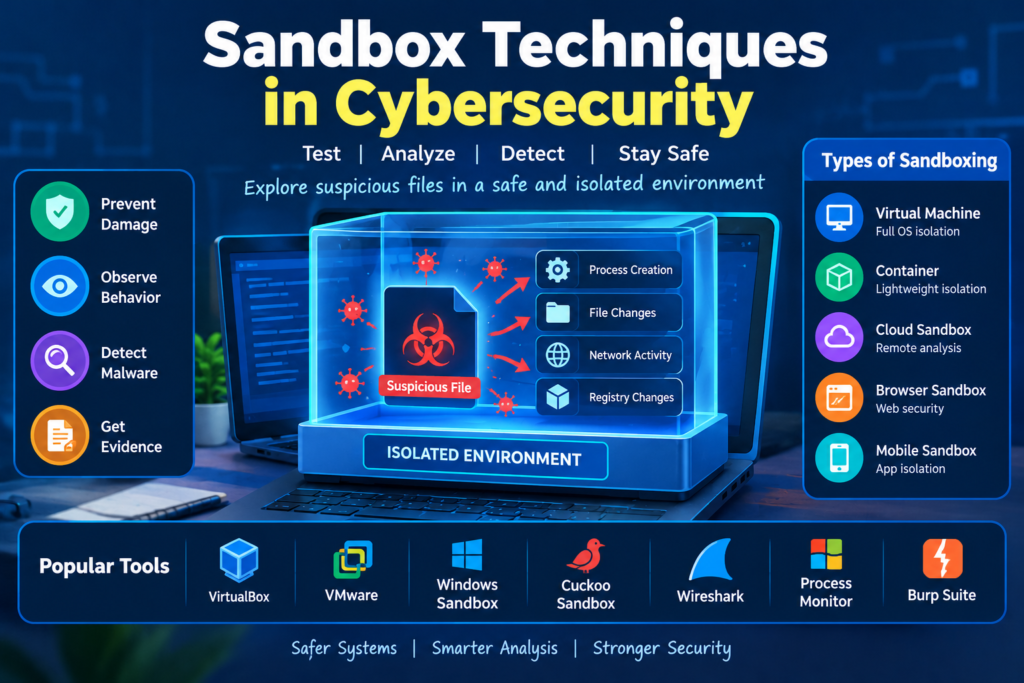
Table of Contents
What Are Sandbox Techniques in Cybersecurity
Sandbox techniques are security methods that use an isolated environment to execute and examine software while restricting its access to important system resources.
A sandbox can limit an application’s access to files, processes, network connections, system settings, and sensitive information. The exact restrictions depend on the sandbox technology and its configuration.
The main purpose is to reduce the risk of testing unfamiliar software while collecting useful information about its behavior.
Simple Definition of Sandboxing
Sandboxing is a cybersecurity technique that runs software in a controlled environment to observe its behavior and reduce the risk of affecting other systems.
Understanding Sandboxing With an Easy Example
Imagine that you download an unfamiliar application that claims to improve your computer’s performance.
You do not know whether the application is safe. Instead of installing it on your personal computer, a cybersecurity analyst can test it inside an isolated environment.
During testing, the analyst observes whether the application creates files, launches additional programs, changes startup settings, or connects to external servers.
If the application performs unexpected activities, the analyst investigates the findings before allowing it to be used.
This is a practical example of sandboxing.
Why Sandbox Techniques Are Important in Cybersecurity
Sandboxing helps organizations investigate suspicious software before allowing it to interact with important systems. It is particularly useful when a file is unfamiliar or its behavior is difficult to predict.
Detecting Unknown Malware
Malware is software designed to perform harmful or unauthorized activities. Examples include ransomware, spyware, trojans, and computer worms.
Some malware may not be immediately recognized by traditional antivirus tools. A sandbox allows security professionals to observe its behavior and look for suspicious activities.
For example, a suspicious executable may create an unexpected startup entry and attempt to contact an unfamiliar server. These actions can provide evidence for further malware investigation.
Protecting Computers From Suspicious Files
Sandboxing helps reduce the risk associated with executing unknown files.
For example, a company receives a suspicious document from an unknown sender. Instead of opening it on an employee’s computer, the security team examines it in a properly isolated environment.
This reduces the chance of exposing important files and business systems to a potential threat.
Investigating Suspicious Email Attachments
Email attachments are frequently used to deliver malicious software.
A sandbox can execute a suspicious attachment and monitor its activities before the organization decides whether to block or allow it.
For example, an attachment claiming to be a delivery receipt unexpectedly launches another process. The security team examines the activity and investigates whether the attachment is malicious.
Testing New Applications
Developers use sandbox environments to test applications before deploying them to production systems.
For example, a software company wants to introduce a new application to its employees. The IT team tests the application in an isolated environment to identify unexpected file changes, excessive permissions, and compatibility problems.
Supporting Incident Response
Incident response involves identifying, investigating, containing, and recovering from cybersecurity incidents.
Sandboxing helps investigators understand the behavior of suspicious files discovered during an incident.
For example, if an employee’s computer becomes infected, the security team may analyze a suspected malicious file in a dedicated laboratory to identify its behavior and develop appropriate detection measures.
How Sandbox Techniques Work
Sandboxing follows a structured process that allows security professionals to execute software, monitor its behavior, and evaluate the results.
Step One. Select the File or Application
The first step is to identify the file or application that requires investigation.
It could be an executable file, a document, a mobile application, or a downloaded program.
For example, an employee reports an unfamiliar email attachment to the security team. The analyst records its name, file type, source, and other relevant information.
Step Two. Prepare an Isolated Environment
The analyst prepares a sandbox suitable for the software being tested.
This may involve a virtual machine, a specialized malware analysis platform, or another isolated environment.
The environment should not contain unnecessary sensitive information. Shared folders, clipboard access, and network connectivity should be restricted according to the risk.
For example, an analyst creates a Windows virtual machine specifically for investigating a suspicious Windows application.
Step Three. Record the Initial System State
Before executing the file, the analyst records the environment’s initial condition.
This may include running processes, existing files, system settings, and network configuration.
Recording the initial state makes it easier to identify changes caused by the program.
For example, if a new file appears in a temporary directory after execution, the analyst can compare it with the initial file inventory.
Step Four. Execute the Program
The analyst runs the selected program inside the sandbox.
The purpose is to observe its actual behavior under controlled conditions.
For example, an unfamiliar application may open normally but launch an unexpected background process after the user selects a particular option.
The analyst records the conditions under which the activity occurs.
Step Five. Monitor Program Behavior
Monitoring helps analysts understand how the program interacts with the operating system and network.
Important activities include process creation, file modification, system configuration changes, memory activity, and network communication.
For example, an application that should work offline unexpectedly attempts to contact an unfamiliar external server. The analyst records the connection and investigates its purpose.
Step Six. Collect and Analyze Evidence
The analyst reviews the information collected during execution.
Evidence may include process logs, network captures, file activity records, system event logs, and memory information.
For example, the analyst discovers that an application created an unexpected startup entry and attempted to download another executable file. These observations are examined together to determine whether the behavior is suspicious.
Step Seven. Restore the Environment
After testing, the analyst restores the sandbox to a known clean state.
This may involve reverting a virtual machine snapshot or rebuilding a disposable environment.
Restoration prevents previous tests from affecting later investigations.
Step Eight. Prepare a Security Report
The final step is to document the findings.
The report should explain what was tested, which environment was used, what activities were observed, which risks were identified, and what actions are recommended.
For example, a report may describe an unexpected process, a suspicious network connection, and the evidence supporting the analyst’s conclusion.
Types of Sandbox Techniques
Different sandbox techniques provide different levels of isolation and are suitable for different security tasks.
Software Based Sandboxing
Software based sandboxing uses operating system features or security software to restrict what an application can access.
For example, a browser may prevent a web page from directly reading arbitrary files from the user’s computer.
If the page contains malicious scripts, these restrictions can reduce the potential damage.
Software based sandboxing is commonly used in browsers, document viewers, and application security systems.
Virtual Machine Sandboxing
Virtual machine sandboxing uses virtualization software to run an operating system inside a separate virtual computer.
The virtual machine can have its own operating system, applications, and virtual hardware.
For example, a cybersecurity student creates a Windows virtual machine to investigate the behavior of a suspicious application without installing it on the main operating system.
Virtual machines are useful for malware research, operating system testing, and security training.
However, a virtual machine is not automatically a perfectly secure sandbox. Its configuration, network access, shared resources, and virtualization software must be considered.
Container Based Sandboxing
Container based sandboxing runs applications in isolated environments that share the host operating system kernel.
Containers can separate application files, dependencies, and resources while allowing developers to deploy software efficiently.
For example, a developer wants to test a web application without changing the main development environment. The developer runs the application inside a container with limited permissions.
Containers are useful for software testing and cloud environments, but they require careful configuration. They do not provide the same isolation model as a virtual machine in every situation.
Cloud Based Sandboxing
Cloud based sandboxing uses remote infrastructure to execute and examine suspicious files.
Organizations can use cloud security platforms to analyze files without maintaining every part of the analysis infrastructure locally.
For example, a company receives hundreds of email attachments every day. Its security platform submits suspicious attachments to a cloud sandbox and uses the results to help identify potentially malicious files.
Organizations should review privacy policies and data handling requirements before uploading confidential files to external services.
Browser Sandboxing
Browser sandboxing restricts the actions that web pages and browser components can perform.
Modern browsers use isolation and permission controls to reduce the risk associated with malicious websites.
For example, a user visits a website containing harmful scripts. Browser security mechanisms help restrict the scripts from accessing arbitrary local files.
Browser sandboxing reduces risk but does not guarantee that every website or downloaded file is safe.
Automated Malware Sandboxing
Automated malware sandboxing executes suspicious files and collects information about their behavior with limited manual intervention.
These systems may monitor processes, file operations, system changes, and network activity.
For example, an organization’s email security platform receives an unfamiliar executable. An automated sandbox analyzes the file and generates a report containing suspicious process activity and attempted network connections.
A security analyst reviews the results and decides whether the file should be blocked or investigated further.
Mobile Application Sandboxing
Mobile operating systems use application isolation to restrict how applications access device resources and information belonging to other applications.
For example, a mobile application may request permission to access contacts, the camera, or the device location.
Operating system permissions and isolation mechanisms help control this access.
Security researchers can also use mobile emulators or dedicated test devices to examine application behavior in a controlled environment.
Common Sandbox Tools Used in Cybersecurity
Security professionals use a range of tools to create isolated environments and observe application behavior.
VirtualBox
VirtualBox is virtualization software that allows users to create and run virtual machines.
It is useful for building security laboratories and testing applications in separate operating system environments.
Example
A cybersecurity student creates a Windows virtual machine and uses monitoring tools to observe the behavior of a harmless test application.
The student can examine file creation and process activity without unnecessarily changing the normal working environment.
VMware Workstation
VMware Workstation is a virtualization platform used to create and manage virtual machines.
It allows researchers to maintain separate operating systems and testing environments.
Example
A security analyst maintains separate Windows and Linux virtual machines to test how an application behaves under different operating system conditions.
Windows Sandbox
Windows Sandbox is a disposable desktop environment available on supported Windows editions and configurations.
When the sandbox is closed, its temporary state is discarded.
Example
An employee needs to examine a utility downloaded from an unfamiliar website. If Windows Sandbox is available and its use is permitted by organizational policy, the employee can test the utility in the disposable environment.
Windows Sandbox reduces risk but should not be treated as a guarantee against every possible attack.
Cuckoo Sandbox
Cuckoo Sandbox is an open source automated malware analysis framework historically used to execute suspicious files in controlled virtual environments.
It can collect behavioral information, including process activity, file changes, and network behavior.
Example
A malware analyst examines an unfamiliar executable using a properly configured analysis environment and reviews the resulting report to identify potentially malicious actions.
Researchers should use maintained software and appropriate isolation when building a malware analysis laboratory.
ANY RUN
ANY RUN is an interactive online malware analysis service that allows users to examine suspicious files and observe their behavior in an analysis environment.
Depending on the analysis configuration, it can provide information about processes, network communication, and other activities.
Example
An analyst investigating a suspicious attachment uses an approved analysis service to examine the sample and review the behavioral results.
Before uploading a file, the analyst checks whether the service’s data handling and privacy settings are appropriate for that file.
Process Monitor
Process Monitor is a Windows utility that records file system, registry, and process activity.
It is not a complete sandbox by itself, but it is useful for observing what an application does inside a sandbox.
Example
An analyst runs a test application in a virtual machine and uses Process Monitor to identify which files the application creates and which registry locations it accesses.
Wireshark
Wireshark is a network protocol analyzer used to capture and inspect network traffic.
It can help analysts investigate DNS requests, network connections, and application communication.
Example
An application attempts to contact an unfamiliar server during testing. The analyst uses Wireshark to inspect the available network evidence and investigate whether the connection is expected.
Applications of Sandbox Techniques
Email Security
Organizations use sandboxing to investigate suspicious email attachments and links.
For example, a company receives an email claiming to come from a delivery service. The attached file unexpectedly launches another process during testing.
The security team investigates the behavior and may block the attachment if the evidence supports a malicious classification.
Malware Research
Researchers use sandboxes to understand how suspicious programs behave.
For example, a suspicious application modifies startup settings and attempts to communicate with an external server. Analysts examine these activities to understand the potential threat and develop detection methods.
Software Development
Developers use isolated environments to test new applications before deployment.
For example, a development team runs a new web application in a container and checks its behavior before deploying it to a production server.
Web Browser Security
Browser sandboxing helps restrict what web content can access on a user’s computer.
For example, a malicious web page may attempt to exploit a browser vulnerability. Isolation mechanisms can reduce the damage that web content can cause when the browser’s security controls work as intended.
Cloud Security
Organizations use isolated environments to test applications and workloads before granting them access to sensitive resources.
For example, a company evaluates a new service in a separate cloud environment before connecting it to production databases.
Threat Hunting and Incident Response
Sandbox analysis can help security teams identify suspicious behavior and investigate related activity across an organization.
For example, an analyst discovers that a suspicious file attempts to connect to an unfamiliar domain. The security team searches its network records to determine whether other computers made similar connections.
Practical Case Study of a Suspicious Email Attachment
The Situation
An employee receives an email containing an attachment described as an urgent invoice.
The sender is unfamiliar, and the message contains unexpected instructions to open the attachment immediately.
The employee reports the email to the security team.
Initial Investigation
The analyst records the attachment’s name, file type, source, and cryptographic hash.
A cryptographic hash helps identify the exact file being examined. It does not independently prove whether the file is malicious.
The analyst prepares an isolated environment and restricts unnecessary network access.
Executing the File in a Sandbox
The analyst executes the attachment under controlled conditions and monitors its behavior.
The program unexpectedly launches another process, creates a file in a temporary directory, and attempts to contact an unfamiliar external server.
The analyst records these observations for further investigation.
Examining the Evidence
The analyst compares the observed behavior with the expected behavior of the attachment and reviews the available email information.
The unexpected process creation and network communication raise concerns because they do not appear consistent with the attachment’s claimed purpose.
The analyst investigates additional evidence before making a final classification.
Taking Appropriate Security Action
If the investigation confirms that the file is malicious, the organization can block the attachment, search for similar messages, investigate potentially affected computers, and contain compromised systems.
The security team can also improve email filtering and provide additional employee awareness training.
Lessons Learned
This example demonstrates how sandboxing helps organizations examine suspicious files before they are allowed to affect users.
It also shows why safe isolation, continuous monitoring, and evidence based decisions are essential.
Difference Between Sandboxing and Dynamic Analysis
Sandboxing and dynamic analysis are closely related, but they serve different purposes.
Sandboxing provides an isolated environment for executing software under controlled conditions.
Dynamic analysis is the process of examining software while it runs.
For example, a researcher executes a suspicious program inside a virtual machine. The virtual machine provides the isolated environment, while monitoring tools collect information about the program’s behavior.
Sandboxing helps control the testing environment, while dynamic analysis helps explain what the program does.
Difference Between Sandboxing and Virtual Machines
A virtual machine is one way to create an isolated environment, while sandboxing is a broader security concept.
A virtual machine runs a separate guest operating system through virtualization software. Sandboxing may use virtual machines, operating system restrictions, containers, or specialized security mechanisms.
For example, a virtual machine may be used as a sandbox for malware analysis. However, a virtual machine used for ordinary software development is not automatically configured as a secure malware sandbox.
The level of protection depends on the environment’s configuration and security controls.
Advantages of Sandbox Techniques
Reduced Risk During Testing
Sandboxing helps prevent suspicious software from directly affecting the main environment when isolation is configured correctly.
Detection of Suspicious Behavior
Behavioral monitoring can reveal unexpected process creation, file modifications, system changes, and network communication.
Support for Malware Analysis
Security researchers can investigate suspicious programs and collect evidence about their behavior.
Safer Software Testing
Developers can test applications in separate environments before deploying them to important systems.
Useful Security Evidence
Sandbox logs and reports help analysts support their findings and recommend appropriate security actions.
Support for Automated Security Systems
Automated sandboxing can help organizations analyze large numbers of suspicious files and prioritize potential threats for investigation.
Limitations of Sandbox Techniques
Malware Can Detect the Sandbox
Some malware checks whether it is running inside a virtual machine or analysis environment. It may delay execution or change its behavior to avoid detection.
Sandbox Escape Is Possible
A sandbox escape occurs when a program breaks out of its intended isolation boundary.
Although properly maintained environments reduce this risk, security vulnerabilities and configuration weaknesses can still create problems.
Some Threats Require Specific Conditions
Malware may activate only after a certain period, user action, network response, or system configuration.
If these conditions are not present during testing, the malicious behavior may remain undetected.
Resource Requirements
Virtual machines and automated analysis platforms may require considerable memory, processing power, storage, and maintenance.
False Positives
Legitimate applications may perform activities that appear suspicious without additional context.
For example, a software updater may create files and connect to external servers as part of normal operation.
No Guarantee of Complete Protection
Sandboxing reduces risk but does not eliminate every threat. Organizations should combine it with endpoint protection, access controls, software updates, network monitoring, and other security measures.
Best Practices for Using Sandbox Techniques
Use Strong Isolation
Keep the sandbox separated from production systems and sensitive information.
Restrict Network Access
Disable unnecessary network connectivity. When network access is required for testing, use controlled and monitored connections.
Disable Unnecessary Sharing
Avoid sharing sensitive folders, clipboard contents, or other resources between the sandbox and the host computer.
Keep Software Updated
Use supported operating systems and maintained security tools to reduce exposure to known vulnerabilities.
Record the Initial System State
Document the environment before testing so that changes can be identified accurately.
Monitor Different Types of Activity
Observe processes, file operations, system configuration changes, and network communication when relevant.
Restore a Clean Environment
Use disposable environments or restore known clean snapshots after testing.
Protect Confidential Information
Do not upload confidential documents to external analysis services unless the service and its data handling practices have been approved.
Document Findings Clearly
Record the sample, environment, observed behavior, evidence, conclusions, and recommended actions.
Follow Legal and Ethical Guidelines
Only test software and systems for which you have appropriate authorization.
Frequently Asked Questions About Sandbox Techniques
What are sandbox techniques in cybersecurity
Sandbox techniques use isolated environments to execute and examine software while reducing the risk of affecting other systems.
What is the main purpose of sandboxing
The main purpose is to investigate suspicious software, observe its behavior, reduce testing risks, and support security decisions.
Which tools are used for sandboxing
Commonly used tools and platforms include VirtualBox, VMware Workstation, Windows Sandbox, Cuckoo Sandbox, and online malware analysis services such as ANY RUN.
Is sandboxing used for malware analysis
Yes. Security researchers use sandbox environments to observe suspicious processes, file changes, system modifications, and network communication.
What is the difference between a sandbox and a virtual machine
A virtual machine runs a separate operating system through virtualization. Sandboxing is a broader concept that restricts software access and may use virtual machines or other isolation methods.
Is sandboxing completely safe
No. Sandboxing reduces risk but cannot guarantee complete protection. Poor configuration, software vulnerabilities, and sandbox escape techniques may create security risks.
Can sandboxing detect every type of malware
No. Some malware detects analysis environments, delays execution, or requires specific conditions before performing malicious activities.
Is sandboxing useful for beginners
Yes. Beginners can start by creating a virtual machine, observing harmless programs, and learning how file and process monitoring tools work.
Is sandboxing used in cloud security
Yes. Organizations use isolated environments to test applications, analyze suspicious files, and reduce the risk of exposing production systems to untrusted software.
What is automated sandboxing
Automated sandboxing uses software to execute suspicious files and collect behavioral information with limited manual intervention.
Conclusion
Sandbox techniques are an important part of modern cybersecurity because they help security professionals examine suspicious files, investigate malware, test applications, and reduce the risks associated with unknown software.
By using isolated environments and monitoring tools, analysts can observe how programs interact with files, processes, system settings, and networks. This information supports malware analysis, email security, software testing, and incident response.
However, sandboxing is not a complete security solution. Some malware can detect analysis environments, wait for specific conditions, or attempt to escape isolation. For this reason, sandboxing should be combined with other security controls and careful analysis.
For cybersecurity students, learning sandbox techniques provides a practical foundation for malware analysis, dynamic analysis, application security, and incident investigation.


