
Penetration Testing Methodology
Beginner friendly tutorial with simple explanations with examples
Introduction to Penetration Testing
Penetration testing is a process of checking the security of a computer system, website, network, or application to find weaknesses before a real attacker discovers them.
It is commonly performed by ethical hackers or security professionals who have permission from the owner of the system.
The main purpose of penetration testing is to find security problems, understand how those problems could affect the organization, and suggest ways to fix them.
For example, imagine a college has an online admission website. Students use this website to submit their names, phone numbers, educational records, and other personal information. If the website does not properly protect this information, an unauthorized person might be able to access students’ records.
The college hires a penetration tester to check the website’s security. The tester examines the login system, checks access permissions, looks for software weaknesses, and prepares a report explaining any problems found.
The college can then fix those problems before someone misuses them.
This is the basic idea of penetration testing.
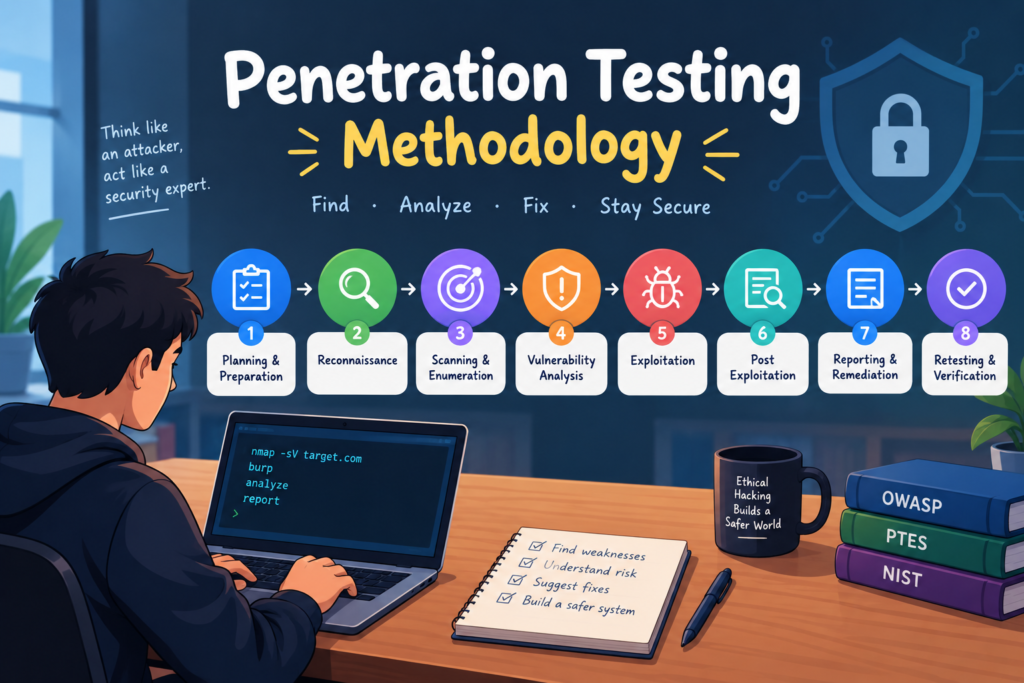
Table of Contents
What Is Penetration Testing Methodology
Penetration testing methodology is a step by step process that security professionals follow when testing a system.
Think of it like building a house. Before building the house, you need a plan, the right materials, and a clear idea of what you want to achieve. You cannot simply start building without preparation.
Penetration testing works in a similar way. A tester needs to understand the target, collect information, check for weaknesses, test those weaknesses safely, and explain the results.
Following a proper methodology makes the testing organized, reduces mistakes, and helps ensure that important security problems are not missed.
For example, suppose a business asks you to test its online shopping website. Instead of immediately running security tools, you first obtain permission and agree on which parts of the website you can test. You then collect information, examine the website, validate possible weaknesses, and prepare a report for the business.
This organized process is called penetration testing methodology.
Why Is Penetration Testing Methodology Important
A proper methodology is important because penetration testing involves more than running tools or finding technical problems.
It helps the tester understand what needs to be tested, how the testing should be performed, and how the results should be explained.
The main benefits include the following.
It keeps testing organized. The tester follows a clear process instead of performing random tests.
It helps find security weaknesses. Each stage focuses on a different part of the system, which helps identify problems that might otherwise be missed.
It reduces the risk of damage. Planning and testing rules help prevent accidental service interruptions or changes to important information.
It helps organizations understand risk. The final report explains which problems could affect the business and why they matter.
It helps verify security improvements. Retesting checks whether the organization has actually fixed the reported problems.
For example
Imagine an online shopping company has thousands of customers. The company wants to protect customer accounts, delivery addresses, and order information.
Without a clear testing plan, a tester might focus only on the login page and miss a weakness in the customer account section.
By following a proper methodology, the tester can examine different parts of the website in an organized way and provide the company with a clearer picture of its security.
Main Stages of Penetration Testing Methodology
A typical penetration test includes the following stages.
1 Planning and preparation
Decide what can be tested and obtain permission.
2 Reconnaissance
Collect information about the target.
3 Scanning and enumeration
Identify systems, services, and available information.
4 Vulnerability analysis
Find and check possible security weaknesses.
5 Exploitation
Safely confirm whether a weakness can be used.
6 Post exploitation
Understand the possible impact of a confirmed weakness.
7 Reporting and remediation
Explain the findings and recommend fixes.
8 Retesting and verification
Check whether the fixes work.
Let us understand each stage in simple words, with practical examples.
Stage 1. Planning and Preparation
Planning and preparation is the first stage of penetration testing. In this stage, the tester and the organization decide how the security test will be performed.
Before starting any technical work, the tester must obtain permission from the owner of the system.
The tester also needs to understand the purpose of the test, which systems are included, which systems are excluded, and what activities are allowed.
This stage is very important because testing the wrong system or using an unsafe method can cause problems for the organization.
What happens during planning
First, the tester identifies the target. The target might be a website, a mobile application, a computer network, or a server.
Second, the tester defines the scope. The scope explains exactly which systems can be tested.
Third, the tester obtains written authorization. This document confirms that the organization has approved the testing activities.
Fourth, the tester agrees on a schedule. Some tests are performed during working hours, while others are scheduled during quieter periods to reduce the effect on users.
Finally, the tester agrees on safety rules, emergency contacts, and how the findings will be reported.
For example
Suppose IT Code Hub has an online student registration website.
The institute hires an ethical hacker to check its security. Before starting, the institute and the tester agree that the registration website and its login page can be tested.
However, the institute’s staff computers and payment provider are not included in the test.
They also agree that the tester must not delete student records or interrupt the website.
Now the tester has clear instructions and can begin the assessment within the approved limits.
Why this stage matters
Planning prevents misunderstandings and helps the tester focus on the correct systems. It also protects the organization from unnecessary risks.
Remember that you should never assume you have permission just because a website is publicly available.
Stage 2. Reconnaissance
Reconnaissance is the process of collecting information about the target before checking it for security weaknesses.
In simple words, reconnaissance means learning as much as possible about the target so that you understand what you are going to test.
For example, before a doctor treats a patient, the doctor asks questions and gathers information about the patient’s condition. Similarly, a penetration tester collects information about a website or network before performing detailed security tests.
The information collected during reconnaissance can help the tester identify which parts of the system need further examination.
Types of reconnaissance
There are two main types of reconnaissance.
Passive reconnaissance
Passive reconnaissance means collecting information from publicly available sources without directly probing the target system.
A tester might examine the organization’s public website, search engine results, public documentation, domain information, and publicly available technology details.
Active reconnaissance
Active reconnaissance involves directly interacting with the target to collect information. For example, a tester might send requests to an authorized website to understand its structure or check which approved services are available.
Active reconnaissance must stay within the agreed scope because it can create traffic on the target system.
What information can a tester collect
A tester may collect information such as the website’s domain name, subdomains, public IP addresses, web technologies, login pages, contact pages, and publicly accessible services.
The tester should record the findings so they can be used in the next stages.
For example
Imagine a company operates a website called shop.example.com.
The tester first reviews the company’s public website and discovers that it also has a customer support portal and a customer login page.
The tester records these findings and checks whether those systems are included in the approved testing scope.
If they are included, the tester can examine them in later stages.
Discovering a login page does not mean that the page is vulnerable. It simply identifies an area that may require further testing.
Why reconnaissance matters
Reconnaissance helps the tester understand the target before using more detailed testing methods. It can save time and help identify important areas that might otherwise be overlooked.
Stage 3. Scanning and Enumeration
Scanning and enumeration are used to learn more about the target system, its services, and its configuration.
These activities are related, but they are not exactly the same.
Scanning usually helps identify active systems, open ports, and available services.
Enumeration goes a step further by collecting more detailed information about the identified services.
What is scanning
A computer can provide different services, such as a website, a remote administration service, or a database service.
These services may communicate through numbered network ports.
For example, port 80 is commonly used for HTTP web traffic, while port 443 is commonly used for HTTPS web traffic.
A penetration tester can use approved scanning tools to identify which ports are open and which services may be available.
An open port does not automatically mean there is a security problem. The tester needs to understand whether the service is necessary and properly protected.
What is enumeration
Enumeration means collecting additional details about an identified system or service.
Depending on the scope, this may include the type of web server, software versions, available application features, or information about user permissions.
The purpose is to understand how the target is configured and whether any details indicate a possible security weakness.
Common tools

Nmap
Nmap is a network discovery and security auditing tool. It can help identify active hosts, open ports, and services on systems that you are authorized to test.
Official website:
Nmap

Burp Suite
Burp Suite is a web application security testing platform. It helps testers examine requests and responses between a browser and a web application.
Official website:
Burp Suite
For example
Suppose a company hosts its website on a server.
During an authorized scan, the tester discovers that the server provides a web service and a remote administration service.
The tester checks whether the remote administration service is required and whether access is limited to approved administrators.
If the service is unnecessarily accessible to the public, the tester may recommend restricting it through a firewall or a secure remote access system.
Why scanning and enumeration matter
These activities help the tester understand which services are available and where further security checks may be needed.
They also help identify unnecessary services that could increase the system’s exposure to attacks.
Stage 4. Vulnerability Analysis
Vulnerability analysis is the process of identifying and examining possible security weaknesses in a system.
A vulnerability is a weakness in software, system configuration, application design, or security controls that could allow someone to misuse the system.
During this stage, the tester uses the information gathered during reconnaissance, scanning, and enumeration to identify possible problems.
However, a possible vulnerability is not always a confirmed vulnerability. The tester needs to investigate the finding before reporting it as a genuine security issue.
Common types of vulnerabilities
Weak authentication
Authentication is the process of checking whether a person is really the user they claim to be. Weak authentication can allow unauthorized people to access accounts.
Broken access control
Access control determines what a user is allowed to view or change. A weakness may allow an ordinary user to access information or functions that should be restricted.
Outdated software
Older software may contain known security weaknesses that have already been corrected in newer versions.
Security misconfiguration
A system may have unnecessary services enabled, overly broad permissions, or unsafe settings.
Sensitive information exposure
An application may accidentally reveal private information through error messages, public files, or improperly protected pages.
How does a tester identify vulnerabilities
The tester reviews the system’s behavior, checks software versions, examines security settings, and compares findings with relevant security advisories.
Automated vulnerability scanners can help identify possible problems. Manual testing helps determine whether the findings are genuine and relevant to the target.
For example
Imagine an online learning website allows students to view their examination results.
Each student should be able to view only their own results. During testing, the tester notices that the application may not properly verify which student is requesting a particular record.
The tester identifies this as a possible access control weakness.
The issue must then be safely validated using authorized test accounts before it is reported as confirmed.
Why vulnerability analysis matters
It helps separate genuine security weaknesses from harmless technical details or inaccurate scanner results.
This allows an organization to spend its time fixing actual security problems.
Stage 5. Exploitation
Exploitation is the stage in which a penetration tester safely checks whether a suspected vulnerability can actually be used to gain unauthorized access or perform an action that should not be allowed.
In simple words, the tester checks whether the weakness is real and what it allows someone to do.
This stage must be handled carefully. Some testing methods can change information, expose private records, or interrupt a service.
The tester should use approved test accounts, test data, and the least intrusive method needed to confirm the weakness.
What does exploitation help us understand
Exploitation can help answer questions such as whether an unauthorized user can access a restricted page, whether a user can view another test account’s information, or whether an application accepts an action that should be blocked.
The objective is not to cause damage. The objective is to demonstrate the security problem with sufficient evidence.
For example
Suppose a company has an online student portal with two test accounts.
Account A belongs to one test student, and Account B belongs to another.
The tester suspects that the portal does not correctly check which student owns a particular record.
Using the approved test environment, the tester checks whether Account A can access a record belonging to Account B.
If the application reveals the other test student’s record, the tester has confirmed an access control weakness.
The tester records the result and stops without accessing real student information.
The development team can then fix the authorization checks.
Why exploitation matters
A scanner might identify a possible weakness, but exploitation can provide evidence that the weakness has a real effect.
This evidence helps the organization understand the problem and decide how urgently it needs to be fixed.
Stage 6. Post Exploitation
Post exploitation is the stage in which the tester examines the possible impact of a confirmed vulnerability.
After validating a weakness, the tester needs to understand what an attacker might be able to access or control because of that weakness.
This stage should remain within the agreed scope. The tester should not explore unrelated systems or collect private information simply because access is possible.
The purpose is to understand the risk while keeping the assessment safe.
What does the tester examine
The tester may examine whether the vulnerability provides access to restricted pages, exposes sensitive information, affects other user accounts, or allows unauthorized changes.
The tester also considers the potential effect on the organization, its customers, and its operations.
For example
Imagine a penetration tester confirms that an ordinary user can access an administrative page in a test application.
The page contains functions for managing user accounts.
The tester documents which restricted functions are exposed, using the approved test environment. The tester does not delete accounts, change passwords, or modify real records.
The report explains that the weakness could allow an unauthorized user to interfere with account management if the issue existed in the live application.
The organization can use this information to understand the possible impact and prioritize the fix.
Why post exploitation matters
Finding a vulnerability tells us that a weakness exists. Understanding its impact tells us why the weakness matters.
This helps the organization decide which problems require the most attention.
Stage 7. Reporting and Remediation
Reporting is the stage in which the penetration tester explains the findings to the organization.
A penetration test is not complete just because the tester finds a vulnerability. The organization needs clear information about the problem, its possible impact, and how to correct it.
A professional report should be easy to understand for both technical staff and management.
What should a penetration testing report contain
A report commonly includes the following information.
Executive summary
This section provides a simple overview of the assessment, the main findings, and the general security concerns.
Scope and methodology
This explains which systems were tested and which testing process was followed.
Detailed findings
Each finding describes the vulnerability, the affected system, the evidence, and the conditions under which the issue was identified.
Severity and impact
The report explains how serious the problem may be and what could happen if it is misused. The severity should be based on evidence and the context of the affected system.
Recommended solution
This section explains what the organization should do to fix the weakness.
Retesting results
If fixes have already been applied, the report can explain whether retesting confirmed that the issues were resolved.
Understanding severity
Security findings are often classified as critical, high, medium, or low.
These labels help an organization decide which issues need attention first. The classification should consider both technical factors and the possible business impact.
For example, a weakness that exposes customers’ private information may require more urgent attention than a minor issue involving a non-sensitive error message.
A scoring framework such as CVSS can help assess technical severity, although the score should be considered alongside the organization’s actual circumstances.
For example
Suppose a penetration tester finds three problems in an online admission system.
The first problem allows one test student to view another test student’s record.
The second problem involves an outdated software component with a relevant security advisory.
The third problem reveals unnecessary technical details in an error message.
The tester documents all three findings and explains how each should be corrected.
The development team improves the access control checks, updates the affected component, and changes the error handling.
The organization now has a clear plan for improving the system’s security.
Why reporting matters
A clear report turns technical findings into practical actions. It helps developers understand what to fix and helps management understand why the work is important.
Stage 8. Retesting and Verification
Retesting is the final stage of the methodology. It takes place after the organization has attempted to fix the vulnerabilities identified during the assessment.
The tester checks whether the original problems still exist.
A developer may believe that a problem has been fixed, but only a suitable test can confirm whether the fix works under the tested conditions.
Retesting also helps identify cases where a fix addresses one situation but leaves another similar weakness.
What happens during retesting
The tester reviews the original report and repeats the relevant security checks.
The tester records whether each finding has been resolved, remains unresolved, or has been only partially resolved.
If the problem remains, the tester provides the results to the development team so further changes can be made.
For example
Suppose the developers of an online student portal fix the access control weakness.
Before the fix, Account A could access Account B’s test record.
After the fix, the tester repeats the same check using the approved accounts.
If Account A can access its own record but receives an access denied response when requesting Account B’s record, the tester has evidence that the specific issue has been corrected for the tested cases.
The tester records the result and informs the institute.
Why retesting matters
Retesting helps confirm that the organization has addressed the reported weaknesses rather than simply changing the code without verifying the result.
It also provides a clear record of the security improvements made after the assessment.
Understanding the Complete Methodology Through One Example
Let us connect all the stages using a single example.
Imagine IT Code Hub wants to test the security of its student management website.
1. Planning
The institute gives written permission and identifies the student website as the approved target.
2. Reconnaissance
The tester collects information about the website and identifies the login page and student portal.
3. Scanning and enumeration
The tester identifies available services and learns more about the application’s technologies.
4. Vulnerability analysis
The tester suspects that the application may not correctly restrict access to student records.
5. Exploitation
The tester safely validates the issue using two approved test accounts.
6. Post exploitation
The tester documents the possible impact without accessing real students’ private information.
7. Reporting and remediation
The tester reports the problem and recommends enforcing authorization checks on the server.
8. Retesting
After the fix, the tester verifies that each test account can access only the records it is permitted to view.
This example shows how the stages work together. Each stage prepares the tester for the next one, and the process ends with evidence and practical security improvements.
Common Penetration Testing Methodologies and Frameworks
Professional testers use established guidance to organize their assessments. Three useful resources for beginners are OWASP WSTG, PTES, and NIST SP 800-115.

OWASP Web Security Testing Guide
This guide focuses on web application security. It covers areas such as login security, access control, session management, input validation, and configuration.
For example: Checking whether a student portal prevents one student from viewing another student’s private information.
Read the official guide

Penetration Testing Execution Standard
PTES provides guidance for organizing a penetration test, from initial planning and information gathering to exploitation and reporting.
For example: Planning an authorized security assessment of a company’s network and documenting the results in a formal report.
Read the official standard

NIST SP 800-115
This NIST guide explains how organizations can plan and conduct technical security tests, analyze the results, and develop ways to reduce security risks.
For example: A company uses a documented testing plan to assess its systems and decide how to correct the weaknesses found.
Read the official NIST publication
These resources have different areas of focus. OWASP WSTG is particularly relevant to web applications, while PTES and NIST provide broader guidance for planning and conducting security assessments.
Practical Lab Exercise for Beginners
Now let us apply the methodology to a simple practice scenario.
Lab scenario
You are working as an ethical hacker for IT Code Hub. The institute has created a student login application in a local practice environment and wants you to check its security before release.
Your task is to follow the methodology and document your findings.
Use only an application that you own or have explicit permission to test.
Exercise instructions
Practical progress
0 of 7 completed
Task 1. Prepare the test
Write down the target, testing objectives, approved activities, and excluded systems.
Task 2. Collect information
Identify the application’s pages, login process, and technologies using permitted sources.
Task 3. Examine the application
Use the local lab and approved tools to understand the available services and application behavior.
Task 4. Identify a possible weakness
Review authentication and access control using test accounts.
Task 5. Validate the finding
If you identify a suspected issue, safely confirm it with non-sensitive test data.
Task 6. Write a report
Explain the issue, evidence, possible impact, and recommended fix.
Task 7. Verify the fix
After the instructor or developer applies the fix, repeat the original test.
Sample report format
You can use the following structure for your practical assignment.
| Report section | What to write |
| Target | Name of the authorized practice application |
| Objective | What you wanted to check |
| Methodology | The stages you followed |
| Finding | The security weakness identified |
| Evidence | Safe screenshots or test results |
| Impact | What could happen if the weakness were misused |
| Recommendation | How to correct the problem |
| Retest result | Whether the fix worked |
If you do not find a vulnerability, record the checks you performed and their results. Do not invent a finding just to complete the report.
Common Mistakes Beginners Should Avoid
Starting without permission. Always obtain authorization before testing any website, network, or application.
Relying only on automated tools. Scanners can miss problems or produce false alarms. Review and verify their results.
Ignoring the testing scope. Do not test additional systems simply because you discover them.
Making unnecessary changes. Avoid deleting data, changing real accounts, or interrupting services to prove a point.
Writing unclear reports. Explain the problem in simple language and include a practical solution.
Skipping retesting. A reported fix should be checked to confirm that it works.
Frequently Asked Questions
What is penetration testing methodology in simple words?
It is an organized set of steps used to check a system’s security, identify weaknesses, understand their impact, and help the owner fix them.
What are the eight main stages?
The stages commonly include planning, reconnaissance, scanning and enumeration, vulnerability analysis, exploitation, post exploitation, reporting and remediation, and retesting.
What is the difference between reconnaissance and scanning?
Reconnaissance involves collecting information about the target. Scanning checks systems and services to identify what is available. Both help the tester decide what needs further examination.
What is the difference between vulnerability analysis and exploitation?
Vulnerability analysis identifies and investigates possible weaknesses. Exploitation safely checks whether a weakness can actually be used to produce an unauthorized result.
Which tools are useful for beginners?
Nmap is useful for learning about networks and services. Burp Suite Community Edition can help beginners examine web application requests and responses. Both should be used only against authorized targets.
Is penetration testing the same as ethical hacking?
The terms are related. Penetration testing is a structured security assessment with a defined scope and reporting process. Ethical hacking is a broader term that can include penetration testing and other authorized security activities.
Why is a penetration testing report necessary?
The report explains the findings, their possible impact, and how to fix them. It allows the organization to turn test results into practical security improvements.
Is penetration testing legal?
Authorized penetration testing is a legitimate security practice. Testing a system without permission can violate applicable laws and policies. Always obtain appropriate authorization and follow the agreed scope.
Conclusion
Penetration testing methodology helps security professionals test systems in a planned, organized, and responsible way.
The process starts with planning and information gathering. The tester then examines the system, identifies possible vulnerabilities, safely validates relevant weaknesses, and documents their potential impact. Finally, the organization fixes the issues and the tester checks whether those fixes work.
The most important lesson for beginners is that penetration testing is not simply about finding ways into a system. It is about understanding security weaknesses, proving their impact safely, and helping organizations protect their users and information.
By learning these stages and practicing in a legal training environment, you can build a strong foundation for further study in ethical hacking and cybersecurity.


