
What Is Package Management?
Package Management is the process of installing, updating, configuring, and removing software packages from a computer operating system.
A package is a collection of files that contains everything required to install and run a software application, including:
- Program files
- Libraries
- Configuration files
- Documentation
- Dependencies
A Package Manager is a software tool that automates these tasks.
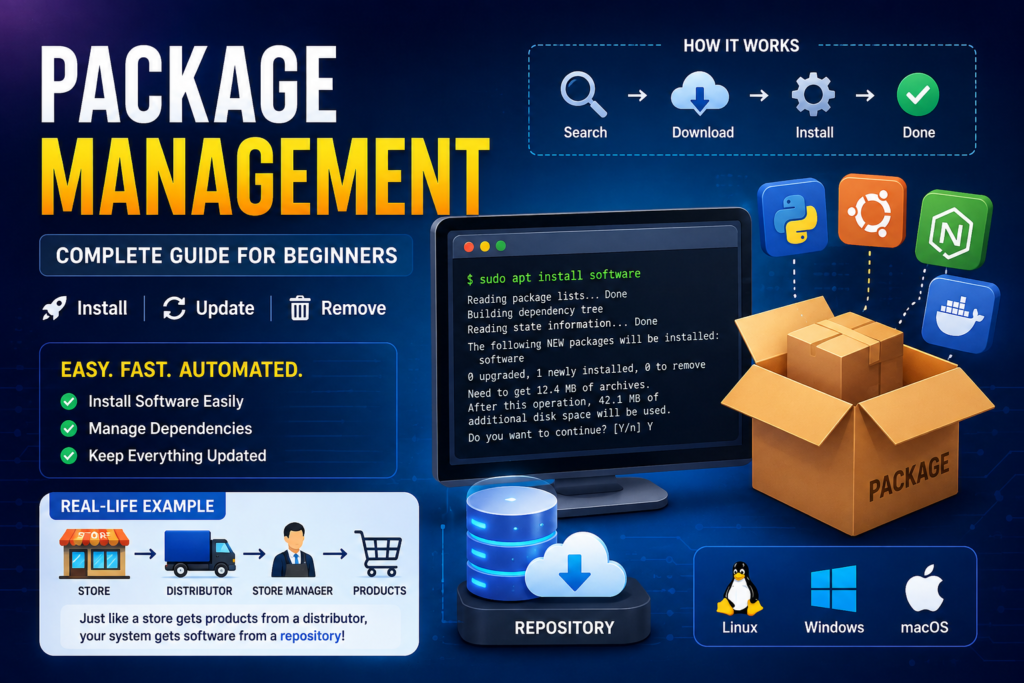
Instead of manually downloading software from websites, you simply type a command, and the package manager downloads, installs, updates, and configures everything automatically.
Example
Suppose that you own a supermarket.
Instead of purchasing every product from different manufacturers separately, you order everything from a trusted distributor.
The distributor:
- Delivers products
- Ensures compatible products
- Replaces expired items
- Updates stock
- Removes discontinued products
A package manager works exactly the same way.
Instead of manually downloading software from hundreds of websites, it gets software from trusted repositories.
| Supermarket | Package Manager |
| Products | Software Packages |
| Distributor | Repository |
| Store Manager | Package Manager |
| Expired Products | Old Software |
| New Stock | Software Updates |
Why Do We Need Package Management?
Without package management, users must:
- Search software online
- Download installers
- Install manually
- Find dependencies
- Update software individually
- Remove software manually
This is slow and can cause compatibility issues.
Package management automates all these tasks.
What Is a Package?
A package is a compressed file containing:
- Application files
- Libraries
- Configuration files
- Installation scripts
- Metadata
- Version information
Example packages:
- Firefox
- VLC Media Player
- Apache
- MySQL
- Python
- Git
What Is a Repository?
A repository is a central storage location where software packages are stored.
Think of it as an online software library.
Examples:
Ubuntu Repository
Fedora Repository
https://download.fedoraproject.org
How Package Management Works
Step 1: User Requests Software
Example:
sudo apt install git
Step 2: Package Manager Searches Repository
It checks:
- Is Git available?
- Latest version?
- Required dependencies?
Step 3: Downloads Packages
Downloads:
- Git
- Required libraries
Step 4: Installs Everything
The package manager:
- Copies files
- Configures settings
- Registers software
Step 5: Ready to Use
Run:
git –version
Package Management Workflow
User
│
▼
Package Manager
│
▼
Repository
│
▼
Downloads Packages
│
▼
Installs Dependencies
│
▼
Configures Software
│
▼
Application Ready
Popular Package Managers
Linux
Ubuntu/Debian
- APT
sudo apt install nginx
Fedora
- DNF
sudo dnf install nginx
Arch Linux
- Pacman
sudo pacman -S nginx
openSUSE
- Zypper
sudo zypper install nginx
Windows
Chocolatey
choco install googlechrome
Winget
winget install Google.Chrome
macOS
Homebrew
brew install python
Common Package Management Tasks
Install Software
sudo apt install vlc
Remove Software
sudo apt remove vlc
Update Package List
sudo apt update
Upgrade Installed Software
sudo apt upgrade
Search Packages
apt search python
Show Package Information
apt show nginx
What Are Dependencies?
Many applications require other software components to function.
These required components are called dependencies.
Example:
VS Code may require:
- libc
- GTK
- OpenSSL
- Node.js libraries
Instead of installing them manually, the package manager installs them automatically.
Dependency Example
Without Package Manager
Install Application
↓
Dependency Missing
↓
Application Doesn’t Work
With Package Manager
Install Application
↓
Package Manager Finds Dependencies
↓
Downloads Everything
↓
Application Works
Types of Packages
Binary Packages
Already compiled.
Example:
Firefox
Google Chrome
VLC
Easy and fast to install.
Source Packages
Contain source code.
Need compilation before installation.
Example:
Linux Kernel
Custom Software
Package Formats
Ubuntu
.deb
Fedora
.rpm
Arch Linux
.pkg.tar.zst
Windows
.msi
.exe
macOS
.pkg
Advantages of Package Management
- Fast software installation
- Automatic dependency handling
- One-command updates
- Improved security
- Easy software removal
- Version control
- Trusted repositories
- Saves time
- Simplifies system administration
Disadvantages
- Internet required for online repositories
- Repository may not contain every application
- Dependency conflicts can occur
- Different Linux distributions use different package managers
Example: Installing Git on Ubuntu
Update repositories:
sudo apt update
Install Git:
sudo apt install git
Verify installation:
git –version
Example output:
git version 2.48.1
Best Practices
- Always update repositories before installing software.
- Install software from official repositories whenever possible.
- Remove unused packages to keep the system clean.
- Keep installed packages updated for security.
- Avoid downloading software from untrusted sources.
Key Takeaways
- Package management automates software installation and maintenance.
- A package contains the application and related files needed for installation.
- Repositories provide trusted software packages.
- Package managers automatically resolve dependencies.
- Popular tools include APT, DNF, Pacman, Winget, Chocolatey, and Homebrew.
- Using a package manager is faster, safer, and more reliable than installing software manually.
Conclusion
Package management is one of the most important features of modern operating systems. It simplifies installing, updating, and removing software while ensuring that dependencies are handled automatically. Whether you’re using Linux, Windows, or macOS, learning your platform’s package manager will make software management more efficient, secure, and reliable.
FAQ
What is package management?
Package management is the process of installing, updating, configuring, and removing software using a package manager.
What is a package manager?
A package manager is software that automates software installation, updates, dependency resolution, and removal.
What is a repository?
A repository is an online collection of software packages maintained by trusted providers.
What are dependencies?
Dependencies are additional libraries or components that an application needs to run correctly.
Which package manager does Ubuntu use?
Ubuntu and Debian use APT (Advanced Package Tool).
Which package manager does Windows provide?
Modern Windows includes Winget, and many users also use Chocolatey.


