
DHCP (Dynamic Host Configuration Protocol) Complete Guide with Easy Examples
What is DHCP?
DHCP (Dynamic Host Configuration Protocol) is a network management protocol. That automatically assigns IP addresses and other network configuration information to these devices which are connected to a network.
Instead of manually configuring every device, a DHCP server performs this task automatically.
For example if you walk into a hotel. Instead of choosing your own room, the receptionist automatically assigns you an available room, gives you the room number, Wi-Fi password, and checkout time. You don’t need to configure anything yourself.
Same as it.
A DHCP stands for (Dynamic Host Configuration Protocol) server works in a very similar way on a network. It automatically assigns IP addresses and other network settings to devices. That’s allowing them to communicate without manual configuration.
If you did not use DHCP, every computer, smartphone, printer, or IoT device would require manual network configuration, making network management difficult and time consuming.
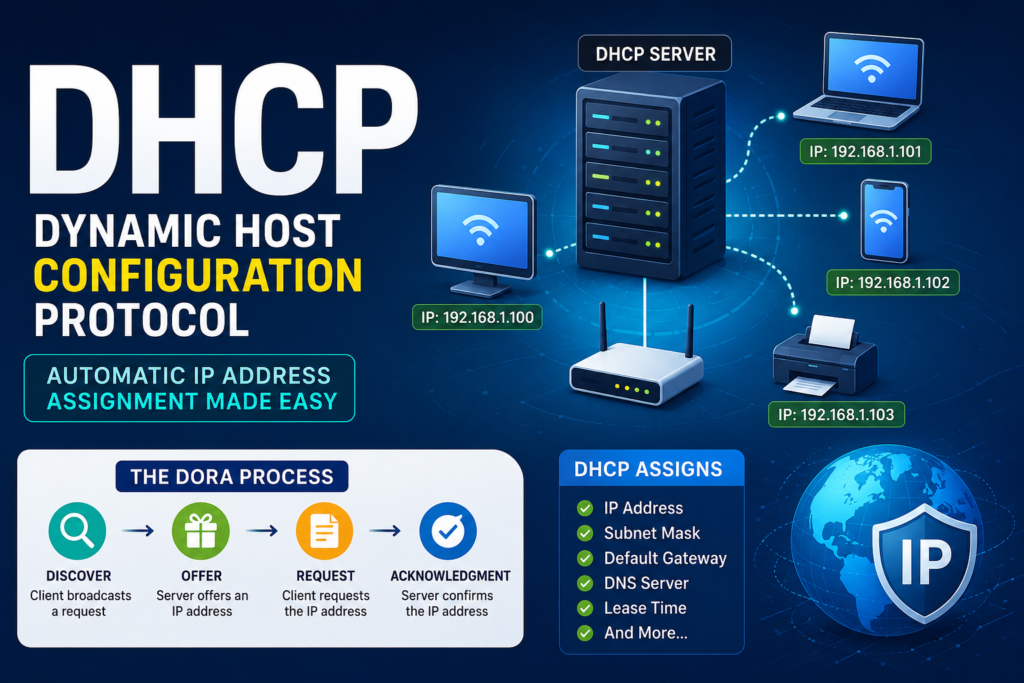
Table of Contents
DHCP provides:
- IP Address
- Subnet Mask
- Default Gateway
- DNS Server
- Lease Time
- Other network configuration options
Why is DHCP Important?
If you consider a company with:
- 500 computers
- 200 laptops
- 100 printers
- 300 mobile phones
If the administrator had to manually assign IP addresses to over 1,000 devices. It would take hours and increase the risk of configuration errors.
DHCP solves this problem by automating the entire process.
Example: Hotel Reception
Think of DHCP as a hotel receptionist.
When a guest arrives:
Guest:
“I’d like a room.”
Receptionist:
“Room 205 is available.”
The receptionist provides:
- Room Number
- Wi-Fi Password
- Checkout Time
- Hotel Rules
Similarly, when a computer connects to a network:
Device:
“I need an IP address.”
DHCP Server:
“Use IP address 192.168.1.25.”
It also provides:
- Subnet Mask
- Gateway
- DNS Server
- Lease Time
Everything is automatic.
How DHCP Works
DHCP follows a four-step process known as DORA.
Step 1: Discover
The device broadcasts a request.
“Is there any DHCP server available?”
Step 2: Offer
The DHCP server responds.
“Yes, I have IP address 192.168.1.20 available.”
Step 3: Request
The device replies.
“I would like to use that IP address.”
Step 4: Acknowledgment (ACK)
The server confirms.
“Done! You can use this IP address.”
The device is now connected to the network.
DHCP DORA Process Diagram
Client
|
| DHCP Discover
v
DHCP Server
|
| DHCP Offer
v
Client
|
| DHCP Request
v
DHCP Server
|
| DHCP ACK
v
Client Gets IP Address
Information Assigned by DHCP
DHCP typically provides:
| Setting | Example |
| IP Address | 192.168.1.25 |
| Subnet Mask | 255.255.255.0 |
| Default Gateway | 192.168.1.1 |
| DNS Server | 8.8.8.8 |
| Lease Time | 24 Hours |
What is a DHCP Lease?
A lease is the amount of time a device is allowed to use an assigned IP address.
Example:
Lease Time = 24 Hours
If the device remains connected, it requests to renew the lease before it expires.
DHCP Components
1. DHCP Server
The server that assigns IP addresses.
Examples:
- Windows Server
- Linux Server
- Home Router
- Cisco Router
2. DHCP Client
Any device requesting an IP address.
Examples:
- Laptop
- Smartphone
- Desktop
- Smart TV
- Printer
- IP Camera
3. DHCP Relay Agent
Used when the DHCP server is on a different network. The relay agent forwards DHCP messages between clients and the server.
DHCP Ports
DHCP uses the UDP protocol.
| Port | Purpose |
| UDP 67 | DHCP Server |
| UDP 68 | DHCP Client |
Types of IP Address Allocation
1. Dynamic Allocation
The server automatically assigns an available IP address.
Best for:
- Home networks
- Offices
- Schools
- Public Wi-Fi
2. Automatic Allocation
The device receives an IP address permanently after the first assignment.
3. Manual Allocation (Reservation)
The administrator reserves a specific IP address for a device based on its MAC address.
Commonly used for:
- Printers
- Servers
- CCTV Cameras
- Network Attached Storage (NAS)
Advantages of DHCP
- Automatic IP address assignment
- Saves time
- Reduces configuration errors
- Prevents IP conflicts
- Simplifies network management
- Easy to scale
- Supports thousands of devices
Disadvantages of DHCP
- Dependency on the DHCP server
- Devices cannot obtain new addresses if the server is unavailable
- Potential security risks if unauthorized DHCP servers are present
- Critical services often require reserved or static IP addresses
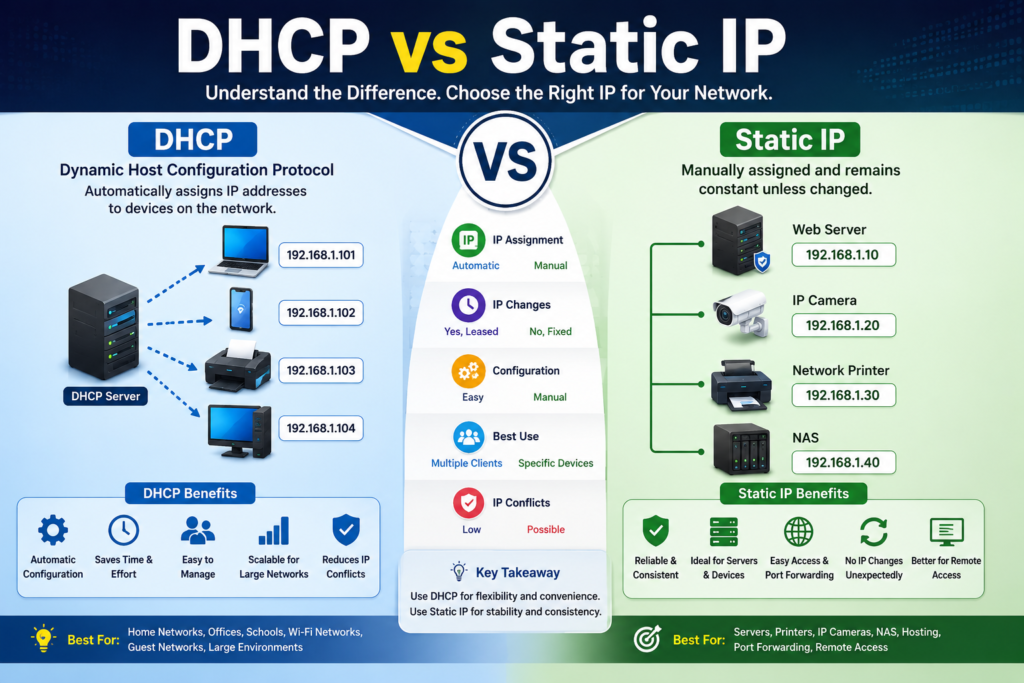
DHCP vs Static IP
| DHCP | Static IP |
| Automatic | Manual |
| Easy to manage | Requires manual configuration |
| Best for users | Best for servers |
| Flexible | Permanent |
| Lower maintenance | Higher maintenance |
Where is DHCP Used?
DHCP is commonly used in:
- Homes
- Offices
- Schools
- Universities
- Hotels
- Airports
- Hospitals
- Banks
- Data Centers
- Public Wi-Fi Networks
Example of DHCP in a Home Network
You connect your smartphone to your home’s Wi-Fi.
- The phone requests network settings.
- Your Wi-Fi router acts as the DHCP server.
- The router assigns:
- IP Address: 192.168.0.15
- Gateway: 192.168.0.1
- DNS Server: 8.8.8.8
- Lease Time: 24 hours
- Your phone can now browse the internet.
No manual configuration is required.
Common DHCP Problems
IP Address Conflict
Occurs when two devices use the same IP address, often due to manual configuration.
Solution: Use DHCP or configure proper reservations.
No Internet Connection
A device may fail to receive an IP address.
Solution: Restart the router, renew the DHCP lease, or verify the DHCP server is running.
APIPA Address
If DHCP fails, Windows may assign an Automatic Private IP Address (APIPA), typically in the 169.254.x.x range.
Best Practices
- Enable DHCP for client devices.
- Reserve IP addresses for servers and printers.
- Monitor the DHCP address pool.
- Use secure network equipment.
- Back up DHCP configurations.
- Remove unauthorized (rogue) DHCP servers.
Key Takeaways
- DHCP automatically assigns IP addresses and network settings.
- It eliminates the need for manual IP configuration.
- DHCP follows the DORA process: Discover, Offer, Request, Acknowledgment.
- It uses UDP ports 67 and 68.
- DHCP is widely used in home, business, and enterprise networks.
- Dynamic allocation simplifies network administration and reduces errors.
Conclusion
DHCP is one of the most essential networking protocols. Because it automates IP address assignment, making networks easier to deploy, manage, and scale. Whether in a home Wi-Fi network, a corporate office, or a university campus. The DHCP ensures that devices receive the correct network configuration quickly and efficiently. That is allowing users to connect with minimal effort.
FAQ
What does DHCP stand for?
Dynamic Host Configuration Protocol.
What is the main purpose of DHCP?
To automatically assign IP addresses and network settings to devices on a network.
What is the DORA process?
The four-step DHCP communication process: Discover, Offer, Request, Acknowledgment.
Which ports does DHCP use?
DHCP uses UDP port 67 (server) and UDP port 68 (client).
Can DHCP assign the same IP address to multiple devices?
Normally no. DHCP tracks leased addresses to avoid conflicts. Properly configured reservations also help prevent duplicate assignments.


