
DNS A Complete Beginner’s Guide with Easy Example
What is DNS?
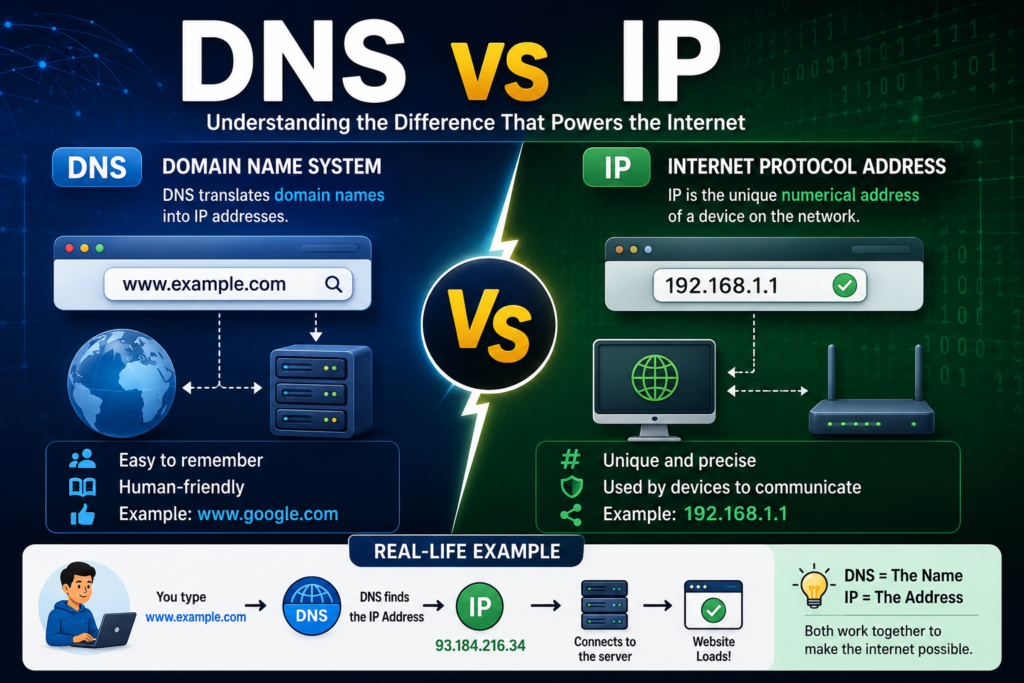
DNS stands for Domain Name System. Which is represented like an address that is used on the internet. It translates human readable domain names (such as google.com).But IP addresses (such as 142.250.190.78) are easy to understand or readable for computers . So, that your device uses IP for location and communication with the correct web server.
Without DNS, users would have to remember long strings of numbers instead of simple website names.
Definition:
DNS (Domain Name System) is a hierarchical and distributed naming system that converts domain names into IP addresses, enabling users to access websites using easy-to-remember names instead of numerical addresses.
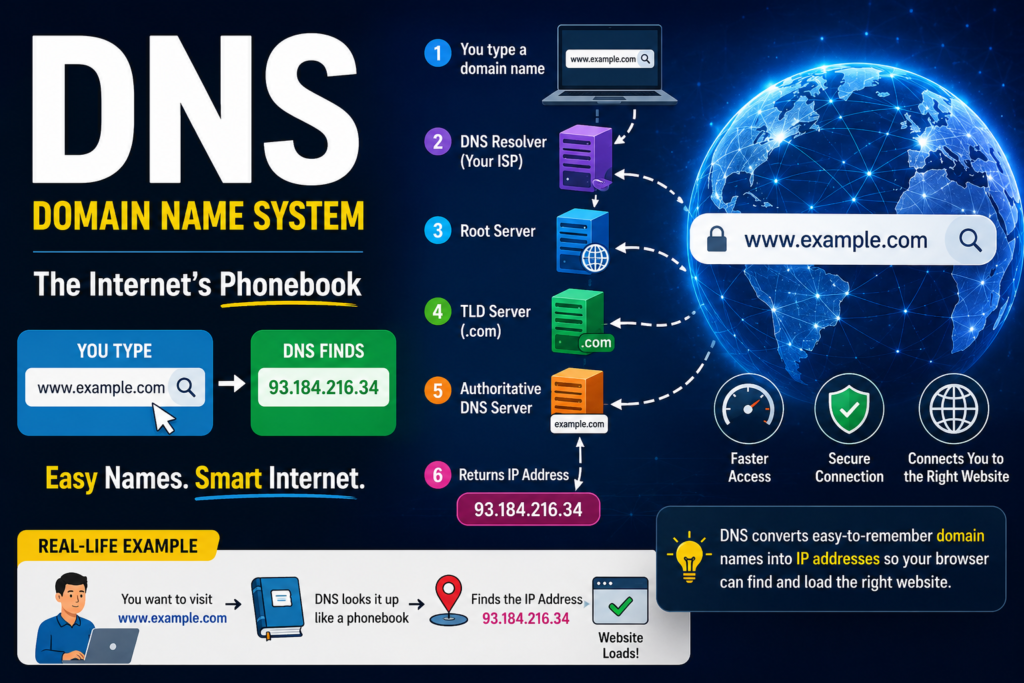
Table of Contents
Why Do We Need DNS?
For Example if you trying to remember the IP address of every website which you visit:
- Google → 142.250.xxx.xxx
- Facebook → 157.240.xxx.xxx
- YouTube → 142.251.xxx.xxx
Remembering hundreds of IP addresses would be almost impossible.
DNS solves this problem by allowing users to type:
www.google.com
instead of
142.250.190.78
Example: DNS as a Phone Contact List
Consider your smartphone.
You don’t remember everyone’s phone number.
Instead, you save:
- Ali
- Ahmed
- Sara
- Office
When you tap “Ali”, your phone automatically finds Ali’s phone number.
DNS works exactly the same way.
| Smartphone | DNS |
| Contact Name | Domain Name |
| Phone Number | IP Address |
| Search Contact | DNS Lookup |
| Call Person | Connect to Website |
Just as your phone finds the correct number, DNS finds the correct IP address.
How DNS Works
Suppose you type:
www.seocodehub.com
The process is:
Step 1
You type the website into your browser.
↓
Step 2
Your computer checks its DNS cache.
If found:
Connect immediately.
If not:
Continue.
↓
Step 3
The request goes to the DNS Resolver.
↓
Step 4
Resolver asks the Root DNS Server.
↓
Step 5
Root server points to the TLD Server (.com).
↓
Step 6
TLD server points to the Authoritative DNS Server.
↓
Step 7
Authoritative server returns the website’s IP address.
↓
Step 8
Your browser connects to that IP address and loads the website.
DNS Lookup Diagram
User
│
▼
Browser
│
▼
DNS Resolver
│
▼
Root Server
│
▼
TLD Server (.com)
│
▼
Authoritative DNS Server
│
▼
IP Address Returned
│
▼
Website Opens
Components of DNS
1. Domain Name
The human-readable website address.
Example:
google.com
facebook.com
seocodehub.com
2. IP Address
The numerical address of a server.
Example:
192.168.1.1
8.8.8.8
142.250.190.78
3. DNS Resolver
Receives your DNS request and searches for the correct IP address.
Usually provided by:
- ISP
- Google DNS
- Cloudflare DNS
4. Root Name Server
The highest level of DNS hierarchy.
It tells the resolver where to find the correct TLD server.
5. TLD Server
TLD means Top-Level Domain.
Examples:
.com
.org
.net
.edu
.gov
.pk
The TLD server directs the request to the authoritative name server.
6. Authoritative DNS Server
Stores the official DNS records for the domain.
Returns the final IP address.
Types of DNS Servers
Recursive Resolver
Searches for the requested IP address on behalf of the user.
Example:
Google DNS
8.8.8.8
Root Name Server
The first stop in the DNS hierarchy.
TLD Name Server
Handles extensions like:
- .com
- .net
- .org
Authoritative Name Server
Contains the official DNS records.
Common DNS Record Types
A Record
Maps a domain to an IPv4 address.
Example:
example.com
↓
192.168.1.10
AAAA Record
Maps a domain to an IPv6 address.
CNAME Record
Creates an alias.
Example:
www.example.com
↓
example.com
MX Record
Used for email servers.
Example:
mail.google.com
TXT Record
Stores text information.
Common uses:
- Domain verification
- SPF
- DKIM
- DMARC
NS Record
Specifies the authoritative name servers.
PTR Record
Performs reverse DNS lookup.
Converts:
IP Address
↓
Domain Name
DNS Caching
DNS stores recently used IP addresses temporarily.
Benefits:
- Faster browsing
- Reduced network traffic
- Lower server load
Example:
First visit:
www.google.com
↓
DNS lookup required
Second visit:
www.google.com
↓
Loaded instantly from cache
Public DNS Providers
| Provider | DNS Address |
| Google DNS | 8.8.8.8 |
| Google Secondary | 8.8.4.4 |
| Cloudflare | 1.1.1.1 |
| Cloudflare Secondary | 1.0.0.1 |
| OpenDNS | 208.67.222.222 |
| Quad9 | 9.9.9.9 |
Advantages of DNS
- Easy-to-remember website names
- Fast website access
- Scalable for billions of websites
- Reduces human error
- Supports email routing
- Enables load balancing and redundancy
- Improves browsing performance through caching
Disadvantages of DNS
- DNS server failures can interrupt website access
- DNS cache poisoning attacks can redirect users
- Misconfigured DNS records can make websites unreachable
- DNS propagation may take time after changes
DNS Security
To improve security:
- Use DNSSEC (Domain Name System Security Extensions) to verify DNS responses.
- Choose trusted public DNS providers.
- Keep DNS records updated.
- Monitor for suspicious DNS activity.
- Protect authoritative DNS servers from unauthorized access.
Practical Example
A student wants to access an online learning website.
The student types:
www.seocodehub.com
The browser does not know where the website is hosted.
DNS searches for the correct IP address.
It finds:
203.0.113.25
The browser connects to that server.
Within seconds, the website loads and the student can start learning.
Without DNS, the student would have to remember the server’s IP address every time they visited the site.
Conclusion
- DNS stands for Domain Name System.
- It translates domain names into IP addresses.
- DNS works like the internet’s phonebook.
- The DNS lookup process involves the resolver, root server, TLD server, and authoritative server.
- DNS records such as A, AAAA, CNAME, MX, NS, TXT, and PTR each have specific roles.
- DNS caching speeds up repeated website visits.
- DNSSEC and trusted DNS providers improve security and reliability.
FAQ
1. What does DNS stand for?
DNS stands for Domain Name System.
2. Why is DNS important?
DNS allows users to access websites using easy-to-remember domain names instead of numerical IP addresses.
3. What is a DNS resolver?
A DNS resolver receives your query and finds the corresponding IP address by communicating with other DNS servers.
4. What is the difference between a domain name and an IP address?
A domain name is a human-friendly website address (e.g., example.com), while an IP address is the numerical address computers use to locate servers.
5. What is DNS caching?
DNS caching stores recently resolved IP addresses so future requests for the same domain can be answered more quickly.


