
What Is a Virtual Machine?
A Virtual Machine (VM) is a software based computer. That runs inside a physical computer. It behaves like a real computer with its own operating system (OS), CPU, memory, storage, and applications. Even though it shares the physical hardware with other virtual machines.
Think of a VM as a computer inside another computer.
Virtual machines are widely used in software development, cloud computing, cybersecurity, testing, education, and enterprise IT. Because they allow multiple operating systems to run on a single physical computer.
Example
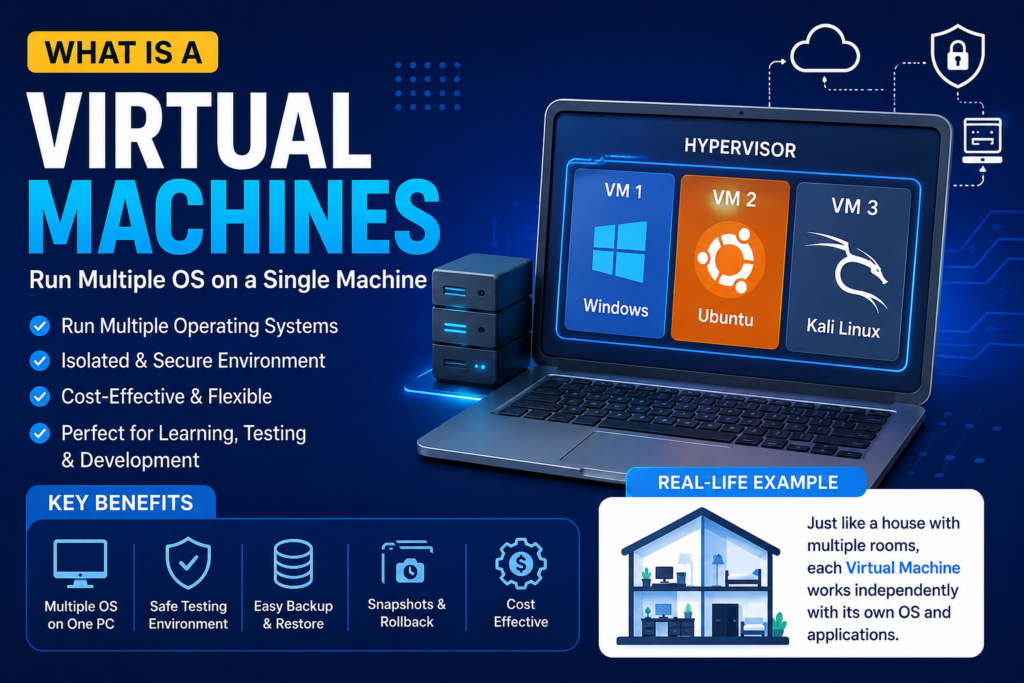
Imagine you own a large house with several rooms.
- The house represents the physical computer.
- Each room represents a virtual machine.
- Every room has its own furniture, electricity, and purpose.
- People in one room don’t interfere with people in another room.
Similarly:
- One VM can run Windows
- Another VM can run Ubuntu Linux
- A third VM can run Kali Linux
All three run independently on the same physical computer.
How Does a Virtual Machine Work?
A virtual machine works with the help of software called a Hypervisor.
The hypervisor creates virtual hardware and manages the physical resources.
That resources are:
- CPU
- RAM
- Storage
- Network
among multiple virtual machines.
Physical Computer
│
├── Hypervisor
│
├── Virtual Machine 1 (Windows)
├── Virtual Machine 2 (Ubuntu)
└── Virtual Machine 3 (Kali Linux)
Each VM believes it has its own dedicated computer.
What Is a Hypervisor?
A Hypervisor is software that creates and manages virtual machines.
It allows multiple operating systems to run on one physical computer safely and efficiently.
Types of Hypervisors
Type 1 Hypervisor (Bare Metal)
That runs directly on the physical hardware.
Examples:
- VMware ESXi
- Microsoft Hyper-V Server
- Xen
- Proxmox VE
Advantages
- High performance
- Better security
- Enterprise-grade
- Used in data centers
Type 2 Hypervisor (Hosted)
Runs on top of an existing operating system.
Examples:
- Oracle VirtualBox
- VMware Workstation
- VMware Fusion
- Parallels Desktop
Advantages
- Easy to install
- Ideal for beginners
- Perfect for testing
- Great for learning
Types of Virtual Machines
1. System Virtual Machine
Provides a complete operating system.
Example:
Installing Ubuntu inside Windows using VirtualBox.
2. Process Virtual Machine
Runs a single application.
Example:
Java Virtual Machine (JVM)
The JVM allows Java programs to run on Windows, Linux, and macOS without modification.
Components of a Virtual Machine
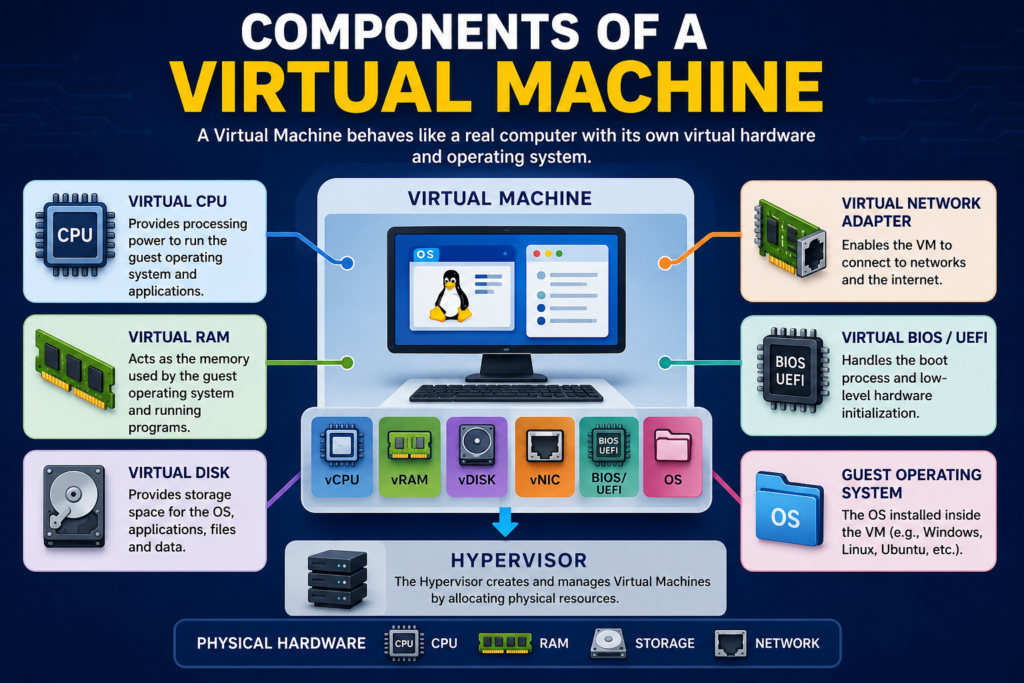
A virtual machine includes:
- Virtual CPU (vCPU)
- Virtual RAM
- Virtual Hard Disk
- Virtual Network Adapter
- Virtual BIOS/UEFI
- Guest Operating System
These components simulate the hardware of a physical computer.
Popular Virtual Machine Software
Oracle VirtualBox
- Free
- Open-source
- Windows
- Linux
- macOS
Best for students and beginners.
VMware Workstation
- Professional features
- Excellent performance
- Snapshot support
- Commercial use
Microsoft Hyper-V
Built into Windows Pro and Enterprise editions.
Ideal for Windows users.
Parallels Desktop
Designed specifically for macOS.
Allows Windows to run smoothly on Mac computers.
Advantages of Virtual Machines
Run Multiple Operating Systems
You can use Windows, Ubuntu, Kali Linux, and Fedora simultaneously.
Safe Testing Environment
If malware infects the VM, your main operating system remains protected.
Cost Effective
One physical computer can host multiple virtual computers, reducing hardware costs.
Easy Backup
VMs can be copied like regular files.
If something goes wrong, simply restore a previous backup.
Snapshots
A snapshot saves the current state of a VM.
You can revert to it anytime after experimenting with software or system changes.
Better Resource Utilization
Instead of leaving hardware idle, organizations maximize CPU, RAM, and storage by running multiple VMs.
Disadvantages of Virtual Machines
- Slower than physical computers
- Requires sufficient RAM and CPU
- Consumes disk space
- Graphics performance may be limited
- Performance decreases if too many VMs run simultaneously
Common Uses of Virtual Machines
Software Development
Developers test applications on different operating systems.
Cybersecurity
Ethical hackers safely test malware and security tools inside isolated VMs.
Cloud Computing
Cloud providers such as:
- Amazon AWS
- Microsoft Azure
- Google Cloud
deliver virtual machines as cloud services.
Education
Students practice Linux, networking, and server administration without buying extra computers.
Server Consolidation
Businesses replace multiple physical servers with virtual servers running on one powerful machine.
Virtual Machine vs Physical Machine
| Feature | Virtual Machine | Physical Machine |
| Hardware | Virtual | Physical |
| Speed | Slightly slower | Faster |
| Cost | Lower | Higher |
| Flexibility | High | Limited |
| Portability | Easy to move | Difficult |
| Isolation | Excellent | Not applicable |
| Multiple OS | Yes | Usually one |
Virtual Machine vs Container
| Virtual Machine | Container |
| Includes full operating system | Shares host OS |
| Larger in size | Lightweight |
| More secure isolation | Faster startup |
| Uses more RAM | Uses less RAM |
| Best for multiple operating systems | Best for application deployment |
Popular container platform:
- Docker
Practical Example
Suppose you’re learning Linux but your laptop has Windows 11 installed.
Instead of removing Windows, you install Oracle VirtualBox.
Inside VirtualBox, you create a virtual machine and install Ubuntu Linux.
Now:
- Windows continues running normally.
- Ubuntu runs in a separate window.
- You can learn Linux commands without affecting your Windows installation.
- If you make a mistake, you can restore a snapshot and start again.
This makes virtual machines an excellent learning tool.
Best Practices
- Allocate RAM carefully.
- Keep the hypervisor updated.
- Use snapshots before major changes.
- Avoid running unnecessary VMs.
- Install antivirus software if using Windows guests.
- Back up important VM files regularly.
Conclusion
Virtual Machines have transformed how we use computers by allowing multiple operating systems to run on a single physical machine. They provide a safe, flexible, and cost-effective environment for development, testing, cybersecurity, education, and cloud computing.
Whether you’re a beginner exploring Linux or an organization managing hundreds of servers, virtual machines offer a practical solution for maximizing hardware resources while maintaining isolation and flexibility. Understanding VMs is a fundamental skill in modern IT, cloud computing, and cyber security.
FAQ
What is a Virtual Machine in simple words?
A Virtual Machine is a software-based computer that runs inside another computer and behaves like a real physical computer.
Can one computer run multiple virtual machines?
Yes. A single physical computer can run several virtual machines simultaneously, depending on its hardware resources.
Is Virtual Box free?
Yes. Oracle Virtual Box is free and open-source for personal and educational use.
Are Virtual Machines safe?
Yes. Virtual machines provide isolated environments, making them ideal for testing software and learning without affecting the host operating system.
What is the difference between a VM and a container?
A VM includes a complete operating system, while a container shares the host operating system, making containers lighter and faster.

