
Malware Packing, Obfuscation, and Evasion
Introduction
Malware authors use different techniques to hide malicious code and make their programs difficult to understand. Some malware files are compressed or packed, while others change the appearance of their code to hide their real purpose. Some malicious programs can also detect when a security researcher is examining them and change their behavior to avoid detection.
These techniques are known as malware packing, code obfuscation, and evasion. They are commonly studied in cybersecurity because understanding them helps security analysts investigate suspicious files, recognize hidden threats, and improve malware detection.
For example, imagine that a suspicious program appears to be a normal document viewer. When a security analyst examines the file, its code looks unreadable. When the program runs, it reveals another part of its code and starts performing suspicious activities. This behavior may indicate that the program uses packing or obfuscation to hide its real functionality.
In this lecture, we will learn how malware packing, obfuscation, and evasion work, along with simple examples and practical methods for identifying suspicious behavior.
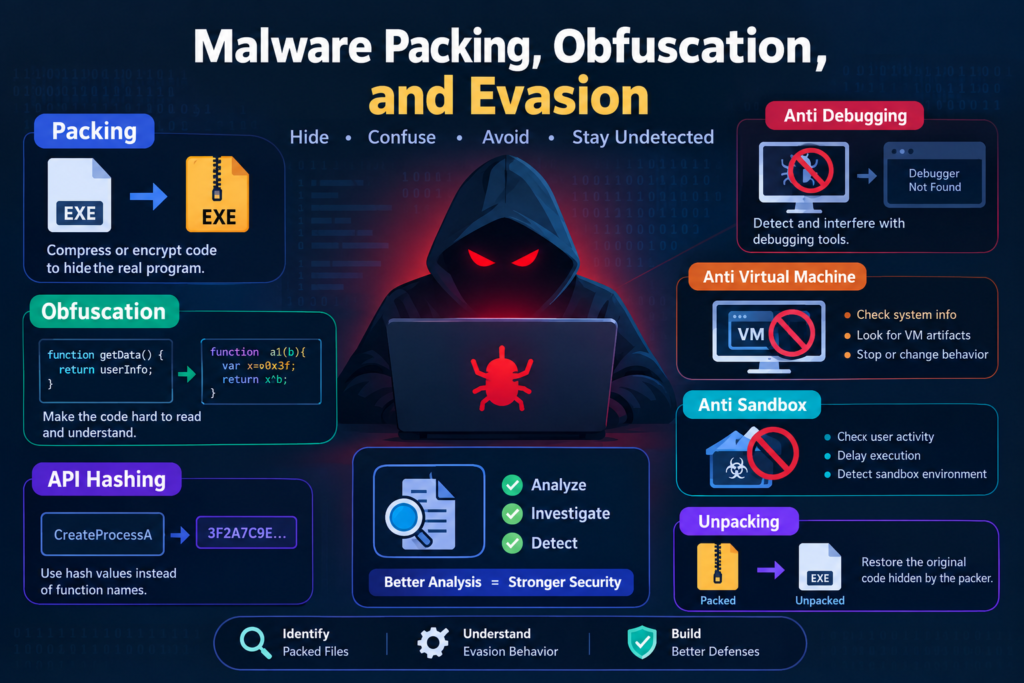
Table of Contents
What Is Malware Packing
Malware packing is a technique used to compress, encrypt, or transform an executable program so that its original code is difficult to inspect directly.
A packed program usually contains a small section of code called a loader or unpacking routine. When the program runs, this routine prepares the hidden code so that the program can continue executing.
Packing is not always malicious. Legitimate software developers also use executable packers to reduce file size or protect their applications. However, malware authors frequently use packing to make security analysis more difficult.
How Malware Packing Works
A normal executable contains instructions that a computer can load and execute. When a program is packed, its original code is transformed into a different representation.
When the packed program starts, the unpacking routine restores the necessary code in memory. The program can then continue running.
For example, suppose a program originally contains instructions for collecting information from a computer and sending it to another system. A packer transforms those instructions into a compressed or encrypted form. A simple file inspection tool may not immediately reveal the original instructions.
A security analyst must investigate how the program starts, what happens during execution, and whether the hidden code performs suspicious activities.
Example
Imagine that a security team receives an unknown executable through an email attachment. A basic antivirus scan does not identify it as malicious, and its strings do not reveal any obvious suspicious commands.
The analyst discovers that the executable contains a small loader and a large section of packed data. During controlled analysis, the program creates executable memory and transfers execution to the newly prepared code.
These observations suggest that the file may be packed. They do not prove that it is malicious, so the analyst continues examining its behavior and other evidence.
Common Executable Packers
Executable packers are tools that transform executable files into a different representation. Some are designed for legitimate software distribution, while others are frequently encountered during malware investigations.
UPX
UPX is a well known executable packer that compresses executable files. It is commonly used with programs that need a smaller distribution size.
Malware authors may also use UPX to make malicious executables less straightforward to inspect.
For example, an analyst may examine a suspicious executable and notice that many of its original strings are missing. File inspection may reveal indicators associated with UPX. The analyst can then investigate whether the file uses ordinary UPX packing or has been modified to interfere with analysis.
The presence of UPX alone is not evidence of malware because legitimate applications can also use it.
Themida
Themida is a commercial software protection tool that can protect applications against reverse engineering and unauthorized modification.
It uses protection techniques that can make executable analysis more difficult. Some protected applications may contain unusual code structures or behavior that differs from ordinary executables.
For example, an analyst investigating a protected application may find that a debugger cannot easily follow its execution. The analyst must determine whether this behavior comes from legitimate software protection or from suspicious activity.
VMProtect
VMProtect is another software protection product. It can transform selected program instructions into a form that runs through a virtual machine implemented by the protection system.
This can make the original program logic more difficult to understand during reverse engineering.
For example, a program protected by VMProtect may not show its original instruction sequence in a straightforward way. An analyst may need to study its execution behavior and identify the protected sections before drawing conclusions.
Why Analysts Study Packers
Understanding executable packers helps analysts identify files that may require additional investigation.
However, packer detection is only one part of malware analysis. A packed executable may be legitimate, and malware can also use custom packing methods that do not match familiar signatures.
Analysts should combine file inspection, behavioral monitoring, and other evidence before deciding whether a file is malicious.
Code Obfuscation Techniques
Code obfuscation changes the appearance or structure of a program to make its logic harder to understand while attempting to preserve its intended behavior.
Legitimate developers sometimes use obfuscation to protect intellectual property. Malware authors use it to make suspicious functionality harder to identify.
Renaming Variables and Functions
One simple obfuscation technique is replacing meaningful names with confusing or meaningless names.
For example, a readable function name such as CollectSystemInformation might be changed to a short name such as a1.
This makes it harder for an analyst to understand the program by reading its code alone.
Inserting Unnecessary Instructions
Some programs contain extra instructions that do not contribute meaningfully to their main purpose.
These instructions can make the code longer and more confusing, increasing the time required to understand it.
For example, a suspicious program may perform several unnecessary calculations before reaching the instructions that handle its main activity. An analyst must determine which instructions matter and which are simply distractions.
Changing Program Structure
Obfuscation can also change the order or organization of instructions.
A program that originally follows a clear sequence may be transformed into a more complicated structure with many branches and conditions.
For example, a program might check several conditions before calling a function that accesses a file. The additional conditions may make it harder to identify the function’s real purpose.
Example
Suppose an analyst examines a script that contains short variable names, confusing conditions, and many unnecessary calculations. The script does not clearly explain what it does.
Instead of trusting the variable names or appearance, the analyst studies the operations performed by the script and monitors its behavior in a safe environment.
The goal is to understand what the program actually does rather than how readable its source code appears.
String Encryption and Encoding
Programs often contain strings such as file paths, website addresses, error messages, and command names. These strings can help analysts understand the purpose of an executable.
Malware authors may hide these strings by encoding or encrypting them.
String Encoding
Encoding changes the representation of information according to a defined format. It does not necessarily provide security or secrecy.
Base64 is a common example of an encoding method. It can make text look unreadable to someone who does not recognize the format, but the encoded information can usually be restored easily.
For example, a program may store a website address in Base64 form rather than displaying the address directly in its file contents.
An analyst who recognizes the encoding can decode the string and investigate whether the address is associated with suspicious activity.
String Encryption
Encryption uses a cryptographic process and a key to protect information from being read without the necessary decryption process.
A program may encrypt a website address, command, or other important string and restore it when needed.
For example, a malicious program may hide the address of a command and control server. When the program runs, it decrypts the address and attempts to communicate with the server.
The hidden address may not be visible during basic file inspection, so the analyst may need to examine the program’s execution and memory.
How Analysts Identify Hidden Strings
Analysts can inspect printable strings, examine suspicious encoded data, and observe which strings appear in memory during execution.
They can also monitor network activity to identify addresses that the program contacts.
A hidden string does not automatically indicate malicious activity. Legitimate applications may also encode or encrypt configuration information.
The analyst must connect the findings with the program’s purpose and behavior.
API Hashing
API hashing is a technique in which a program identifies a system function using a calculated hash value instead of storing the function name directly.
In Windows, applications commonly use application programming interfaces to interact with the operating system. These functions may support activities such as creating files, managing processes, allocating memory, or communicating over a network.
Malware authors may use API hashing to make important function names less visible during static analysis.
How API Hashing Works
In a typical program, an imported function may have a recognizable name that gives an analyst an idea of what the program does.
With API hashing, the program calculates or stores a hash value associated with a function name. At runtime, it searches for the corresponding function using that value.
This can make the program’s import information less informative.
Example
Imagine that an analyst examines an executable and finds very few recognizable Windows API names in its import table.
During further analysis, the analyst observes that the program creates a process and accesses system memory. These activities suggest that the executable may resolve some functions dynamically rather than relying on clearly listed imports.
The analyst investigates the relevant instructions and runtime behavior to understand which system functions are being used.
API hashing is one possible explanation, but dynamic function resolution can also occur in legitimate software.
Why API Hashing Matters
API hashing can make it harder to identify suspicious behavior through static inspection alone.
Analysts can investigate function resolution routines, examine execution in a debugger, and observe operating system activity. This helps them determine which functions the program uses even when their names are hidden.
Control Flow Obfuscation
Control flow describes the order in which a program executes instructions and moves between functions or sections of code.
Control flow obfuscation makes this order more difficult to understand.
Instead of presenting a straightforward sequence of instructions, the program may contain unnecessary branches, confusing conditions, or complicated jumps between different sections.
Complicated Branching
A program normally uses conditions to decide which instructions should run.
Obfuscated code may contain many additional conditions that make the execution path harder to follow.
For example, a function may check several unrelated values before continuing to its main operation. Some of these checks may not meaningfully affect the final result.
An analyst must determine which conditions control important behavior and which are intended to create confusion.
Control Flow Flattening
Control flow flattening transforms a program’s original structure into a different arrangement, often using a central dispatcher to decide which block executes next.
This can make the original sequence of operations difficult to recognize.
For example, a function that originally performs three clear steps may be transformed into several smaller blocks selected through a central control structure.
The program may still perform the same task, but its internal organization becomes harder to follow.
Example
Suppose an analyst opens a suspicious program in a disassembler. Instead of seeing a clear sequence of operations, the analyst finds many jumps and conditions.
By examining how the instructions connect and checking which branches are reached during execution, the analyst gradually reconstructs the program’s logic.
Understanding control flow helps reveal hidden functionality that might not be obvious from individual instructions.
Anti Debugging Techniques
A debugger allows an analyst to pause a program, inspect its memory, examine instructions, and understand how it behaves.
Anti debugging techniques attempt to detect or interfere with debugging tools.
Malware authors may use these techniques to make investigation more difficult.
Detecting a Debugger
A program may check whether it is running under a debugger or whether certain debugging-related conditions are present.
If the program detects a debugger, it may stop, delay execution, or change its behavior.
For example, a suspicious executable may appear to do nothing when an analyst opens it in a debugger. When the same file runs outside the debugger, it may perform additional activities.
This difference can indicate that the program responds to its analysis environment.
Timing Checks
Some programs measure how long certain operations take. Debugging can slow execution, which may affect these measurements.
A program may interpret an unusual delay as evidence that someone is inspecting it.
For example, an executable may wait or terminate if a particular operation takes longer than expected while being examined.
Timing differences alone are not proof of anti debugging because normal system performance can also vary.
Changing Behavior Under a Debugger
Some malware may avoid its main activity when it detects debugging.
This can make the file appear harmless during an investigation.
An analyst can compare the program’s behavior under different controlled conditions and look for consistent differences.
How Analysts Investigate Anti Debugging
Analysts examine the program’s checks, observe when execution changes, and compare the results with normal execution.
They should also consider legitimate software protections and environmental differences before deciding that a program is malicious.
Anti Virtual Machine Techniques
Virtual machines allow security researchers to run suspicious software in a controlled environment without using their everyday operating system.
They are widely used in malware analysis because they make it easier to isolate samples, restore clean states, and monitor activity.
However, some malware attempts to identify whether it is running inside a virtual machine.
Detecting Virtual Machine Indicators
A program may inspect hardware information, device names, system configuration, or other environmental details that suggest virtualization.
If the program identifies a virtual machine, it may stop running or avoid performing its main activities.
For example, an analyst runs a suspicious file inside a virtual Windows system. The file starts but does not display any obvious activity. The analyst later discovers that it behaves differently on a separate authorized test system.
This difference may suggest environment detection, although other factors must also be investigated.
Checking System Resources
Some malware checks the amount of available memory, the number of processors, or other system characteristics.
A virtual machine with limited resources may look different from a typical desktop computer.
For example, a suspicious program may refuse to continue when it detects an unusually small amount of memory. This could be an attempt to avoid automated analysis, but resource checks can also be used by legitimate software.
Why Anti Virtual Machine Techniques Matter
Anti virtual machine behavior can prevent analysts from observing a program’s full functionality.
Analysts should document environmental checks, compare behavior under controlled conditions, and avoid treating a single virtualization indicator as proof of malware.
A virtual machine remains a valuable analysis tool even when a sample attempts to detect it.
Anti Sandbox Techniques
A sandbox is an environment designed to run suspicious files while monitoring their behavior.
Security products and research teams use sandboxes to observe file changes, process creation, network activity, and other operations.
Anti sandbox techniques attempt to recognize these environments and hide the program’s actual behavior.
Checking User Activity
Some malware checks whether the system appears to be used by a real person.
It may look for normal interaction, commonly used applications, or signs of an established user environment.
For example, a suspicious program may remain inactive until it detects certain user activity. In an automated sandbox, the required activity might never occur.
As a result, the sandbox may record little or no suspicious behavior.
Delaying Execution
Some malware waits before performing its main activities.
A sandbox may analyze a file for only a limited period. If the program waits longer than the observation window, the sandbox might not capture its actual behavior.
For example, a suspicious executable may start, remain idle, and then attempt to access files or communicate over a network after a delay.
Analysts should consider delayed execution when a program appears inactive despite other suspicious indicators.
Checking the Environment
Malware may inspect system configuration, installed applications, or other environmental details to identify automated analysis systems.
If it detects an environment it considers suspicious, it may terminate or perform harmless activities instead.
Example
A security team receives an executable that produces no visible suspicious activity in an automated sandbox.
The team notices that the file contains unusual environmental checks and that its execution stops shortly after startup.
The analysts investigate the checks and collect additional behavioral evidence using an appropriately isolated analysis environment.
The absence of suspicious activity in a sandbox does not prove that the file is safe. It may simply mean that the program’s behavior was not triggered or observed.
Unpacking Fundamentals
Unpacking is the process of recovering or examining the original program code hidden by a packer.
When a packed executable runs, its loader may restore the original code in memory. Analysts can investigate this process to understand the program’s actual instructions and behavior.
Unpacking can make static analysis more useful because the analyst may be able to inspect code that was previously compressed or transformed.
Static and Dynamic Unpacking
Static unpacking examines the packed file without executing it. This may be possible when the packer is known and the transformation can be reversed using appropriate tools.
Dynamic unpacking observes the program while it runs in a controlled environment. The analyst monitors the unpacking process and examines the resulting code in memory.
Not every packed file can be unpacked easily, and some samples use multiple layers of packing or custom protection.
Understanding the Unpacking Process
An analyst may look for a small initial loader, changes in memory permissions, newly written executable memory, and a transfer of execution to a different memory region.
These events can provide clues that the program is preparing hidden code.
For example, an executable initially contains very few readable strings. During controlled execution, additional code becomes available in memory and begins performing file operations.
The analyst investigates the newly available instructions and connects them with the observed behavior.
Why Unpacking Is Important
Unpacking can reveal information that is difficult to obtain from the original file alone.
However, unpacking does not automatically explain the entire program. Analysts must still examine its functions, identify suspicious operations, and document their findings.
All dynamic unpacking should take place in a properly isolated environment with appropriate safety controls.
Identifying Packed Executables
Identifying a packed executable is an important skill in malware analysis.
Analysts use several indicators to determine whether a program may be packed. No single indicator is reliable enough to prove packing in every case.
Unusual Section Names
Windows executable files commonly contain sections that hold code and data.
Some packers introduce unusual section names or change the names of existing sections. These differences may indicate that a file has been packed or protected.
However, legitimate software can also use unusual section names.
High Entropy
Entropy measures how unpredictable the data in a file appears.
Compressed or encrypted data often has high entropy because it contains fewer obvious patterns. A packed executable may therefore contain sections with high entropy.
For example, an analyst examines a suspicious executable and finds that one large section contains very few readable strings and has high entropy. These findings suggest that the section may contain compressed or encrypted data.
High entropy alone does not prove that a file is packed or malicious. Compressed resources and other legitimate data can also have high entropy.
Unusual Import Tables
The import table can show which external functions an executable uses.
A packed file may have a small import table because the hidden program code has not yet been restored. The initial loader may require only a limited number of functions.
For example, a suspicious executable contains very few recognizable Windows API imports even though its observed behavior involves several operating system operations.
The analyst investigates whether the program resolves additional functions dynamically or restores more code during execution.
Limited Readable Strings
Packed executables may contain fewer readable strings than expected.
An analyst might not find clear file paths, error messages, or network addresses in the initial file.
This can be a useful clue, especially when combined with unusual sections, high entropy, or suspicious runtime behavior.
Using Analysis Tools
Tools such as Detect It Easy and PEStudio can help analysts inspect executable structure and identify possible packers.
File hashing tools can record the sample’s identity, while debuggers and system monitoring utilities can help investigate its runtime behavior.
Tool results should be treated as evidence to investigate rather than as automatic proof that a file is malicious.
Detecting Evasion Behavior
Evasion behavior refers to actions that help a program avoid detection, analysis, or security monitoring.
Malware may use several evasion techniques together. For example, a program may pack its code, check for a debugger, inspect its environment, and delay execution.
Detecting these behaviors requires analysts to examine both the executable’s structure and its activity during execution.
Comparing Static and Dynamic Findings
Static analysis examines a file without running it. Dynamic analysis observes what happens when the program executes.
When the two approaches produce unexpected differences, the analyst should investigate the reason.
For example, static inspection reveals a suspicious executable with almost no readable strings. During controlled execution, the program accesses files and attempts network communication.
The difference suggests that some important information or functionality was not visible during the initial inspection.
Monitoring Unexpected Memory Activity
A program may allocate memory, change memory permissions, or transfer execution to newly prepared code.
These actions can occur in legitimate applications, but they can also be associated with unpacking or other suspicious techniques.
Analysts should examine which process performs the activity, which memory regions are involved, and what happens afterward.
Investigating Delayed or Conditional Behavior
A suspicious program may remain inactive until certain conditions are met.
Analysts can monitor execution over an appropriate observation period and document the conditions associated with changes in behavior.
They should also investigate whether the program behaves differently when debugging tools or virtualization are present.
Correlating Multiple Indicators
Reliable malware analysis depends on combining evidence rather than relying on one suspicious feature.
For example, an executable may have high entropy, a small import table, unusual memory activity, and different behavior under a debugger.
Together, these findings may justify a more detailed investigation. However, the analyst should still determine whether the behavior has a legitimate explanation.
Example
A security analyst receives an executable from a suspicious email attachment.
The initial inspection reveals an unusual file structure and very few readable strings. The analyst then examines the file in an isolated virtual machine and observes that it creates a new process and attempts an unexpected network connection.
Further investigation reveals that its behavior changes when analysis tools are present.
By connecting the file structure, process activity, network observations, and environment checks, the analyst develops a clearer understanding of the executable’s behavior and can provide evidence for a security decision.
Conclusion
Malware packing, obfuscation, and evasion are important concepts in cybersecurity because they explain why suspicious programs can be difficult to inspect and understand.
Packing transforms executable code into a form that may be harder to analyze. Obfuscation changes the appearance or structure of code, while techniques such as API hashing and control flow obfuscation can hide important program logic. Anti debugging, anti virtual machine, and anti sandbox techniques attempt to interfere with security investigation.
Security analysts use executable inspection, string analysis, memory monitoring, debugging, and controlled behavioral analysis to investigate these techniques.
The most important lesson is that no single indicator proves that a program is malicious. A reliable conclusion comes from combining multiple pieces of evidence, understanding the program’s behavior, and documenting the findings carefully.


