
Subnetting Complete Guide with Easy Example
What Is Subnetting?
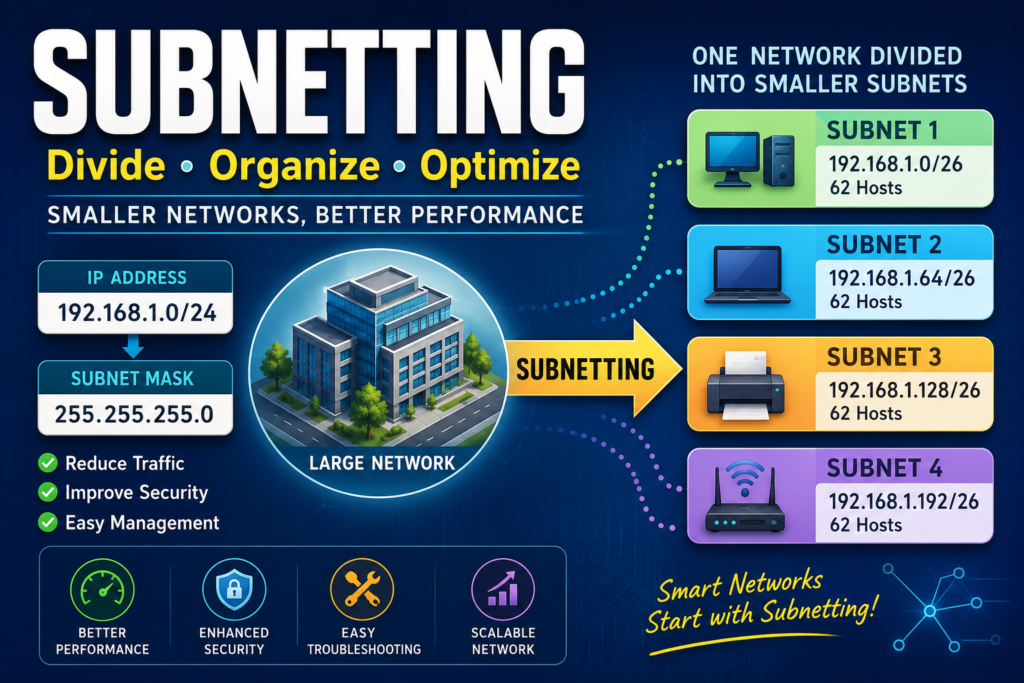
Subnetting is the process of dividing a large IP network into a smaller network. So, that is more manageable networks called subnets (sub-networks).
Instead of placing every device on one large network, sub-netting organizes devices into separate groups. For making the network faster, more secure, and easier to manage.
Think of sub-netting as dividing one big neighborhood into several smaller streets, where each street has its own houses and traffic.
Why Is Subnetting Important?
Sub-netting provides many advantages, including:
- Improves network performance
- Reduces unnecessary network traffic
- Enhances security
- Simplifies troubleshooting
- Efficiently uses IP addresses
- Makes network management easier
- Supports network scalability
Example of Sub-netting
For Example if a university campus with 600 computers.
Without sub-netting, all devices are connected to one large network.
University Network
|
|– Computer 1
|– Computer 2
|– Computer 3
|– …
|– Computer 600
If one computer sends a broadcast message, all 600 computers receive it.
This causes:
- Heavy network traffic
- Slower performance
- Difficult troubleshooting
- Security risks
Now imagine dividing the university into separate departments.
University
├── Administration
├── Computer Lab
├── Library
├── Accounts
├── Faculty
├── Hostel
Each department becomes its own subnet.
Now, a broadcast from the Library only reaches Library computers instead of the entire campus.
This improves speed and reduces unnecessary traffic.
Another Simple Example
Imagine an apartment building.
The building has:
- 100 apartments
- One main entrance
Without apartment numbers, finding someone would be difficult.
Instead, the building is divided into floors.
Building
Floor 1
Apartment 101
Apartment 102
Floor 2
Apartment 201
Apartment 202
Floor 3
Apartment 301
Sub-netting works the same way.
Instead of one huge network, it creates smaller organized sections.
How Subnetting Works
Every IP address consists of two parts:
- Network ID
- Host ID
Example:
192.168.10.25
If the subnet mask is:
255.255.255.0
Then
Network ID
192.168.10
Host ID
25
Sub-netting borrows bits from the Host ID to create more networks.
What Is a Subnet Mask?
A Subnet Mask identifies which part of an IP address belongs to the network and which part belongs to the host.
Example:
IP Address
192.168.1.100
Subnet Mask
255.255.255.0
The subnet mask tells devices that:
192.168.1
is the network,
while
100
is the host.
Common Subnet Masks
| CIDR | Subnet Mask | Hosts per Subnet |
| /24 | 255.255.255.0 | 254 |
| /25 | 255.255.255.128 | 126 |
| /26 | 255.255.255.192 | 62 |
| /27 | 255.255.255.224 | 30 |
| /28 | 255.255.255.240 | 14 |
| /29 | 255.255.255.248 | 6 |
| /30 | 255.255.255.252 | 2 |
Example of Sub-netting
Suppose you have:
Network
192.168.1.0/24
A /24 network contains:
256 IP addresses
If you divide it into four equal subnets:
192.168.1.0/26
192.168.1.64/26
192.168.1.128/26
192.168.1.192/26
Each subnet contains:
- 64 total IP addresses
- 62 usable host addresses
Subnet Calculation Example
Original Network:
192.168.1.0/24
Need:
4 Subnets
Borrow:
2 Host Bits
Result:
New Prefix
/26
Subnet List
| Subnet | Network Address | First Host | Last Host | Broadcast |
| 1 | 192.168.1.0 | 192.168.1.1 | 192.168.1.62 | 192.168.1.63 |
| 2 | 192.168.1.64 | 192.168.1.65 | 192.168.1.126 | 192.168.1.127 |
| 3 | 192.168.1.128 | 192.168.1.129 | 192.168.1.190 | 192.168.1.191 |
| 4 | 192.168.1.192 | 192.168.1.193 | 192.168.1.254 | 192.168.1.255 |
Binary Representation
Original
/24
11111111.11111111.11111111.00000000
Borrow 2 bits
/26
11111111.11111111.11111111.11000000
The two borrowed bits create:
00
01
10
11
Which results in four subnets.
Formula for Sub-netting
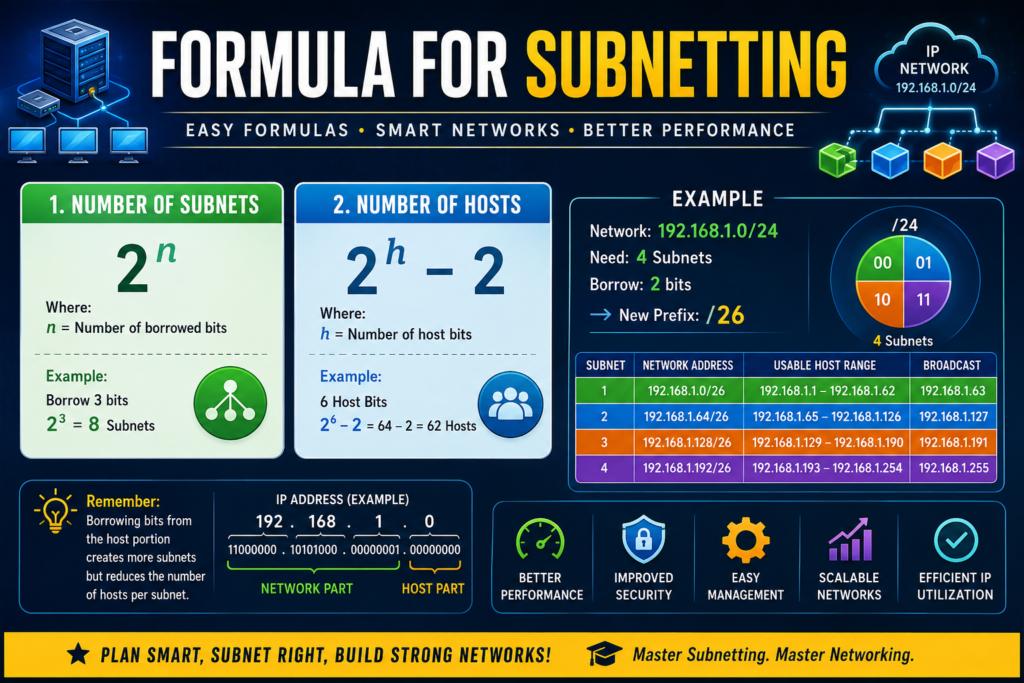
Number of Subnets
2^n
Where:
n = borrowed bits
Example
Borrow 3 bits
2³ = 8 Subnets
Number of Hosts
2^h − 2
Where:
h = host bits remaining
Example
6 Host Bits
2⁶ − 2
64 − 2
62 Hosts
Advantages of Subnetting
1. Better Performance
Smaller networks generate less broadcast traffic.
2. Improved Security
Sensitive departments can be isolated using separate subnets.
3. Easier Troubleshooting
Network issues are easier to locate within a specific subnet.
4. Efficient IP Address Usage
Sub-netting minimizes wasted IP addresses by matching subnet sizes to actual needs.
5. Better Network Management
Networks become more organized and easier to maintain.
6. Scalability
New departments or branches can be assigned new subnets without redesigning the entire network.
Disadvantages of Subnetting
- Requires planning
- More complex configuration
- Requires knowledge of binary calculations
- Routers must be configured correctly
- Misconfigured subnet masks can cause connectivity problems
Where Is Sub-netting Used?
Sub-netting is commonly used in:
- Schools and Universities
- Offices
- Banks
- Hospitals
- Government organizations
- Data Centers
- Internet Service Providers (ISPs)
- Cloud Computing environments
Best Practices
- Plan your IP addressing before deployment.
- Use CIDR notation for flexible subnet design.
- Keep related devices in the same subnet.
- Document network addresses, gateways, and subnet masks.
- Reserve room for future growth when allocating subnets.
- Use VLANs with sub-netting to improve network segmentation and security.
Conclusion
Sub-netting is one of the most important concepts in computer networking. By dividing a large network into smaller networks. That is, organized subnets for organizations can improve performance, strengthen security, simplify management, and make efficient use of IP addresses. Whether you’re designing a home lab, managing a business network, or preparing for certifications like CCNA, Network+, or Security+, mastering sub-netting is a valuable skill. That forms the foundation of modern networking.
FAQ
What is subnetting in networking?
Subnetting is the process of dividing one large IP network into multiple smaller networks to improve performance, security, and management.
Why do we use subnetting?
Subnetting reduces broadcast traffic, improves network efficiency, enhances security, and optimizes IP address utilization.
What is a subnet mask?
A subnet mask identifies the network portion and the host portion of an IP address.
What is CIDR?
CIDR (Classless Inter-Domain Routing) is a notation such as /24 or /26 that specifies how many bits are used for the network portion of an IP address.
Is subnetting difficult to learn?
No. Once you understand IP addresses, binary basics, and subnet masks, sub-netting becomes much easier with practice.


