
TCP/IP Model Complete Guide with Trusted Examples
The TCP IP Model stands for (Transmission Control Protocol/Internet Protocol) Model is the foundation of modern computer networking. It defines how data is transmitted across networks, including the internet. Forever when you browse a website, send an email, watch a YouTube video, or use social media. Then the TCP/IP model is working behind the scenes.
That Developed by the U.S. Department of Defense (DoD) in the 1970s. The TCP/IP model became the standard networking architecture for the internet. Because of its reliability, scalability, and interoperability.
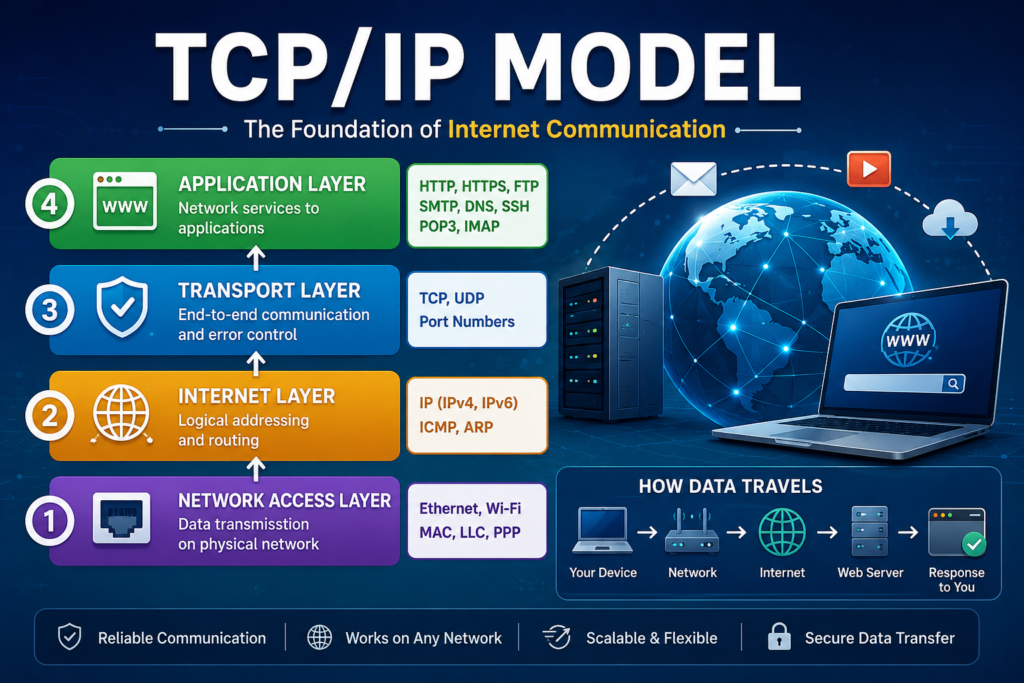
What Is the TCP/IP Model?
The TCP/IP model is a networking framework. That explains how devices communicate over a network. It divides communication into four layers, each layer responsible for specific networking tasks.
These layers work together to ensure data reaches its destination accurately and efficiently.
The four layers are:
- Application Layer
- Transport Layer
- Internet Layer
- Network Access Layer
Example of the TCP/IP Model
For example you want to send a birthday gift to your friend. Which is living in another city.
Each step of delivering the package represents one layer of the TCP/IP model.
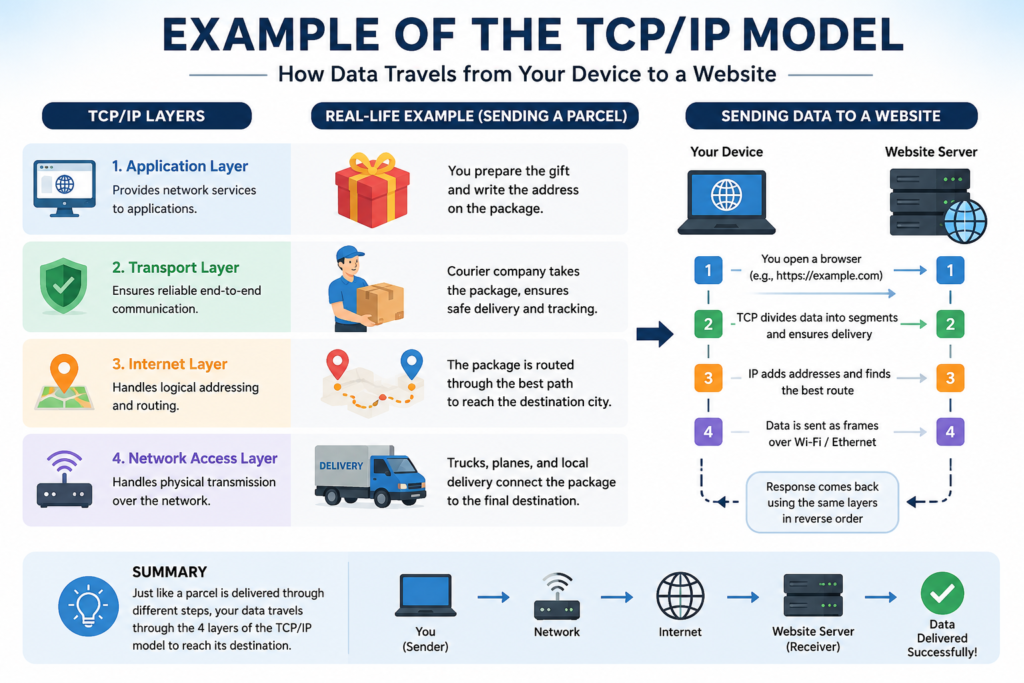
| TCP/IP Layer | Real-Life Example |
| Application Layer | You write a greeting card and pack the gift. |
| Transport Layer | The courier company packages and tracks your parcel. |
| Internet Layer | The parcel is assigned the destination address and routed to the correct city. |
| Network Access Layer | Trucks, airplanes, and local delivery vehicles physically transport the parcel. |
When your friend receives the package, the process is completed. Same as its data successfully reaches another computer.
The Four Layers of the TCP/IP Model
1. Application Layer
The Application Layer is the top layer of the TCP/IP model. It provides network services directly to users and applications.
Whenever you open a website, send an email, upload a file, or make a video call, you are interacting with this layer.
Functions
- Provides communication between software and the network
- Supports web browsing
- Email communication
- File transfer
- Remote login
- Name resolution
Common Protocols
- HTTP
- HTTPS
- FTP
- SMTP
- POP3
- IMAP
- DNS
- SSH
- Telnet
Example
When you type:
Your browser sends an HTTP/HTTPS request using the Application Layer.
2. Transport Layer
The Transport Layer ensures that data is delivered correctly, completely, and in the proper order.
Large files are divided into smaller pieces called segments before transmission.
Functions
- End-to-end communication
- Error detection
- Data segmentation
- Flow control
- Reliable delivery
- Port addressing
Main Protocols
TCP (Transmission Control Protocol)
Features:
- Reliable
- Connection-oriented
- Error checking
- Retransmission of lost packets
- Ordered delivery
Used for:
- Websites
- Online banking
- File downloads
UDP (User Datagram Protocol)
Features:
- Fast
- Connectionless
- No guaranteed delivery
- Low latency
Used for:
- Video streaming
- Online gaming
- Voice calls
- Live broadcasts
Example
Imagine downloading a 500 MB PDF.
The Transport Layer divides the file into thousands of segments.
If one segment is missing, TCP requests only that missing segment instead of downloading the entire file again.
3. Internet Layer
The Internet Layer is responsible for logical addressing and routing.
Its main job is determining the best path for data to travel across different networks.
Functions
- IP addressing
- Packet routing
- Packet forwarding
- Fragmentation
Common Protocols
- IPv4
- IPv6
- ICMP
- ARP
Example
When sending an email from Pakistan to Canada, routers determine the best path for the data packet to reach its destination.
4. Network Access Layer
The Network Access Layer is responsible for physically sending data through cables, Wi-Fi, or other network media.
It combines the responsibilities of the OSI Data Link and Physical layers.
Functions
- Frame creation
- MAC addressing
- Physical transmission
- Error detection
- Media access
Technologies
- Ethernet
- Wi-Fi
- Fiber optics
- Bluetooth
- DSL
Example
Your Wi-Fi router sends signals through radio waves so your laptop receives the internet connection.
Data Encapsulation Process
When sending data, each layer adds its own information.
Application Data
↓
Transport Layer
Adds TCP/UDP Header
↓
Internet Layer
Adds IP Header
↓
Network Access Layer
Adds MAC Header & Trailer
↓
Physical Transmission
This process is called Encapsulation.
Data Decapsulation
At the receiving computer:
- Network Access Layer removes MAC information.
- Internet Layer removes IP information.
- Transport Layer removes TCP/UDP information.
- Application Layer displays the original data.
Common TCP/IP Protocols
| Protocol | Purpose |
| HTTP | Web browsing |
| HTTPS | Secure websites |
| FTP | File transfer |
| SMTP | Sending email |
| POP3 | Receiving email |
| IMAP | Managing email |
| DNS | Domain name resolution |
| TCP | Reliable communication |
| UDP | Fast communication |
| IP | Logical addressing |
| ICMP | Network diagnostics |
| ARP | MAC address resolution |
Advantages of the TCP/IP Model
- International networking standard
- Highly scalable
- Reliable communication
- Supports multiple operating systems
- Flexible architecture
- Easy troubleshooting
- Works across different hardware vendors
- Backbone of the internet
Disadvantages of the TCP/IP Model
- Does not clearly separate some functions compared to the OSI model
- More complex to study for beginners
- Security is not built into the core model
- Protocol configuration can be challenging in large networks
TCP/IP Model vs OSI Model
| Feature | TCP/IP Model | OSI Model |
| Number of Layers | 4 | 7 |
| Developed By | U.S. DoD | ISO |
| Practical Use | Widely used on the Internet | Mainly a reference model |
| Network Standard | Yes | Mostly conceptual |
| Simplicity | Simpler | More detailed |
Where Is the TCP/IP Model Used?
The TCP/IP model powers almost every modern network, including:
- Internet browsing
- Email services
- Cloud computing
- Online gaming
- Video streaming
- Mobile applications
- IoT devices
- Banking systems
- Enterprise networks
- Social media platforms
Example of Opening a Website
Suppose you visit https://example.com:
- Application Layer: Your browser creates an HTTPS request.
- Transport Layer: TCP divides the request into segments and ensures reliable delivery.
- Internet Layer: IP adds the source and destination IP addresses and selects a route.
- Network Access Layer: Wi-Fi or Ethernet sends the data across the physical network.
The server processes the request and returns the webpage using the same layers in reverse order.
Conclusion
The TCP/IP model is the backbone of modern networking and the internet. It consists of four -layer architecture that allows devices to communicate reliably across local and global networks. By understanding the roles of the Application, Transport, Internet, and Network Access layers, you can better understand how data travels from one device to another. The parcel delivery example illustrates that, just like a package moves through different stages before reaching its recipient, data passes through multiple TCP/IP layers before arriving at its destination.
FAQ
What does TCP/IP stand for?
TCP/IP stands for Transmission Control Protocol/Internet Protocol.
How many layers are in the TCP/IP model?
The TCP/IP model has four layers:
Application
Transport
Internet
Network Access
Which protocol is faster TCP or UDP?
UDP is faster because it does not establish a connection or guarantee delivery. TCP is slower but provides reliable, ordered data transmission.
Why is the TCP/IP model important?
It provides the standard framework that enables devices on different networks to communicate, making the internet possible.
What is encapsulation in TCP/IP?
Encapsulation is the process of adding protocol-specific headers (and, at the Network Access layer, a trailer) to data as it moves down the TCP/IP layers before transmission.


