
Hardware Basics A Beginner’s Guide
Every computer, laptop, smartphone, and gaming console is built by using hardware. While software provides instructions to hardware for performing the specific task.
Understanding the hardware basics. That is one of the first steps toward learning computer science, programming, cybersecurity, or IT support.
In this tutorial, you’ll learn what hardware is and different types of hardware. How to work each hardware component with examples.
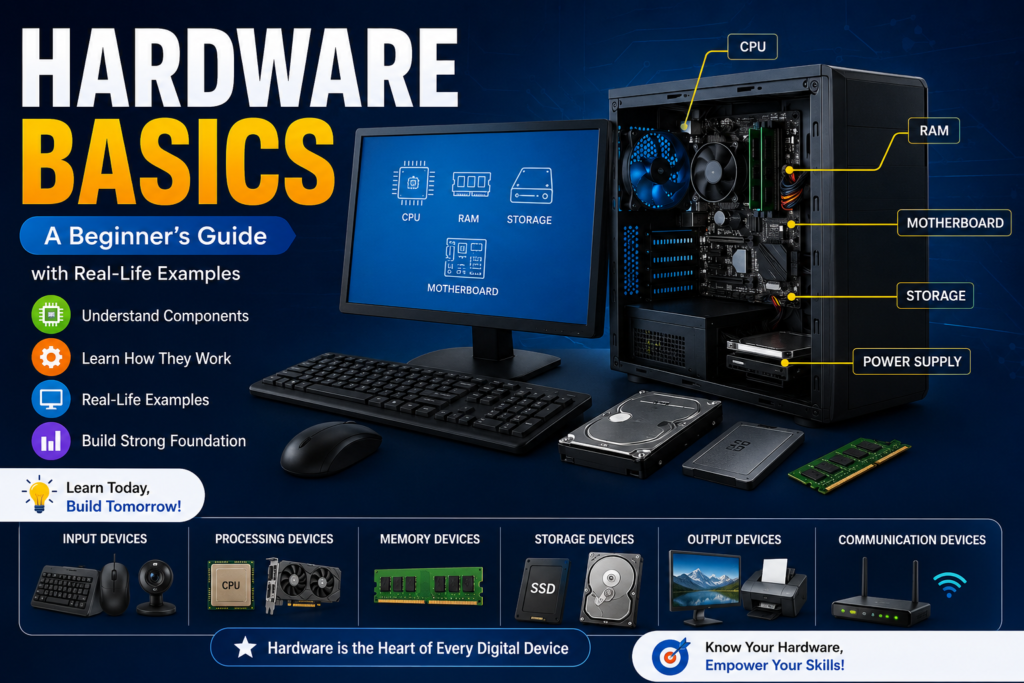
Table of Contents
What is Hardware?
All physical components of a computer or electronic device that you can see and touch are called Hardware. These components work together to process data. And store information for further use.
Unlike software, which consists of programs and applications, hardware is the physical equipment that runs those programs.
Examples of Hardware are:
- Keyboard
- Mouse
- Monitor
- CPU
- RAM
- Hard Drive
- SSD
- Motherboard
- Printer
- Speakers
Example
For example a restaurant.
- The customer’s order represents the software (instructions).
- The chef, kitchen, stove, and cooking tools represent the hardware.
Without the kitchen equipment. The chef cannot prepare food. Similarly. Software can’t run without hardware.
Types of Computer Hardware
Computer hardware can be divided into several categories.
1. Input Devices
These devices are used to enter data into a computer are called input devices.
Examples
- Keyboard
- Mouse
- Scanner
- Microphone
- Webcam
- Barcode Scanner
Example
A cashier uses a barcode scanner to scan products at a supermarket. The scanner sends product information to the computer.
2. Output Devices
These devices are used to get output from the computer after the processing data are called output devices.
Examples
- Monitor
- Printer
- Speakers
- Projector
- Headphones
Example
When you print your school assignment, then the printer produces a physical copy of your document. That printer is called an output device.
3. Processing Devices
These components process instructions and perform calculations.
CPU (Central Processing Unit)
The CPU is often called the brain of the computer. Because it executes instructions and manages all operations.
GPU (Graphics Processing Unit)
The GPU processes graphics and videos, making it essential for gaming, video editing, and AI applications.
Example
When you play a video game, the CPU handles game logic while the GPU renders high quality graphics.
4. Storage Devices
These devices are used to permanently save data are called storage devices.
Types
HDD (Hard Disk Drive)
- Mechanical storage
- Larger capacity
- Lower cost
- Slower speed
SSD (Solid State Drive)
- Flash memory
- Faster performance
- More durable
- Lower power consumption
Examples
- Hard Drive
- SSD
- USB Flash Drive
- Memory Card
- External Hard Drive
Example
If you save the family photos on an external hard drive, keep them available even after the computer is turned off.
5. Memory Devices
These devices temporarily store information while the computer is running.
RAM (Random Access Memory)
RAM stores active programs and data currently being used.
ROM (Read Only Memory)
ROM stores permanent instructions required to start the computer.
Example
Opening many browser tabs uses more RAM. If RAM is insufficient, your computer may become slow.
6. Communication Devices
These devices are used to communicate with each other computers by networks and the internet.
Examples
- Wi-Fi Adapter
- Ethernet Card
- Bluetooth Adapter
- Modem
- Router
Example
A home Wi-Fi router is connected with multiple devices like smartphones, laptops, and smart TVs to the internet.
Main Components Inside a Computer
Motherboard
The motherboard is the main circuit board. That is used for connecting all hardware components.
CPU
Processes instructions and controls computer operations.
RAM
Provides temporary working memory for applications.
Storage
Stores operating systems, software, and personal files.
Power Supply Unit (PSU)
Converts electricity into usable power for computer components.
Cooling System
Keeps hardware cool using fans or liquid cooling systems.
Hardware vs Software
| Hardware | Software |
| Physical components | Programs and applications |
| Can be touched | Cannot be touched |
| Manufactured | Developed using programming |
| May wear out physically | Can be updated or reinstalled |
| Examples: CPU, RAM, Keyboard | Examples: Windows, Linux, Chrome |
Why Hardware is Important
Hardware is basic component because it:
- Runs operating systems
- Stores files
- Processes information
- Connects to the internet
- Displays results
- Supports gaming and multimedia
- Enables communication
Without hardware, the software cannot perform any function.
Everyday Hardware Examples
Office
- Desktop computer
- Printer
- Scanner
- Keyboard
School
- Laptop
- Projector
- Webcam
Home
- Smart TV
- Wi-Fi Router
- Smartphone
Hospital
- Medical imaging computers
- Patient monitoring systems
- Barcode scanners
Choosing the Right Hardware
When buying a computer, check the following component:
- Processor performance
- RAM capacity
- SSD storage
- Graphics requirements
- Battery life (laptops)
- Upgrade options
- Warranty and reliability
Common Hardware Problems
Some common issues are:
- Computer not turning on
- Overheating
- Hard drive failure
- Slow performance due to low RAM
- Faulty keyboard or mouse
- Monitor display issues
Regular cleaning and maintenance can help prevent many of these problems.
Best Practices for Hardware Care
- Keep your computer clean and dust free.
- Avoid blocking air vents.
- Use a surge protector to prevent electrical damage.
- Back up important files regularly.
- Handle hardware carefully during installation or upgrades.
- Keep device drivers and firmware updated.
Conclusion
Understanding hardware basics is essential for anyone interested in technology, programming, cybersecurity, or computer repair. From input and output devices to processors, memory, and storage, each hardware component plays a specific role in a computer’s performance.
Whether you’re using a laptop for online learning, building a gaming PC, or troubleshooting a slow computer, knowing how hardware works will help you make informed decisions and solve common problems more effectively.
FAQ
What is hardware?
All physical components of a computer or electronic device that you can see and touch are called Hardware. These components work together to process data. And store information for further use.
Is RAM hardware?
Yes. RAM is a physical hardware component used for temporary memory while a computer is running.
What is the difference between hardware and software?
Hardware consists of physical components, while software includes the programs and operating systems that run on the hardware.
Which hardware component is called the brain of the computer?
The CPU (Central Processing Unit) is known as the brain of the computer because it processes instructions and controls system operations.
Can a computer work without hardware?
No. Hardware is required for a computer to operate. Software alone cannot function without physical components.


