
Complete Gobuster Usage Guide to Web Enumeration, Usage, VHost & Examples
Gobuster is a popular open-source command-line tool used for directory, file, DNS, and virtual host enumeration during authorized security testing. Security professionals, penetration testers, bug bounty hunters, and cybersecurity students commonly use it to discover resources that may not be linked directly from a website.
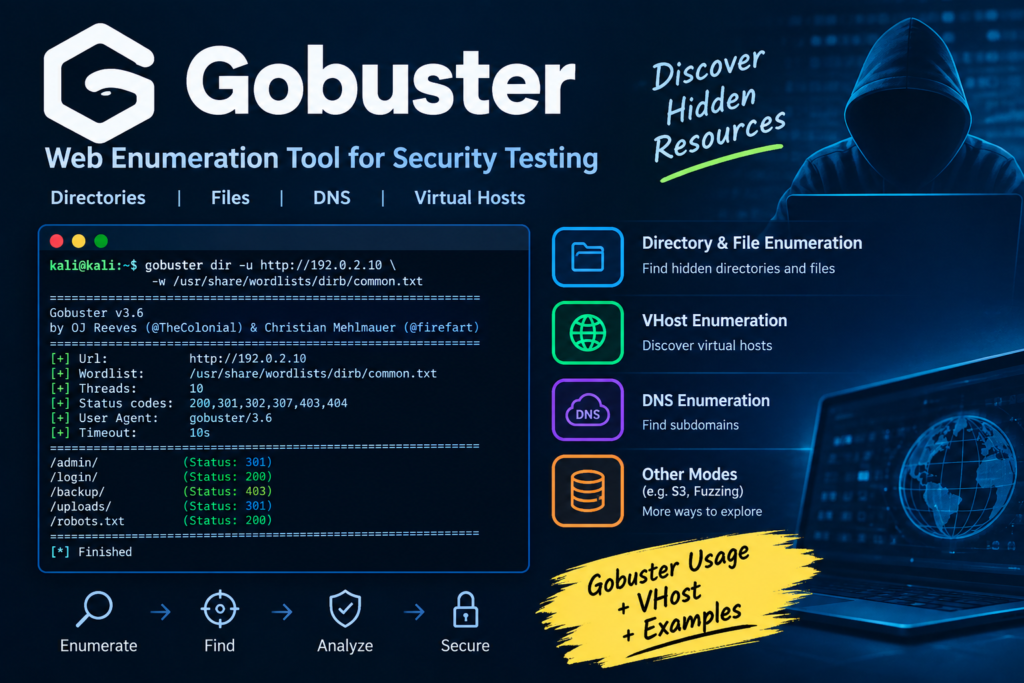
Table of Contents
For example, a website may publicly show:
But the web server might also contain directories such as:
/admin/
/backup/
/uploads/
/dev/
Gobuster can help identify these resources by testing a target against a wordlist.
Important: Only use Gobuster against systems you own or have explicit permission to test. Unauthorized enumeration can violate laws, contracts, or security policies.
What Is Gobuster?
Gobuster is a fast command-line enumeration tool written in Go. It is designed to perform various types of brute-force enumeration against web applications and other network services.
Common uses include:
- Directory enumeration
- File enumeration
- DNS subdomain enumeration
- Virtual host enumeration
- Amazon S3 bucket enumeration
- Finding hidden web resources
- Security testing and penetration testing
Gobuster is especially useful because it can quickly test thousands of possible names from a wordlist.
Simple Example
Suppose you are authorized to test:
You have a wordlist containing:
admin
login
backup
uploads
test
Gobuster can request URLs such as:
If the server responds differently for an existing resource, Gobuster can report it.
Why Is Gobuster Used?
Web applications frequently contain resources that aren’t visible through normal website navigation.
For example:
example.com/
├── index.html
├── login/
├── admin/
├── uploads/
└── backup/
A visitor might only see the homepage and login page.
During an authorized penetration test, discovering /admin/ or /backup/ can help a security professional understand the application’s attack surface.
Gobuster therefore helps with the reconnaissance and enumeration phase of security testing.
Gobuster Installation
Gobuster is commonly available on security-focused Linux distributions such as Kali Linux.
First, check whether it is already installed:
gobuster version
If Gobuster is available, you should see its version information.
On Debian-based systems, you can also install it using the distribution package manager:
sudo apt update
sudo apt install gobuster
Then verify the installation:
gobuster version
You can view the available commands with:
gobuster help
Gobuster Usage
Understanding gobuster usage starts with its basic command structure.
A typical directory enumeration command looks like:
gobuster dir -u https://example.com -w /path/to/wordlist.txt
Here:
- gobuster starts the program.
- dir selects directory/file enumeration.
- -u specifies the target URL.
- -w specifies the wordlist.
For example, in an authorized lab:
gobuster dir -u http://192.0.2.10 -w /usr/share/wordlists/dirb/common.txt
The address 192.0.2.10 is from the documentation-only IP range and is suitable for illustrating a lab example.
Understanding the Gobuster dir Mode
The dir mode is commonly used to discover directories and files on a web server.
Basic syntax:
gobuster dir -u TARGET -w WORDLIST
Example:
gobuster dir -u http://192.0.2.10 -w wordlist.txt
Depending on the server configuration and Gobuster version, you may also test common file extensions:
gobuster dir -u http://192.0.2.10 -w wordlist.txt -x php,html,txt
The -x option tells Gobuster to append the specified extensions to wordlist entries.
For example:
admin.php
login.php
config.txt
index.html
Gobuster Example
Let’s look at a simple gobuster example using a fictional authorized training server.
Suppose your security lab contains:
http://192.0.2.10
You have a wordlist:
/usr/share/wordlists/dirb/common.txt
You can run:
gobuster dir -u http://192.0.2.10 -w /usr/share/wordlists/dirb/common.txt
Gobuster may produce results similar to:
/admin (Status: 301)
/login (Status: 200)
/uploads (Status: 301)
/robots.txt (Status: 200)
The exact results depend on the target.
What Do These Status Codes Mean?
200 OK
Usually means the requested resource exists and the server successfully returned it.
301 Moved Permanently
Usually indicates that the resource redirects somewhere else, often from:
/admin
to:
/admin/
403 Forbidden
The resource may exist, but the server refuses access.
404 Not Found
Usually means the requested resource wasn’t found.
Gobuster Wordlists
Gobuster depends heavily on the quality of the wordlist.
A wordlist contains possible names that Gobuster tests against the target.
Example:
admin
administrator
login
dashboard
backup
uploads
test
dev
For authorized security testing, commonly used wordlists can be found in security distributions and projects such as SecLists.
A larger wordlist can discover more possibilities, but it can also generate substantially more requests and take longer.
Therefore, choosing an appropriate wordlist is important.
Gobuster VHost Enumeration
One important feature is gobuster vhost enumeration.
A Virtual Host (VHost) allows a web server to host multiple websites or applications using the same IP address.
For example, a server might host:
www.example.com
admin.example.com
dev.example.com
test.example.com
All of these domains could potentially point to the same server.
During an authorized assessment, Gobuster can test possible hostnames to identify virtual hosts.
A typical command is:
gobuster vhost -u http://example.com -w wordlist.txt
The wordlist might contain:
admin
dev
test
staging
portal
Gobuster then tests candidate hostnames such as:
admin.example.com
dev.example.com
test.example.com
staging.example.com
portal.example.com
Why Is Gobuster VHost Useful?
VHost enumeration can reveal applications that aren’t linked from the main website.
For example:
www.example.com
might be the public website, while:
dev.example.com
could be a development application.
Discovering the development host during an authorized assessment gives the security team another asset to review.
Directory Enumeration vs VHost Enumeration
These two Gobuster techniques are different.
| Technique | What It Searches |
| dir | Directories and files |
| vhost | Virtual hosts |
| dns | DNS subdomains |
| fuzz | General-purpose fuzzing |
Directory Enumeration
Example:
example.com/admin
example.com/login
example.com/uploads
VHost Enumeration
Example:
admin.example.com
dev.example.com
staging.example.com
DNS Enumeration
Example:
admin.example.com
mail.example.com
vpn.example.com
The appropriate mode depends on what you are testing and what authorization you have.
Gobuster DNS Mode
Gobuster can also perform DNS enumeration.
Basic syntax:
gobuster dns -d example.com -w wordlist.txt
Here:
- dns selects DNS enumeration.
- -d specifies the domain.
- -w specifies the wordlist.
For example, a security team might use a controlled lab domain and a wordlist containing:
dev
vpn
api
staging
Potential results could include:
dev.example.com
api.example.com
mail.example.com
Again, only perform this against domains you are authorized to assess.
Useful Gobuster Options
Gobuster has many options, and the available flags can vary between versions.
You can always check the installed version’s documentation:
gobuster help
For directory mode:
gobuster dir –help
Some commonly encountered options include:
| Option | Purpose |
| dir | Directory/file enumeration mode |
| vhost | Virtual host enumeration |
| dns | DNS enumeration |
| -u | Target URL |
| -w | Wordlist |
| -x | File extensions |
| -t | Number of concurrent threads |
| -o | Save output to a file |
| -q | Quiet output in supported modes |
| -h | Help |
Always check:
gobuster <mode> –help
because supported options can change between releases.
Saving Gobuster Results
During a penetration test, keeping a record of findings is important.
Gobuster supports output files in relevant modes.
For example:
gobuster dir -u http://192.0.2.10 -w wordlist.txt -o results.txt
You can then review:
cat results.txt
This is useful when enumeration produces a large number of results.
Example: Authorized Web Security Assessment
Imagine a company has asked a penetration tester to assess its staging application.
The company provides:
http://192.0.2.10
and explicitly authorizes directory enumeration.
The tester begins with a small wordlist:
gobuster dir -u http://192.0.2.10 -w common.txt
The results show:
/admin (Status: 301)
/login (Status: 200)
/backup (Status: 403)
/uploads (Status: 301)
The tester doesn’t immediately assume that /backup is vulnerable.
Instead, the finding is documented:
Potentially sensitive backup directory discovered. Access currently returns HTTP 403.
The security team can then investigate whether the directory contains unnecessary files, whether access controls are correctly configured, and whether the resource should be exposed at all.
The tester might also have permission to check virtual hosts:
gobuster vhost -u http://example.com -w vhosts.txt
Suppose the assessment identifies:
dev.example.com
The team can then verify whether this development environment is properly secured.
Important Lesson
Gobuster itself does not prove that a discovered resource is vulnerable.
It is an enumeration tool.
A discovered directory, file, subdomain, or VHost must be investigated and validated within the authorized scope.
Gobuster vs Other Enumeration Tools
Gobuster is one of several tools available to security professionals.
| Tool | Common Purpose |
| Gobuster | Directory, DNS and VHost enumeration |
| Nmap | Network/service discovery |
| ffuf | Web fuzzing |
| Dirsearch | Web directory discovery |
| Nikto | Web server security checks |
| Burp Suite | Web application testing |
Each tool has a different purpose.
For example, Nmap is primarily used for network and service discovery, while Gobuster is particularly useful for discovering web resources and hostnames.
Common Gobuster Mistakes
1. Using the Wrong Wordlist
A poor wordlist can produce incomplete results.
Choose a wordlist appropriate for the target and assessment scope.
2. Ignoring HTTP Status Codes
A result isn’t automatically a vulnerability.
Always investigate the response.
3. Treating 403 as a Vulnerability
A 403 Forbidden response often indicates that a resource exists but access is denied.
That alone is not proof of a security issue.
4. Running Excessive Requests
Large wordlists and high concurrency can place significant load on a server.
Use reasonable settings, especially in production environments.
5. Testing Without Permission
Never run enumeration against websites, servers, domains, or applications without authorization.
How to Learn Gobuster Safely
If you’re learning cybersecurity, use intentionally vulnerable environments such as:
- Local virtual machines
- CTF platforms
- Cybersecurity training labs
- Your own web applications
- Systems for which you have written authorization
A simple practice environment can contain:
Kali Linux
↓
Training Web Server
↓
Gobuster
This lets you learn enumeration without targeting real systems without permission.
Gobuster Command Cheat Sheet
Check version
gobuster version
View help
gobuster help
Directory enumeration
gobuster dir -u http://192.0.2.10 -w wordlist.txt
Directory enumeration with extensions
gobuster dir -u http://192.0.2.10 -w wordlist.txt -x php,html,txt
Save results
gobuster dir -u http://192.0.2.10 -w wordlist.txt -o results.txt
VHost enumeration
gobuster vhost -u http://example.com -w vhosts.txt
DNS enumeration
gobuster dns -d example.com -w wordlist.txt
Always confirm the exact syntax supported by your installed Gobuster version with:
gobuster –help
Conclusion
Gobuster is a powerful and practical enumeration tool for cybersecurity professionals and students. Its directory, DNS, and VHost capabilities make it useful during the reconnaissance stage of an authorized penetration test.
The most important concepts to remember are:
- gobuster dir → discover directories and files
- gobuster vhost → investigate potential virtual hosts
- gobuster dns → enumerate DNS names
- Wordlists → provide candidate names to test
- HTTP status codes → help interpret responses
- Enumeration results → require further validation
If you’re learning cybersecurity, practice gobuster usage in a controlled lab environment first. Understanding why a result appears is more valuable than simply running commands.
FAQ
What is Gobuster used for?
Gobuster is used for authorized security enumeration, including discovering web directories, files, DNS subdomains, and virtual hosts.
Is Gobuster free?
Yes. Gobuster is an open-source security tool.
What is gobuster usage?
Gobuster usage generally involves selecting an enumeration mode, specifying an authorized target, and providing an appropriate wordlist.
For example:
gobuster dir -u http://192.0.2.10 -w wordlist.txt
What is Gobuster VHost?
Gobuster VHost is used to test potential virtual hostnames associated with a web server.
Example:
gobuster vhost -u http://example.com -w vhosts.txt
What is a simple Gobuster example?
A basic directory enumeration example is:
gobuster dir -u http://192.0.2.10 -w wordlist.txt
It tests words from the specified wordlist against the authorized web server.
Can Gobuster find hidden websites?
Gobuster can help identify directories, files, DNS names, and virtual hosts that aren’t obvious from normal website navigation. However, discovery does not necessarily mean that the resource is hidden, sensitive, or vulnerable.
Is Gobuster available on Kali Linux?
Yes, Gobuster is commonly available for Kali Linux and can be installed through Kali’s package repositories.



hmary pass to website nh ha , to iski practice kis pa kry ?? aur ab thora Video lectures bhi provide kr dyn , prhny ma zra mushkil hoti ha , sari hi new chezy hain ,
Best tu ye ha k ap log khud ki he ik website bna lo experiments k lye us pe try krty raha kro.
ya ksi website k admin ko mail kr k us se permission ly lo k sir hum ap ki website ki khamyan dondna chahty hn security k hawalay se hum apki ki privacy ka khayal rakhen gy ap ka data kahen b leak ni kren gy. Hum students hn hamara maqad srf sekhna ha ksi ko preshan krna ni es tara se us se allow krwa lye aur wo mail ap apny pas save rakhen takay wo kal ko Ap logon pe koi qanoni karwai na kren.
rahi bat video ki tu Ishallah wo b provide kr dn ga. bs time ki waja se ni ho paye abi tk