Google Ads Fundamentals & Account Structure
1. Lecture Overview
Course: Google Ads Complete Course
Lecture: 1 of 15
Title: Google Ads Fundamentals & Account Structure
Level: Beginner
Format: Theory + Practical
Recommended Duration: 2–3 hours
Table of Contents
Learning Objectives
By the end of this lecture, students will be able to:
- Explain what Google Ads is.
- Understand how Google Ads works.
- Explain PPC advertising.
- Differentiate Google Ads from SEO and social media advertising.
- Understand important Google Ads terminology.
- Explain the Google Ads account hierarchy.
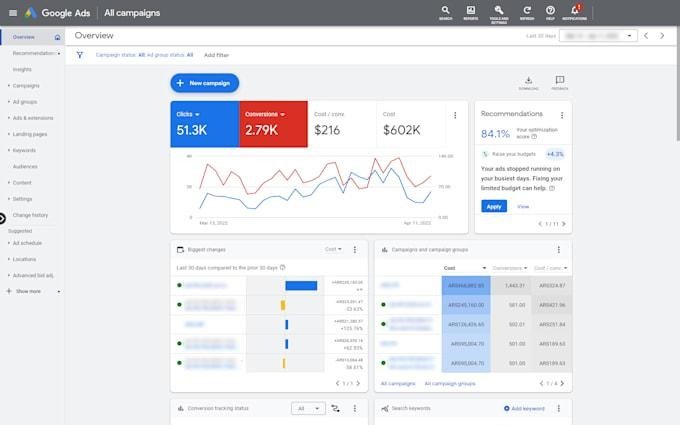
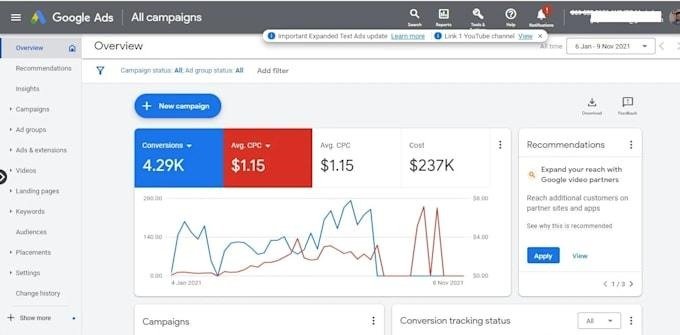
- Understand campaigns, ad groups, keywords, ads, and assets.
- Navigate the Google Ads interface.
- Understand basic account, billing, and access settings.
- Explain the purpose of an MCC/manager account.
2. What Is Google Ads?
Google Ads is Google’s online advertising platform that allows businesses to promote products, services, websites, apps, and other offerings across Google’s advertising ecosystem.
Businesses can create advertising campaigns to reach people based on factors such as:
- Search queries
- Location
- Audience characteristics
- Interests
- Website behavior
- Devices
- Previous interactions
- Products or services they are interested in
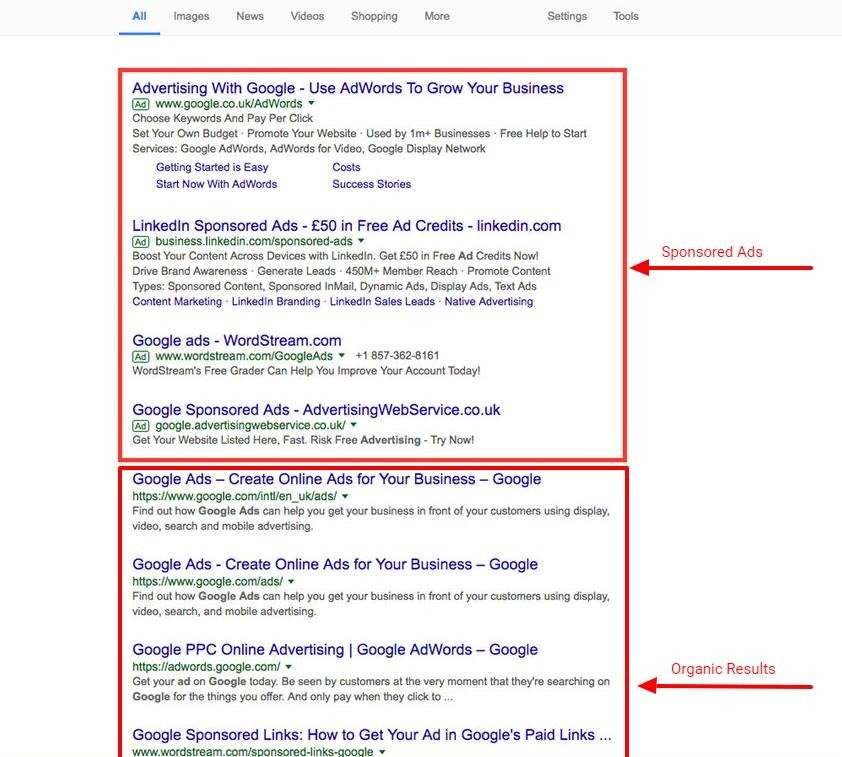
Simple Example
Suppose you own a web development company.
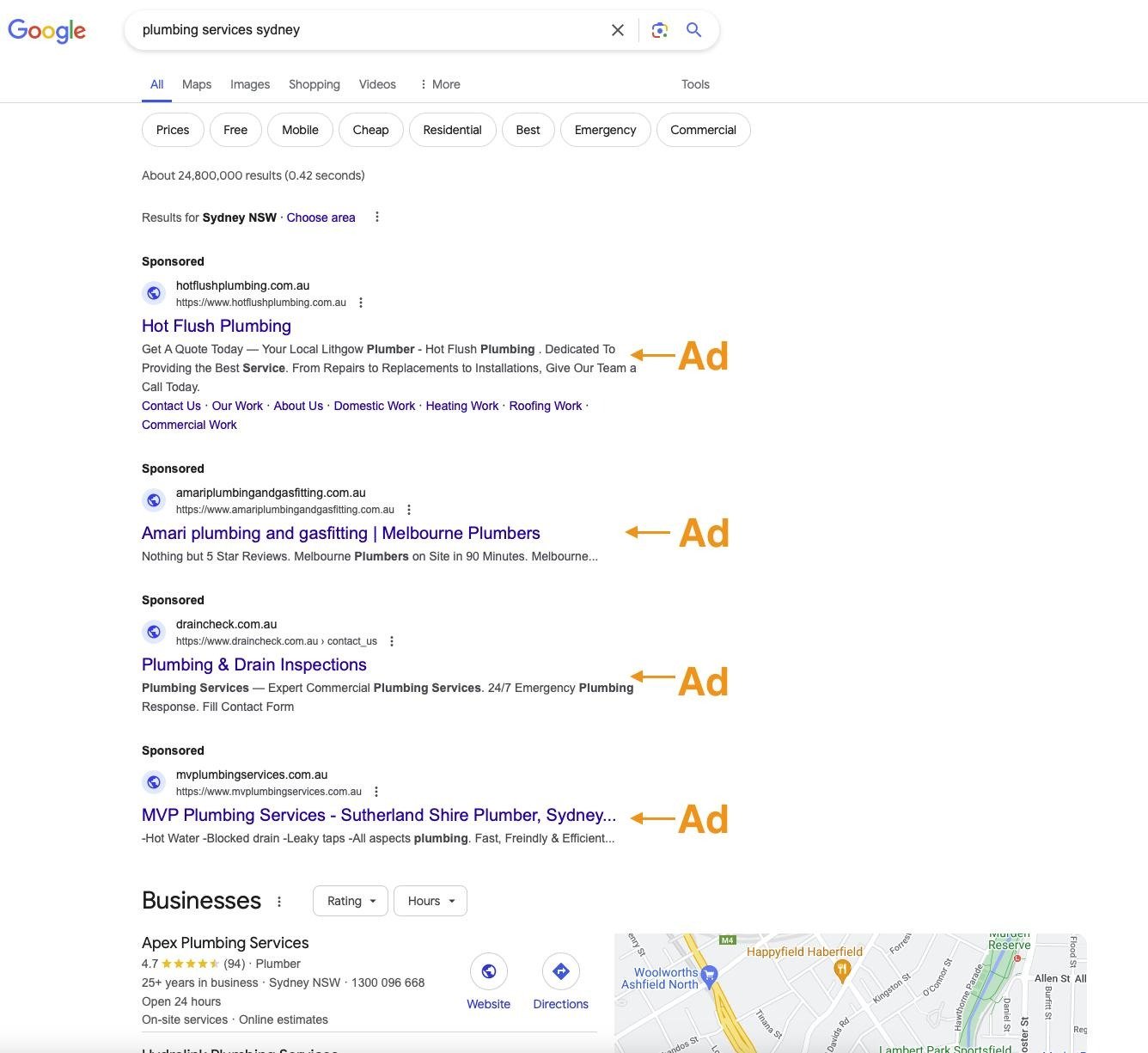
A potential customer searches:
“web development company near me”
A business using Google Ads may have an advertisement appear among the search results.
The business generally pays when someone interacts with the advertisement under the campaign’s chosen bidding and billing model.
3. What Is PPC?
PPC stands for Pay-Per-Click.
It is an advertising model where advertisers can be charged based on clicks, depending on the campaign and bidding setup.
Example
Suppose:
- Ad receives 100 clicks
- Average CPC = $1
Estimated click cost:
100 × $1 = $100
However, Google Ads is not limited to a simple “pay for every click” model. Different campaign types and bidding strategies can optimize toward objectives such as conversions or conversion value.
4. How Google Ads Works
A simplified Google Ads process looks like this:
Advertiser → Campaign → Targeting → Ad Auction → Ad → User → Landing Page → Conversion
Step 1 — Advertiser
A business decides what it wants to promote.
Example:
Online SEO Course
Step 2 — Campaign
The advertiser creates a campaign around a particular advertising objective.
Step 3 — Targeting
The advertiser defines relevant targeting such as:
- Keywords
- Locations
- Audiences
- Devices
- Languages
- Scheduling
Step 4 — Ad Auction
When an eligible advertising opportunity occurs, Google determines which eligible ads can appear and in what positions.
Step 5 — User Interaction
The user may:
- Click the ad
- Visit the website
- Call the business
- Purchase a product
- Submit a form
Step 6 — Conversion
If the desired action happens, it can be recorded as a conversion when appropriate tracking has been configured.
5. Google Ads vs SEO
Students often confuse Google Ads with SEO.
| Google Ads | SEO |
| Paid advertising | Organic search optimization |
| Can generate traffic soon after campaigns become eligible to serve | Usually requires time to build organic visibility |
| Advertiser controls campaign targeting and budget | Rankings depend on Google’s organic systems |
| Traffic stops when advertising is stopped | Organic visibility can continue after content ranks |
| Requires advertising budget | Does not require paying Google for each organic click |
| Campaign performance can be measured through advertising metrics | Organic performance is measured through SEO/search metrics |
Important Point
Google Ads and SEO are not necessarily competitors.
A business can use both:
SEO → Long-term organic visibility
Google Ads → Paid search and other advertising opportunities
6. Google Ads vs Social Media Advertising
Google Ads and social media advertising can serve different purposes.
Google Search
A user may already be actively searching for:
“buy running shoes”
This can indicate existing demand.
Social Media
A user may be browsing social media without actively searching for running shoes.
An advertiser can introduce the product through advertising.
Basic Difference
Search advertising: often captures existing search demand.
Social advertising: can be useful for audience-based discovery, awareness, engagement, and conversion campaigns.
Both can be part of the same digital marketing strategy.
7. Google Ads Ecosystem
Google Ads can be used across multiple advertising environments.
Major areas students should understand include:
Search
Text-based advertisements that can appear in Google Search results.
Display
Visual advertisements that can appear across eligible websites, apps, and other placements.
YouTube
Video advertising on Google’s YouTube platform and related inventory.
Shopping
Product-focused advertising for eligible ecommerce businesses.
Performance Max
A campaign type designed to access multiple Google advertising channels from one campaign.
App Advertising
Campaigns designed around app-related objectives such as installations or in-app actions.
Local/Business Advertising
Advertising that can help businesses reach customers based on location and local intent.
8. Important Google Ads Terminology
Students should learn these terms before creating campaigns.
Advertiser
The business or organization paying for advertising.
Campaign
The main level used to organize advertising objectives, budgets, bidding, and targeting.
Ad Group
A group within a campaign used to organize related ads and targeting elements.
Keyword
A term or phrase used to help determine when Search ads may be eligible to appear.
Example:
SEO course
Search Term
The actual query entered by a user.
Example:
User searches:
best SEO course for beginners
The advertiser may have a keyword related to:
SEO course
The actual user query is the search term.
Ad
The promotional message shown to potential customers.
Asset
Additional information or creative components associated with an ad, such as:
- Sitelinks
- Callouts
- Structured snippets
- Images
- Logos
- Other eligible assets
Impression
An instance of an advertisement being shown.
Click
When a user interacts with an eligible clickable ad element.
CTR
Click-Through Rate
A common formula is:
CTR = Clicks ÷ Impressions × 100
Example:
- 1,000 impressions
- 50 clicks
CTR:
50 ÷ 1,000 × 100 = 5%
CPC
Cost Per Click
A basic calculation is:
CPC = Cost ÷ Clicks
Example:
- Cost = $100
- Clicks = 50
Average CPC:
$100 ÷ 50 = $2
Conversion
A valuable action defined by the advertiser, such as:
- Purchase
- Lead submission
- Phone call
- Signup
- Appointment
- Download
CPA
Cost Per Acquisition/Action
A basic calculation:
CPA = Cost ÷ Conversions
ROAS
Return on Ad Spend
A basic calculation:
ROAS = Conversion Value ÷ Advertising Cost
Example:
- Conversion value = $5,000
- Ad spend = $1,000
ROAS:
5,000 ÷ 1,000 = 5
This can also be expressed as 500% ROAS.
9. Google Ads Account Structure
One of the most important concepts in this lecture is the account hierarchy.
A simplified structure is:
Google Ads Account
- Campaign
- Ad Group
- Keywords
- Ads
- Assets
- Ad Group
Think of it like a company structure:
Account → Departments → Teams → Individual work
10. Account
The Google Ads account is the overall advertising environment.
It contains things such as:
- Campaigns
- Billing information
- Users/access
- Conversion setup
- Account-level settings
- Campaign performance data
Example:
IT Code Hub Google Ads Account
could contain:
- Search campaigns
- Display campaigns
- YouTube campaigns
- Performance Max campaigns
11. Campaign
A campaign is a major organizational level.
A campaign can have its own:
- Budget
- Bidding strategy
- Location targeting
- Language targeting
- Network settings
- Campaign objective/goals
- Other campaign-level settings
Example
For an SEO training business:
Campaign 1:
SEO Course Search
Campaign 2:
Web Development Course Search
Campaign 3:
Remarketing
12. Ad Group
Ad groups organize closely related advertising themes.
Example:
Campaign: SEO Course
Ad Group 1: SEO Course
Ad Group 2: SEO Training
Ad Group 3: SEO Classes
Each ad group can contain relevant:
- Keywords
- Ads
- Related targeting elements
Important Principle
Keep closely related keywords and ads together.
Avoid putting completely unrelated subjects into one ad group.
13. Keywords
Keywords help advertisers communicate what searches their Search campaign is relevant to.
Example:
Ad Group: SEO Course
Keywords:
seo course
seo training
seo classes
learn seo
seo course online
Later in the course, we will study:
- Broad match
- Phrase match
- Exact match
- Negative keywords
- Search term analysis
14. Ads
Ads communicate the offer to potential customers.
A Search ad may communicate:
Headline:
Learn SEO Online
Description:
Learn keyword research, technical SEO, content optimization, and Google Search strategies.
The ad should be relevant to the user’s search and the landing page.
15. Assets
Assets provide additional information or functionality.
Examples include:
Sitelink
Links users to specific pages.
Example:
- SEO Course
- Web Development
- Contact Us
- About Us
Callout
Highlights benefits.
Example:
- Practical Training
- Expert Guidance
- Flexible Learning
Structured Snippet
Provides categorized information.
Example:
Courses: SEO, WordPress, Python, Web Development
Assets can help provide additional information and improve the usefulness of an ad.
16. Understanding Campaign Organization
Consider an online education business.
A possible structure could be:
ACCOUNT
│
├── SEARCH: SEO COURSE
│ │
│ ├── SEO COURSE
│ │ ├── Keywords
│ │ └── Ads
│ │
│ └── SEO TRAINING
│ ├── Keywords
│ └── Ads
│
├── SEARCH: WEB DEVELOPMENT
│ │
│ ├── PHP COURSE
│ └── PYTHON COURSE
│
└── PERFORMANCE MAX
└── ONLINE COURSES
This organization makes campaigns easier to:
- Manage
- Analyze
- Optimize
- Budget
- Report
17. Google Ads Interface
Students should become familiar with the main areas of the Google Ads interface.
Common areas include:
- Overview
- Campaigns
- Ad groups
- Ads
- Assets
- Keywords
- Search terms
- Audiences
- Insights
- Goals/Conversions
- Billing
- Tools
- Reports
- Recommendations
The exact interface can change over time, so students should focus on understanding the purpose of each section rather than memorizing its exact location.
18. Account Settings
Important account-level areas include:
Billing
Used to manage:
- Payment methods
- Transactions
- Billing information
Access and Security
Used to manage users and permissions.
Different users may need different levels of access.
Linked Accounts
Google Ads can connect with relevant Google products and services, depending on the advertising setup.
Examples include:
- Google Analytics
- YouTube
- Merchant Center
Conversion Measurement
Businesses can configure conversion tracking to measure valuable actions.
19. What Is an MCC?
MCC stands for Manager Accounts.
A Google Ads manager account can help agencies or organizations manage multiple Google Ads accounts from a central environment.
Example:
- Manager Account
- Client A
- Client B
- Client C
- Client D
- Client E
This is especially useful for:
- Agencies
- Freelancers
- Large organizations
- Businesses managing multiple advertising accounts
20. Practical Example
Imagine a local computer institute wants to advertise:
“Web Development Course”
Account
Computer Institute Google Ads Account
Campaign
Search – Web Development Course
Ad Groups
Ad Group 1: Web Development Course
Ad Group 2: Web Development Training
Ad Group 3: Web Development Classes
Keywords
web development course
web development training
web development classes
learn web development
Ads
Example:
Headline:
Web Development Course
Description:
Learn HTML, CSS, JavaScript and PHP with practical training.
Landing Page
The ad could send users to:
/web-development-course
The landing page should clearly explain the course and provide an appropriate conversion action.
21. Common Beginner Mistakes
Mistake 1 — Putting everything into one campaign
Different products/services may require different campaign structures.
Mistake 2 — Mixing unrelated keywords
Example:
SEO course
Python course
Graphic design course
Laptop repair
Mobile accessories
These topics have different user intent and should generally not be treated as one tightly themed ad group.
Mistake 3 — Ignoring conversion tracking
Getting clicks is not necessarily the same as getting business results.
Mistake 4 — Focusing only on clicks
Important business outcomes may include:
- Leads
- Sales
- Revenue
- Calls
- Appointments
Mistake 5 — Sending every ad to the homepage
A dedicated, relevant landing page can provide a better user experience.
Mistake 6 — Ignoring search terms
Advertisers should regularly review actual search queries to identify relevant opportunities and irrelevant traffic.
22. Lecture 1 Practical Assignment
Assignment: Create a Google Ads Account Structure
Choose a fictional business.
Examples:
- SEO training institute
- Clothing store
- Restaurant
- Web development agency
- Online store
- Local computer institute
Create the following:
Part A — Business
Write:
- Business name
- Product/service
- Target customers
- Main business goal
Part B — Campaigns
Create 3 campaigns.
Example:
Campaign 1 — Search
Campaign 2 — Display
Campaign 3 — Remarketing
Part C — Ad Groups
Create at least 2 ad groups under your Search campaign.
Part D — Keywords
Add at least 5 relevant keywords to each ad group.
Part E — Ads
Create one sample advertisement for each ad group.
Part F — Landing Pages
Assign an appropriate landing page to each ad group.
23. Assignment Template
Students can complete this table:
| Element | Your Answer |
| Business Name | |
| Product/Service | |
| Target Audience | |
| Business Goal | |
| Campaign 1 | |
| Campaign 2 | |
| Campaign 3 | |
| Ad Group 1 | |
| Ad Group 2 | |
| Keywords | |
| Ad Copy | |
| Landing Page |
24. Knowledge Check
Q1. What does PPC stand for?
Answer: Pay-Per-Click.
Q2. What is a campaign?
Answer: A major organizational level in Google Ads used to manage advertising settings such as budget, bidding, targeting, and goals.
Q3. What is an ad group?
Answer: A group used to organize closely related ads and targeting elements within a campaign.
Q4. What is a keyword?
Answer: A term or phrase used to help determine when Search ads may be eligible to appear.
Q5. What is a conversion?
Answer: A valuable action defined by an advertiser, such as a purchase, lead, signup, or call.
Q6. What is an MCC/Manager Account?
Answer: A Google Ads management environment that can be used to manage multiple Google Ads accounts.
Q7. What is CTR?
Answer:
CTR = Clicks ÷ Impressions × 100
25. Lecture Summary
In this lecture, students learned:
- What Google Ads is
- What PPC means
- How Google Ads advertising works
- Google Ads vs SEO
- Google Ads vs social media advertising
- Google Ads advertising channels
- Important terminology
- Account structure
- Campaigns
- Ad groups
- Keywords
- Ads
- Assets
- Google Ads interface
- Account settings
- Manager Accounts/MCC
- Basic campaign organization
The most important concept to remember:
Account → Campaign → Ad Group → Keywords + Ads + Assets
This structure will be the foundation for the practical campaign-building work in the next lectures.
Continue with the campaign structure
- Build the Lecture 1 assignment