
How to find free ranking keywords by using google keyword planner with pratical Examples.
If you want to improve your website’s SEO, Google Ads campaigns, or content strategy, finding the right keywords is one of the most important steps. Google Keyword Planner is one of the most useful keyword research tools available because it provides keyword ideas and search-related data directly from Google’s advertising platform.
Whether you are a beginner blogger, SEO professional, affiliate marketer, content creator, or business owner, you can use the Google Keyword Planner tool to discover relevant search terms, understand keyword demand, and build a more effective content strategy.
In this guide, you will learn what Google Keyword Planner is, how it works, how to use it for keyword research, and how to find useful keywords without spending money on expensive SEO tools.
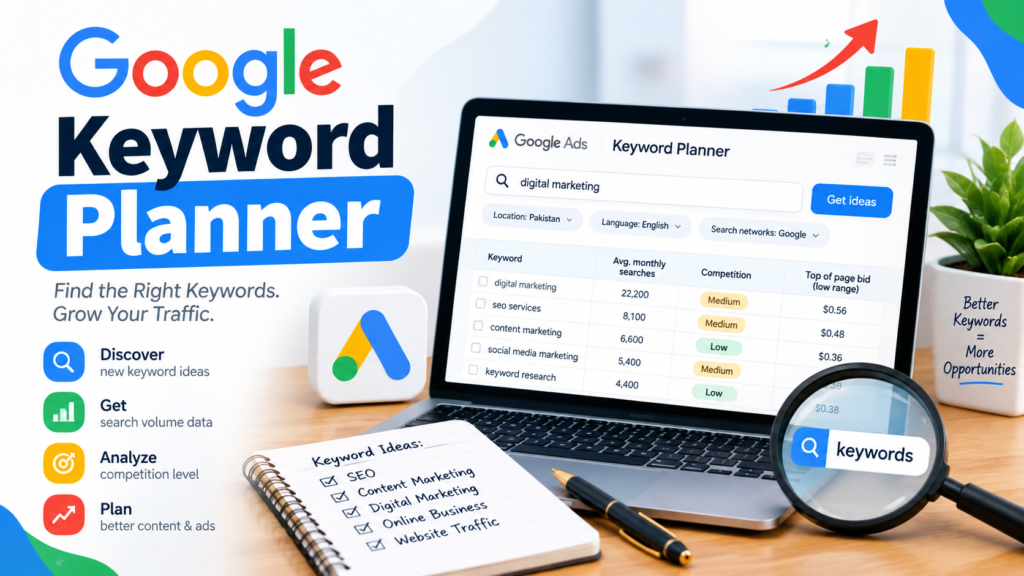
Table of Contents
What Is Google Keyword Planner?
Google Keyword Planner is a keyword research tool provided through Google Ads. It was primarily designed to help advertisers discover keywords for search advertising campaigns, estimate search activity, and plan their advertising strategy.
However, SEO professionals and bloggers can also use it as a valuable source of keyword ideas.
For example, suppose you run a technology website and want to write an article about Excel. Instead of guessing what people search for, you could enter:
Excel formulas
Google Keyword Planner may suggest related terms such as:
- Excel formulas
- basic Excel formulas
- Excel formulas list
- Excel IF formula
- Excel SUM formula
- Excel VLOOKUP formula
- Excel formulas for beginners
These suggestions can help you create content around topics that people are actually searching for.
Is Google Keyword Planner Free?
Yes, Google Keyword Planner is available without paying for the keyword research tool itself. You need a Google account and access to Google Ads.
This makes it an attractive option for people looking for google keyword planner free or keyword planner free solutions.
However, there is an important distinction:
Using Keyword Planner to research keywords does not mean that Google Ads advertising is free.
You can research keywords without launching a paid advertising campaign, while running Google Ads campaigns requires an advertising budget.
For SEO beginners, this makes Keyword Planner a useful free keyword research tool for generating ideas and understanding keyword demand.
How Does Google Keyword Planner Work?
The basic process is simple:
- Open Google Ads.
- Access Keyword Planner.
- Choose a keyword research option.
- Enter a keyword or website.
- Select your location and language.
- Review keyword suggestions.
- Analyze search volume and competition.
- Select keywords relevant to your content.
- Organize keywords into topic groups.
- Create content around the strongest opportunities.
The exact interface and available metrics can change over time, so some screens may look different depending on your Google Ads account.
How to Access Google Keyword Planner
To access the google ads keyword planner tool, go to Google Ads and sign in with your Google account.
Inside Google Ads, look for:
Tools → Planning → Keyword Planner
You will generally see options for discovering new keywords and analyzing existing keyword ideas.
If you are using Keyword Planner for SEO, you do not necessarily need to create a large advertising campaign simply to research topics.
Two Main Keyword Planner Features
The Google Keyword Planner tool provides two major ways to perform keyword research.
1. Discover New Keywords
This feature helps you find keyword ideas related to a topic.
For example, enter:
cyber security
You may discover related topics such as:
- what is cyber security
- cyber security types
- cyber security tools
- network security
- cyber security course
- information security
- cyber security for beginners
This is particularly useful when creating a new content cluster.
2. Get Search Volume and Forecasts
The second feature allows you to examine keywords you already have.
For example, suppose you have this list:
- SEO
- keyword research
- Google Keyword Planner
- long tail keywords
- SEO tools
You can enter these keywords and analyze the available information.
This can help you compare topics before deciding which ones deserve content.
Example: Keyword Research for a Technology Blog
Imagine that you own a technology education website called SEO Code Hub and want to create a new category about SEO.
You start with the broad keyword:
SEO
The term is extremely broad.
Instead of creating an article immediately, use the keyword planner tool to discover related searches.
You might build a topic structure such as:
Main Topic
SEO
Supporting Topics
- What is SEO?
- How does SEO work?
- Keyword research
- Search intent
- Long-tail keywords
- Short-tail keywords
- On-page SEO
- Technical SEO
- Link building
- Google Search Console
This approach allows you to build a complete topical structure instead of publishing random articles.
Example: Keyword Research for Excel
Suppose you want to create an Excel tutorial website.
You enter:
Excel formulas
into Google Keyword Planner.
The resulting keyword ideas can help you identify subtopics such as:
- basic Excel formulas
- Excel formulas for beginners
- Excel SUM formula
- Excel IF formula
- Excel COUNTIF
- Excel VLOOKUP
- Excel XLOOKUP
- Excel formulas list
You could then create a content cluster:
Pillar Article:
Excel Formulas: Complete Beginner’s Guide
Supporting Articles:
Basic Excel Formulas
Excel IF Formula
Excel VLOOKUP Formula
Excel XLOOKUP Formula
Excel COUNTIF Formula
This creates a logical internal-linking structure.
Example: Local Business Keyword Research
Suppose you own a computer training institute in Pakistan.
Your initial keyword might be:
computer courses
You could investigate related phrases such as:
- computer courses in Pakistan
- computer course for beginners
- IT courses
- computer training institute
- online computer courses
- Excel course
- graphic designing course
You can then combine relevant keywords with your target location where appropriate.
For example:
computer courses in [city]
This can help create location-specific landing pages or articles when there is genuine local search demand.
How to Use Google Keyword Planner for SEO
Although Keyword Planner was created for advertising, it can still support SEO keyword research.
Follow this process.
Step 1: Start With a Seed Keyword
A seed keyword is a broad phrase describing your topic.
Examples:
- SEO
- Excel
- cyber security
- Python
- WordPress
- digital marketing
Don’t worry about finding the perfect keyword immediately.
Your goal is to generate ideas.
Step 2: Enter the Keyword
Enter your seed keyword into the google planner keyword tool.
For example:
Python programming
Review the suggested keyword ideas.
You may discover different search intents and related subjects.
Step 3: Analyze Search Volume
Keyword Planner provides search-volume information that can help you understand how much search interest exists around a keyword.
Remember that search-volume estimates are not the same as guaranteed organic traffic.
A keyword with high search volume can still be difficult to rank for.
Step 4: Consider Competition
Keyword Planner includes competition information, but SEO users should interpret it carefully.
The competition metric is primarily related to Google Ads advertisers, not directly to organic Google rankings.
For example:
High paid-ad competition does not automatically mean high organic SEO difficulty.
Likewise, a keyword with low advertising competition is not automatically easy to rank for.
This distinction is extremely important.
Google Keyword Planner vs. SEO Keyword Difficulty
Many SEO tools provide a metric called Keyword Difficulty (KD).
Keyword Planner’s competition metric is different.
Keyword Planner Competition
Primarily indicates advertiser competition for Google Ads.
SEO Keyword Difficulty
Attempts to estimate how difficult it may be to rank organically.
Therefore, if you are doing SEO research, don’t use the Keyword Planner competition column as your only measure of ranking difficulty.
Instead, manually analyze the current Google search results.
Look at:
- Domain authority
- Page quality
- Search intent
- Backlinks
- Content depth
- Topical relevance
- SERP features
- Website reputation
How to Find Long-Tail Keywords With Google Keyword Planner
Long-tail keywords are usually more specific search phrases.
For example:
Broad keyword:
Excel
More specific keyword:
Excel formulas
Long-tail keyword:
basic Excel formulas for beginners
Long-tail keywords can be useful because they often communicate clearer search intent.
For a new website, targeting highly relevant specific queries can be more practical than immediately targeting extremely broad keywords.
Example: Building a Long-Tail Keyword Strategy
Suppose your primary topic is:
cyber security
Instead of targeting only the broad keyword, build supporting topics:
- what is cyber security
- types of cyber security
- cyber security for beginners
- cyber security tools
- network security basics
- web security fundamentals
- information security basics
Each article can target a specific search intent.
Over time, these pages can collectively establish topical coverage.
Using a Website to Discover Keyword Ideas
Google Keyword Planner can also help generate keyword ideas from a website or webpage.
For example, imagine you have an article about:
Basic Excel Formulas
You can use relevant website-based keyword discovery to identify related terms and potential content topics.
This can be useful for discovering terms that you might not think of yourself.
However, always review the suggestions manually.
Not every automatically generated keyword will be relevant to your audience.
How to Choose the Best Keywords
Don’t select keywords based only on search volume.
Use a broader evaluation process.
Consider these factors:
1. Relevance
Does the keyword match your website and article?
2. Search Intent
What does the searcher actually want?
3. Search Demand
Is there meaningful interest in the topic?
4. Competition
How strong are the current search results?
5. Content Opportunity
Can you create a significantly useful resource?
6. Business or Website Value
Will the topic help your website achieve its goal?
Search Intent Example
Consider these three keywords:
“Google Keyword Planner”
This could indicate informational or tool-related intent.
“Google Keyword Planner tutorial”
This is strongly informational.
“Google Keyword Planner login”
This indicates navigational intent.
The content should match the intent behind the query.
For example, a detailed tutorial is appropriate for:
Google Keyword Planner tutorial
But a giant SEO guide may not be appropriate for someone searching for:
Google Keyword Planner login
Keyword Planner Free: Is It Enough for SEO?
For many beginners, keyword planner free functionality can provide a strong starting point.
You don’t necessarily need several expensive tools when you are just learning keyword research.
You can combine Google Keyword Planner with:
- Google Search
- Google Search Console
- Google Trends
- Google autocomplete
- People Also Ask
- Related searches
- Your website analytics
This combination can provide substantial keyword research data.
Google Keyword Planner Tool vs. Other Keyword Research Tools
The Google Keyword Planner tool has one major advantage: it comes directly from Google’s advertising ecosystem.
Other SEO platforms may provide additional features such as:
- Keyword difficulty
- Competitor analysis
- Backlink analysis
- SERP analysis
- Content gaps
- Historical rankings
- Traffic estimates
Examples include popular SEO platforms such as Ahrefs, Semrush, Moz, and other specialized keyword research tools.
However, beginners can start with Google Keyword Planner and expand their toolkit as their SEO requirements grow.
Common Google Keyword Planner Mistakes
Mistake 1: Targeting Only High-Volume Keywords
A high-volume keyword may be extremely competitive.
Instead, build a mixture of:
- Broad keywords
- Medium-specificity keywords
- Long-tail keywords
Mistake 2: Treating Paid Competition as SEO Difficulty
Remember:
Google Ads competition ≠ organic SEO difficulty.
Always analyze the actual organic search results.
Mistake 3: Ignoring Search Intent
A keyword may look attractive but still be irrelevant to your content.
Always ask:
What does the searcher expect to find?
Mistake 4: Keyword Stuffing
Don’t repeatedly insert the same keyword into every paragraph.
For example, avoid writing:
Google Keyword Planner is a Google Keyword Planner tool for Google Keyword Planner keyword research.
This sounds unnatural.
Instead, use natural variations and related concepts.
Mistake 5: Creating One Article for Every Keyword
Not every keyword needs its own page.
Several closely related keywords may belong naturally within one comprehensive article.
For example:
- basic Excel formulas
- Excel formulas for beginners
- Excel basic formulas list
may potentially be covered by one strong article, depending on the search results and intent.
A Simple Google Keyword Planner Workflow
Here is a practical workflow you can repeat for almost any topic:
Step 1
Choose a broad seed keyword.
Step 2
Enter it into Google Keyword Planner.
Step 3
Collect relevant keyword suggestions.
Step 4
Remove irrelevant terms.
Step 5
Group keywords according to search intent.
Step 6
Identify primary and secondary keywords.
Step 7
Check the current Google search results.
Step 8
Evaluate competing pages.
Step 9
Create useful content that satisfies the search intent.
Step 10
Track organic performance in Google Search Console.
This process is much more reliable than selecting keywords based solely on a single metric.
Google Keyword Planner for Bloggers
Bloggers can use Keyword Planner to plan an entire content calendar.
For example, suppose your blog focuses on cybersecurity.
You could start with:
cybersecurity
Then develop content around:
- What Is Cybersecurity?
- Types of Cybersecurity
- Network Security
- Web Security
- Information Security
- Firewall
- VPN
- IDS and IPS
- Two-Factor Authentication
- Credential Stuffing
Each topic can target a specific user need while contributing to the broader cybersecurity topic.
Google Keyword Planner for Affiliate Websites
Affiliate marketers can also use keyword research to identify product-related topics.
For example, a website covering laptops might research:
- best laptop for students
- laptop for programming
- gaming laptop
- business laptop
- laptop buying guide
Instead of publishing a generic article about “laptops,” the website can build targeted content around different user needs.
Google Keyword Planner for YouTube Content
Keyword research isn’t limited to websites.
You can also use keyword ideas to generate content topics for YouTube.
For example, if your research identifies interest around:
Excel formulas
You could create videos such as:
- Basic Excel Formulas for Beginners
- 10 Excel Formulas You Should Know
- Excel IF Formula Explained
- Excel VLOOKUP Tutorial
- Excel XLOOKUP vs VLOOKUP
The keyword research process helps you align content with topics people are actively interested in.
Benefits of Google Keyword Planner
The tool offers several advantages.
Free Access
It can be used as a starting point without purchasing a premium SEO subscription.
Google’s Own Data Ecosystem
It is integrated with Google Ads and designed around Google’s search advertising data.
Keyword Discovery
It can generate many related keyword ideas.
Content Planning
Keyword ideas can be converted into articles, tutorials, videos, and content clusters.
Beginner Friendly
The basic workflow is relatively straightforward.
Useful for Multiple Industries
It can be applied to technology, education, ecommerce, marketing, finance, travel, local businesses, and many other niches.
Limitations of Google Keyword Planner
Despite its usefulness, it isn’t a complete SEO platform.
Some limitations include:
- It is primarily designed for advertisers.
- Search-volume information may be presented as ranges or estimates depending on account conditions.
- Paid competition is not the same as organic ranking difficulty.
- It doesn’t replace detailed SERP analysis.
- It does not provide the complete backlink and competitor-analysis capabilities of dedicated SEO platforms.
For serious SEO campaigns, use Keyword Planner as one part of a broader research process.
Conclusion
Google Keyword Planner is a practical starting point for anyone learning keyword research. Its biggest advantage is that it can provide keyword ideas and search-related data without requiring a separate premium SEO subscription.
For the best results, don’t simply choose the keyword with the largest search volume. Evaluate relevance, search intent, competition, content quality, and the needs of your audience.
A smart workflow is:
Google Keyword Planner → Keyword Ideas → Search Intent → SERP Analysis → Content Creation → Internal Linking → Google Search Console → Optimization
Whether you are building a technology blog, affiliate website, local business website, YouTube channel, or educational resource, the google keyword planner tool free research workflow can give you a strong foundation for developing a targeted content strategy.



Hi, I’m Jessica– as well as I write material checked out by 500K+ monthly tech/marketing viewers.
my web page same day payday loans